<?xml version="1.0" encoding="utf-8"?><feed xmlns="http://www.w3.org/2005/Atom" xml:lang="en"><generator uri="https://jekyllrb.com/" version="3.10.0">Jekyll</generator><link href="http://fernandocejas.com/feed.xml" rel="self" type="application/atom+xml" /><link href="http://fernandocejas.com/" rel="alternate" type="text/html" hreflang="en" /><updated>2025-12-09T19:14:32+00:00</updated><id>http://fernandocejas.com/feed.xml</id><title type="html">Fernando Cejas</title><subtitle>Welcome! I&apos;m Fernando Cejas, Head of Engineering @TignumEng, former Director of Mobile @Wire, @SoundCloud Alumni, former @IBM Developer Advocate  and @Tuenti Alumni. I&apos;m a geek/nerd, huge fan of Mobile Development, Artificial Intelligence,  Quantum Computing and Software Engineering in general. Here I share my experiences and expose my ideas  but all views, posts and opinions are my own.
</subtitle><author><name>Fernando Cejas</name><email>me@fernandocejas.com</email></author><entry><title type="html">Rust cross-platform… The Android part…</title><link href="http://fernandocejas.com/blog/engineering/2023-07-27-rust-cross-platform-android/" rel="alternate" type="text/html" title="Rust cross-platform… The Android part…" /><published>2023-07-27T00:00:00+00:00</published><updated>2023-07-27T00:00:00+00:00</updated><id>http://fernandocejas.com/blog/engineering/rust-cross-platform-android</id><content type="html" xml:base="http://fernandocejas.com/blog/engineering/2023-07-27-rust-cross-platform-android/"><![CDATA[<p class="lead"><strong>“Nothing is impossible. The word itself says ‘I’m possible!”</strong></p>

<ul class="large-only" id="markdown-toc">
  <li><a href="#introduction-and-whys" id="markdown-toc-introduction-and-whys">Introduction and Whys</a></li>
  <li><a href="#our-goal" id="markdown-toc-our-goal">Our Goal</a></li>
  <li><a href="#where-is-the-code" id="markdown-toc-where-is-the-code">Where is the code?</a></li>
  <li><a href="#the-big-picture" id="markdown-toc-the-big-picture">The Big Picture</a></li>
  <li><a href="#running-the-project" id="markdown-toc-running-the-project">Running the Project</a>    <ul>
      <li><a href="#requirements" id="markdown-toc-requirements">Requirements</a></li>
      <li><a href="#generating-rust-artifacts-crates" id="markdown-toc-generating-rust-artifacts-crates">Generating Rust artifacts (crates)</a></li>
      <li><a href="#running-the-android-app" id="markdown-toc-running-the-android-app">Running the Android App</a></li>
    </ul>
  </li>
  <li><a href="#crypto-the-rust-project" id="markdown-toc-crypto-the-rust-project">Crypto: The Rust Project</a>    <ul>
      <li><a href="#crypto-show-me-the-code" id="markdown-toc-crypto-show-me-the-code">Crypto: Show me the code</a></li>
      <li><a href="#crypto-artifact-generation" id="markdown-toc-crypto-artifact-generation">Crypto: Artifact Generation</a></li>
      <li><a href="#crypto-android-abis" id="markdown-toc-crypto-android-abis">Crypto: Android ABIs</a></li>
      <li><a href="#crypto-infrastructure-improvements" id="markdown-toc-crypto-infrastructure-improvements">Crypto: Infrastructure Improvements</a></li>
    </ul>
  </li>
  <li><a href="#android-implementation-details" id="markdown-toc-android-implementation-details">Android: Implementation Details</a>    <ul>
      <li><a href="#android-setting-up-the-build-system" id="markdown-toc-android-setting-up-the-build-system">Android: Setting Up the Build System</a></li>
      <li><a href="#android-loading-rust-libraries" id="markdown-toc-android-loading-rust-libraries">Android: Loading Rust Libraries</a></li>
      <li><a href="#android-calling-rust-from-kotlin" id="markdown-toc-android-calling-rust-from-kotlin">Android: Calling Rust from Kotlin</a></li>
    </ul>
  </li>
  <li><a href="#use-case-scenarios" id="markdown-toc-use-case-scenarios">Use Case Scenarios</a></li>
  <li><a href="#conclusion" id="markdown-toc-conclusion">Conclusion</a></li>
  <li><a href="#references" id="markdown-toc-references">References</a></li>
</ul>

<h2 id="introduction-and-whys">Introduction and Whys</h2>

<p>Even in a world of <a href="https://kotlinlang.org/docs/multiplatform.html" target="_blank">Kotlin Multiplatform</a>, there are <a href="https://rust-lang.github.io/rustup/cross-compilation.html" target="_blank">other options</a>, which <strong>might cover other specifc use case scenarios</strong> (more about it along this post).</p>

<p>This is actually the main reason, why I would like to <strong target="_blank">present Rust as a <a href="https://doc.rust-lang.org/nightly/rustc/platform-support.html">candidate for code reusability</a></strong> across different platforms… in this case for <strong>Android Development</strong>.</p>

<p class="message"><strong>DISCLAIMER:</strong> The idea is <strong>NOT to develop a full android application entirely in Rust</strong>, but to <strong>delegate specific functionality</strong> by integrating this language, which brings <strong>high performance</strong> and <strong>memory safety</strong> between <a href="https://www.rust-lang.org/" target="_blank">its main characteristics</a>.</p>

<h2 id="our-goal">Our Goal</h2>

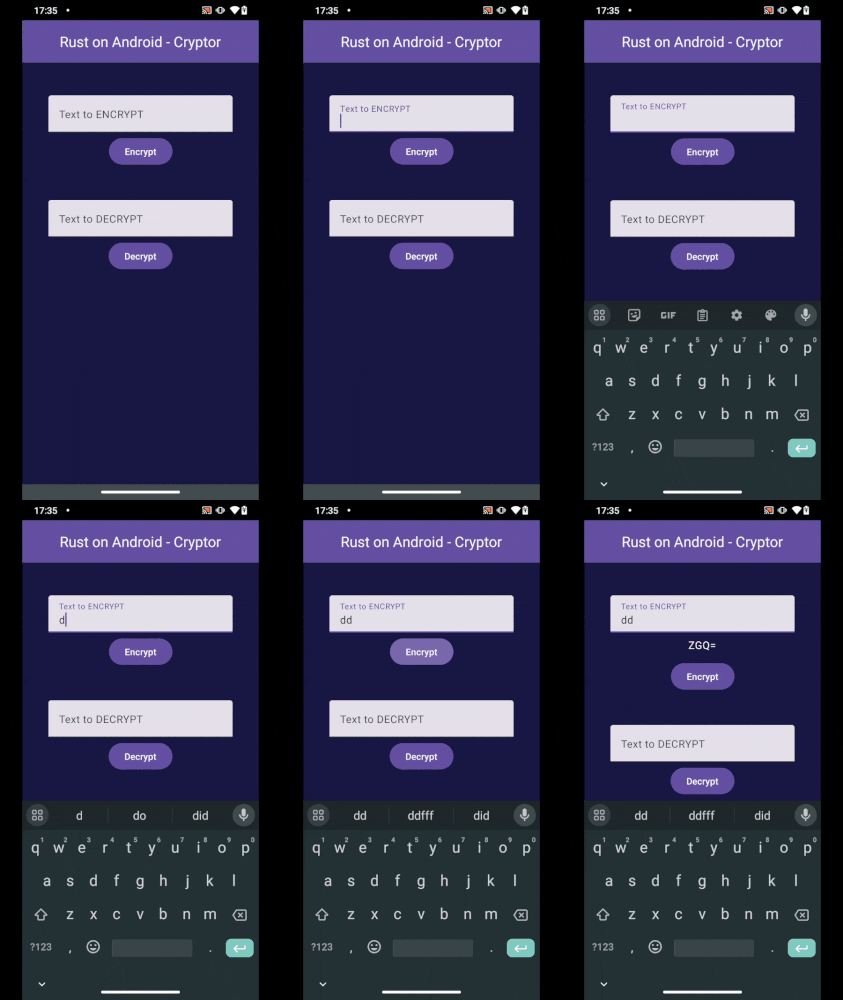
<p><strong>Our project</strong> consists of an <strong>Android Application</strong> that will call <strong>Rust</strong> code in order to <strong>encrypt/decrypt</strong> a given <code class="language-plaintext highlighter-rouge">String</code>:</p>

<p class="figcaption"><br />
<img src="/assets/img/blog/rust_cross_platform_android_project_demo.gif" alt="fernando-cejas" class="image-center image-border" />
Our Android App calling Rust code.</p>

<h2 id="where-is-the-code">Where is the code?</h2>

<p><strong>Before continuing,</strong> it is worth mentioning that the <strong>entire codebase</strong> sits in a <strong target="_blank"><a href="https://github.com/android10/Rust-Cross-Platform-Development/">Github Repository</a></strong> containig <strong target="_blank"><a href="https://github.com/android10/Rust-Cross-Platform-Development/tree/main/rust-library#cryptor_jni">extra documentation</a></strong> and <strong target="_blank"><a href="https://github.com/android10/Rust-Cross-Platform-Development/blob/main/rust-library/cryptor_jni/src/bin/release.rs#L1">code comments</a></strong> to facilitate <strong>UNDERSTANDING</strong> and <strong>LEARNING</strong>.</p>

<h2 id="the-big-picture">The Big Picture</h2>

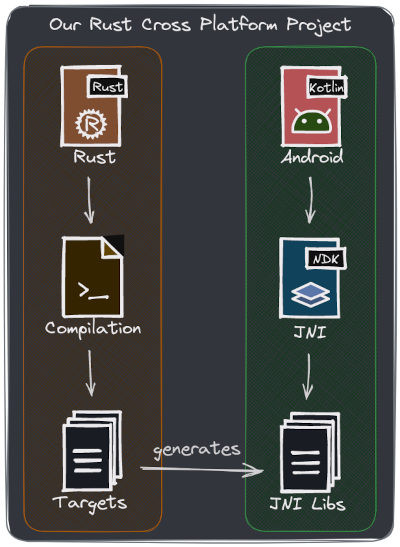
<p>In a nutshell, <strong>our project will follow this flow:</strong></p>

<p class="figcaption"><br />
<img src="/assets/img/blog/rust_cross_platform_android_project_overview.png" alt="fernando-cejas" class="image-center image-border" />
Our global project overview.</p>

<p><strong>Rust and Android interaction</strong> involves a bunch of parts (my approach is to have <strong>2 separated projects that we can independently evolve</strong>):</p>

<ol>
  <li><strong>Rust compilation takes place in the first place.</strong></li>
  <li><strong target="_blank">JNI artifacts (libraries) are generated for <a href="https://developer.android.com/ndk/guides/abis">different android cpu architectures and instruction sets</a></strong>.</li>
  <li><strong target="_blank">These artifacts (extension <code class="language-plaintext highlighter-rouge">.so</code>) should be placed in <a href="https://developer.android.com/ndk/guides/abis#native-code-in-app-packages"><code class="language-plaintext highlighter-rouge">jniLibs</code> folder</a></strong> <strong>inside the Android Project.</strong></li>
  <li><strong target="_blank">Android consumes them via <a href="https://developer.android.com/training/articles/perf-jni">Java Native Interface</a></strong> <strong>(JNI).</strong></li>
</ol>

<p>As a next step, let’s <strong>run</strong> the project, <strong>break things down</strong> and <strong>dive deeper</strong> into each part.</p>

<h2 id="running-the-project">Running the Project</h2>

<p>After <a href="https://github.com/android10/Rust-Cross-Platform-Development/" target="_blank">cloning the repo</a>, <strong>follow the steps below.</strong></p>

<h3 id="requirements">Requirements</h3>

<ul>
  <li><strong target="_blank">Android <a href="https://developer.android.com/studio">SDK</a></strong> <strong target="_blank">and <a href="https://developer.android.com/ndk/">NDK</a></strong> installed.</li>
  <li><strong>ANDROID_HOME</strong> env variable pointing to the <strong>Android Sdk</strong> location: mine is at <code class="language-plaintext highlighter-rouge">/home/fernando/Android/Sdk</code>.</li>
  <li><strong>Android NDK</strong> version should match the one inside the <a href="https://github.com/android10/Rust-Cross-Platform-Development/blob/main/rust-library/cryptor_jni/build.rs" target="_blank"><code class="language-plaintext highlighter-rouge">jni_crypto/build.rs</code> file</a>.
    <ul>
      <li><strong>In my case</strong> <code class="language-plaintext highlighter-rouge">$ANDROID_HOME/ndk/25.2.9519653</code> <strong>matches with</strong> <code class="language-plaintext highlighter-rouge">ANDROID_NDK_VERSION = "25.2.9519653"</code>.</li>
    </ul>
  </li>
  <li><strong target="_blank"><a href="https://www.rust-lang.org/tools/install">Rust</a></strong> <strong>latest edition</strong>. If in <strong>trouble</strong>, check the project <a href="https://github.com/android10/Rust-Cross-Platform-Development/blob/main/rust-library/cryptor_jni/Cargo.toml#L5" target="_blank"><code class="language-plaintext highlighter-rouge">Cargo.toml</code></a> file for the correct one.</li>
  <li>Your <strong target="_blank"><a href="https://developer.android.com/studio/intro/">IDE</a></strong> and <strong target="_blank"><a href="https://vscodium.com/">Editor</a></strong> of preference.</li>
</ul>

<h3 id="generating-rust-artifacts-crates">Generating Rust artifacts (crates)</h3>

<ul>
  <li><strong>Go to</strong> <code class="language-plaintext highlighter-rouge">rust-library/jni_cryptor</code> folder.</li>
  <li><strong>Run</strong> <code class="language-plaintext highlighter-rouge">cargo run --bin release</code>.</li>
  <li><strong>Run</strong> <code class="language-plaintext highlighter-rouge">cargo run --bin publish</code>.</li>
  <li><a href="https://github.com/android10/Rust-Cross-Platform-Development/blob/main/rust-library/README.md#available-commands-1" target="_blank">OPTIONAL</a>: <code class="language-plaintext highlighter-rouge">cargo test</code>.</li>
</ul>

<h3 id="running-the-android-app">Running the Android App</h3>

<ul>
  <li><strong>Import in Android Studio</strong> the <code class="language-plaintext highlighter-rouge">android-sample</code> folder (<code class="language-plaintext highlighter-rouge">build.gradle.kts</code> file).</li>
  <li><strong>Run <code class="language-plaintext highlighter-rouge">app</code> via IDE.</strong></li>
</ul>

<h2 id="crypto-the-rust-project">Crypto: The Rust Project</h2>

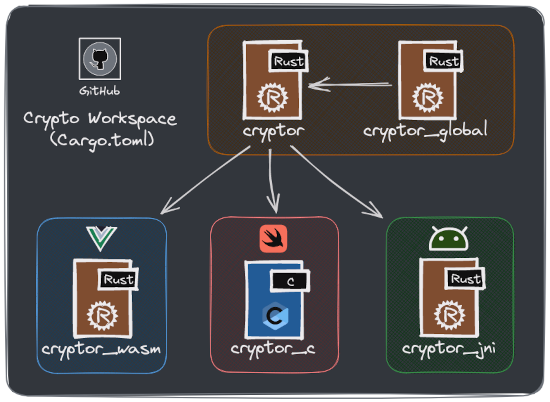
<p>The <strong>Rust project structure</strong> (called <code class="language-plaintext highlighter-rouge">crypto</code>) looks like <strong>this:</strong></p>

<p class="figcaption"><br />
<img src="/assets/img/blog/rust_cross_platform_crypto_project_overview.png" alt="fernando-cejas" class="image-center image-border" />
Our Rust ‘crypto’ project overview.</p>

<ul>
  <li><strong>cryptor:</strong> Our core crate where we perform <code class="language-plaintext highlighter-rouge">string</code> <strong>encryption/decryption</strong>.</li>
  <li><strong>cryptor_global:</strong> As it name established, a global crate for code reusability.</li>
  <li><strong>cryptor_jni:</strong> Our JNI exposed API that act as a proxy by calling <strong>cryptor</strong> functions.</li>
</ul>

<p class="message"><strong>NOTE:</strong> We focus on the <strong>sub-projects that involve Android</strong>, so do not worry about the content of the other folders, since each of them is independent and <strong>they do not affect each other.</strong></p>

<h3 id="crypto-show-me-the-code">Crypto: Show me the code</h3>

<p><strong>Let’s use the example of text encryption</strong> (it is simplified by only base64-encoding a <code class="language-plaintext highlighter-rouge">string</code>). So here is our <code class="language-plaintext highlighter-rouge">encrypt</code> <strong>function in Rust</strong>, part of the <strong>crypto</strong> crate <a href="https://github.com/android10/Rust-Cross-Platform-Development/blob/main/rust-library/cryptor/src/lib.rs" target="_blank">inside the <code class="language-plaintext highlighter-rouge">cryptor/src/libs.rs</code> file</a>:</p>

<div class="language-rust highlighter-rouge"><div class="highlight"><pre class="highlight"><code><span class="k">use</span> <span class="nn">base64</span><span class="p">::{</span>
    <span class="n">Engine</span> <span class="k">as</span> <span class="n">_</span><span class="p">,</span> 
    <span class="nn">engine</span><span class="p">::</span><span class="nn">general_purpose</span><span class="p">::</span><span class="n">STANDARD</span> <span class="k">as</span> <span class="n">base64Engine</span>
<span class="p">};</span>

<span class="cd">///</span>
<span class="cd">/// Encrypts a String.</span>
<span class="cd">/// </span>
<span class="k">pub</span> <span class="k">fn</span> <span class="nf">encrypt</span><span class="p">(</span><span class="n">to</span><span class="p">:</span> <span class="o">&amp;</span><span class="nb">str</span><span class="p">)</span> <span class="k">-&gt;</span> <span class="nb">String</span> <span class="p">{</span>
    <span class="n">base64Engine</span><span class="nf">.encode</span><span class="p">(</span><span class="nn">String</span><span class="p">::</span><span class="nf">from</span><span class="p">(</span><span class="n">to</span><span class="p">))</span>
<span class="p">}</span>
</code></pre></div></div>

<p>And <strong target="_blank"><a href="https://github.com/android10/Rust-Cross-Platform-Development/blob/main/rust-library/cryptor/tests/integration_tests.rs">a tiny test for it</a></strong>:</p>

<div class="language-rust highlighter-rouge"><div class="highlight"><pre class="highlight"><code><span class="k">use</span> <span class="n">cryptor</span><span class="p">;</span>

<span class="nd">#[test]</span>
<span class="k">fn</span> <span class="nf">test_encrypt_string</span><span class="p">()</span> <span class="p">{</span>
    <span class="k">let</span> <span class="n">to_encrypt</span> <span class="o">=</span> <span class="s">"hello_world_from_rust"</span><span class="p">;</span>
    <span class="k">let</span> <span class="n">str_encoded_b64</span> <span class="o">=</span> <span class="s">"aGVsbG9fd29ybGRfZnJvbV9ydXN0"</span><span class="p">;</span>

    <span class="k">let</span> <span class="n">encrypted_result</span> <span class="o">=</span> <span class="nn">cryptor</span><span class="p">::</span><span class="nf">encrypt</span><span class="p">(</span><span class="o">&amp;</span><span class="n">to_encrypt</span><span class="p">);</span>
    
    <span class="nd">assert_eq!</span><span class="p">(</span><span class="n">str_encoded_b64</span><span class="p">,</span> <span class="n">encrypted_result</span><span class="p">);</span>
<span class="p">}</span>
</code></pre></div></div>

<p><strong>Now we need our JNI Api in place</strong>, which makes use of our <strong>crypto crate</strong> (as showcased in the <code class="language-plaintext highlighter-rouge">crypto</code> project structure picture above). This sits <a href="https://github.com/android10/Rust-Cross-Platform-Development/blob/main/rust-library/cryptor_jni/src/lib.rs" target="_blank">inside the <code class="language-plaintext highlighter-rouge">cryptor_jni/scr/libs.rs</code> file</a>:</p>

<div class="language-rust highlighter-rouge"><div class="highlight"><pre class="highlight"><code><span class="cd">///</span>
<span class="cd">/// [cfg(target_os = "android")]: Compiler flag ("cfg") which exposes</span>
<span class="cd">/// the JNI interface for targeting Android in this case</span>
<span class="cd">/// </span>
<span class="cd">/// [allow(non_snake_case)]: Tells the compiler not to warn if</span>
<span class="cd">/// we are not using snake_case for a variable or function names.</span>
<span class="cd">/// For Android Development we want to be consistent with code style. </span>
<span class="cd">/// </span>
<span class="nd">#[cfg(target_os</span> <span class="nd">=</span> <span class="s">"android"</span><span class="nd">)]</span>
<span class="nd">#[allow(non_snake_case)]</span>
<span class="k">pub</span> <span class="k">mod</span> <span class="n">android</span> <span class="p">{</span>

    <span class="k">extern</span> <span class="k">crate</span> <span class="n">jni</span><span class="p">;</span>
    
    <span class="c1">// This is the interface to the JVM </span>
    <span class="c1">// that we'll call the majority of our</span>
    <span class="c1">// methods on.</span>
    <span class="c1">// @See https://docs.rs/jni/latest/jni/</span>
    <span class="k">use</span> <span class="k">self</span><span class="p">::</span><span class="nn">jni</span><span class="p">::</span><span class="n">JNIEnv</span><span class="p">;</span>

    <span class="c1">// These objects are what you should use as arguments to your </span>
    <span class="c1">// native function. They carry extra lifetime information to </span>
    <span class="c1">// prevent them escaping this context and getting used after </span>
    <span class="c1">// being GC'd.</span>
    <span class="k">use</span> <span class="k">self</span><span class="p">::</span><span class="nn">jni</span><span class="p">::</span><span class="nn">objects</span><span class="p">::{</span><span class="n">JClass</span><span class="p">,</span> <span class="n">JString</span><span class="p">};</span>
    
    <span class="c1">// This is just a pointer. We'll be returning it from our function. </span>
    <span class="c1">// We can't return one of the objects with lifetime information </span>
    <span class="c1">// because the lifetime checker won't let us.</span>
    <span class="k">use</span> <span class="k">self</span><span class="p">::</span><span class="nn">jni</span><span class="p">::</span><span class="nn">sys</span><span class="p">::</span><span class="n">jstring</span><span class="p">;</span>
    
    <span class="k">use</span> <span class="nn">cryptor</span><span class="p">::</span><span class="n">encrypt</span><span class="p">;</span>

    <span class="cd">///</span>
    <span class="cd">/// Encrypts a String.</span>
    <span class="cd">/// </span>
    <span class="nd">#[no_mangle]</span> <span class="c1">// This keeps Rust from "mangling" the name so it is unique (crate).</span>
    <span class="k">pub</span> <span class="k">extern</span> <span class="s">"system"</span> <span class="k">fn</span> <span class="n">Java_com_fernandocejas_rust_Cryptor_encrypt</span><span class="o">&lt;</span><span class="nv">'local</span><span class="o">&gt;</span><span class="p">(</span>
        <span class="k">mut</span> <span class="n">env</span><span class="p">:</span> <span class="n">JNIEnv</span><span class="o">&lt;</span><span class="nv">'local</span><span class="o">&gt;</span><span class="p">,</span>
        <span class="c1">// This is the class that owns our static method. It's not going to be used,</span>
        <span class="c1">// but still must be present to match the expected signature of a static</span>
        <span class="c1">// native method.</span>
        <span class="n">_class</span><span class="p">:</span> <span class="n">JClass</span><span class="o">&lt;</span><span class="nv">'local</span><span class="o">&gt;</span><span class="p">,</span>
        <span class="n">input</span><span class="p">:</span> <span class="n">JString</span><span class="o">&lt;</span><span class="nv">'local</span><span class="o">&gt;</span><span class="p">,</span>
    <span class="p">)</span> <span class="k">-&gt;</span> <span class="n">jstring</span> <span class="p">{</span>

        <span class="c1">// First, we have to get the string out of Java. Check out the `strings`</span>
        <span class="c1">// module for more info on how this works.</span>
        <span class="k">let</span> <span class="n">to_encrypt</span><span class="p">:</span> <span class="nb">String</span> <span class="o">=</span> <span class="n">env</span><span class="nf">.get_string</span><span class="p">(</span><span class="o">&amp;</span><span class="n">input</span><span class="p">)</span>
                                    <span class="nf">.expect</span><span class="p">(</span><span class="s">"Couldn't get java string!"</span><span class="p">)</span><span class="nf">.into</span><span class="p">();</span>

        <span class="c1">// We encrypt our str calling the cryptor library</span>
        <span class="k">let</span> <span class="n">encrypted_str</span> <span class="o">=</span> <span class="nf">encrypt</span><span class="p">(</span><span class="o">&amp;</span><span class="n">to_encrypt</span><span class="p">);</span>
        
        <span class="c1">// Here we have to create a new Java string to return. Again, more info</span>
        <span class="c1">// in the `strings` module.</span>
        <span class="k">let</span> <span class="n">output</span> <span class="o">=</span> <span class="n">env</span><span class="nf">.new_string</span><span class="p">(</span><span class="o">&amp;</span><span class="n">encrypted_str</span><span class="p">)</span>
                        <span class="nf">.expect</span><span class="p">(</span><span class="s">"Couldn't create Java String!"</span><span class="p">);</span>

        <span class="c1">// Finally, extract the raw pointer to return.</span>
        <span class="n">output</span><span class="nf">.into_raw</span><span class="p">()</span>
    <span class="p">}</span>
<span class="p">}</span>
</code></pre></div></div>

<p><strong>Something to pay a bit of attention to,</strong> is the <strong>function signature</strong>, which <strong>we will cover in our android project part</strong>. But for now, let’s leave it here and focus on our <strong>artifact (crate) generation</strong>.</p>

<p class="message"><strong>NOTE:</strong> I have used the <strong target="_blank"><a href="https://crates.io/crates/jni">jni crate</a></strong> for <strong>this purpose</strong>, which has <strong target="_blank"><a href="https://docs.rs/jni/latest/jni/">excellent documentation</a></strong>.</p>

<h3 id="crypto-artifact-generation">Crypto: Artifact Generation</h3>

<p>At this point, <strong>our Rust code is in place,</strong> and we need to generate our <code class="language-plaintext highlighter-rouge">.so</code> artifacts via <code class="language-plaintext highlighter-rouge">cargo</code> (<a href="https://doc.rust-lang.org/cargo/index.html" target="_blank">Rust package manager</a>).</p>

<p>When building the <code class="language-plaintext highlighter-rouge">crypto_jni</code> crate with the <code class="language-plaintext highlighter-rouge">cargo build</code> command (inside our <code class="language-plaintext highlighter-rouge">crypto_jni</code> foler), <code class="language-plaintext highlighter-rouge">cargo</code> first <a href="https://doc.rust-lang.org/cargo/reference/build-scripts.html" target="_blank">searches for a build script file</a> (<code class="language-plaintext highlighter-rouge">build.rs</code>) in the <strong>root folder of the project in order to execute it.</strong></p>

<p><strong>AND HERE IS WHERE THE MAGIC HAPPENS!!!…</strong> so let’s have a look at what is inside our <a href="https://github.com/android10/Rust-Cross-Platform-Development/blob/main/rust-library/cryptor_jni/build.rs" target="_blank"><code class="language-plaintext highlighter-rouge">build.rs</code></a> file:</p>

<div class="language-rust highlighter-rouge"><div class="highlight"><pre class="highlight"><code><span class="o">...</span>
<span class="k">static</span> <span class="n">ANDROID_NDK_VERSION</span><span class="p">:</span> <span class="o">&amp;</span><span class="nb">str</span> <span class="o">=</span> <span class="s">"25.2.9519653"</span><span class="p">;</span>
<span class="o">...</span>
<span class="k">fn</span> <span class="nf">main</span><span class="p">()</span> <span class="p">{</span>
    <span class="nn">system</span><span class="p">::</span><span class="nf">rerun_if_changed</span><span class="p">(</span><span class="s">"build.rs"</span><span class="p">);</span>

    <span class="nf">create_android_targets_config_file</span><span class="p">();</span>
    <span class="nf">add_android_targets_to_toolchain</span><span class="p">();</span>
<span class="p">}</span>
</code></pre></div></div>

<p>Basically we are creating a <a href="https://doc.rust-lang.org/cargo/reference/config.html#configuration">cargo config file</a> containing <a href="https://doc.rust-lang.org/nightly/rustc/platform-support/android.html" target="_blank">android</a> <a href="https://doc.rust-lang.org/cargo/reference/config.html#target">targets</a> information, needed by <code class="language-plaintext highlighter-rouge">cargo</code> <a href="https://rust-lang.github.io/rustup/cross-compilation.html" target="_blank">to perform cross compilation</a>.</p>

<p>Run <code class="language-plaintext highlighter-rouge">cargo build</code> inside the <code class="language-plaintext highlighter-rouge">cryptor_jni</code> folder and once done <strong>open the generated file at <code class="language-plaintext highlighter-rouge">rust-library/cryptor_jni/.cargo/config</code>,</strong> which should look similar to this:</p>

<div class="language-bash highlighter-rouge"><div class="highlight"><pre class="highlight"><code><span class="o">[</span>target.armv7-linux-androideabi]
ar <span class="o">=</span> <span class="s2">".../ndk/25.2.9519653/.../linux-x86_64/bin/arm-linux-androideabi-ar"</span>
linker <span class="o">=</span> <span class="s2">".../ndk/25.2.9519653/.../linux-x86_64/bin/armv7a-linux-androideabi21-clang"</span>

<span class="o">[</span>target.i686-linux-android]
ar <span class="o">=</span> <span class="s2">".../ndk/25.2.9519653/.../linux-x86_64/bin/i686-linux-android-ar"</span>
linker <span class="o">=</span> <span class="s2">".../ndk/25.2.9519653/.../linux-x86_64/bin/i686-linux-android21-clang"</span>

<span class="o">[</span>target.aarch64-linux-android]
ar <span class="o">=</span> <span class="s2">".../ndk/25.2.9519653/.../linux-x86_64/bin/aarch64-linux-android-ar"</span>
linker <span class="o">=</span> <span class="s2">".../ndk/25.2.9519653/.../linux-x86_64/bin/aarch64-linux-android21-clang"</span>

<span class="o">[</span>target.x86_64-linux-android]
ar <span class="o">=</span> <span class="s2">".../ndk/25.2.9519653/.../linux-x86_64/bin/x86_64-linux-android-ar"</span>
linker <span class="o">=</span> <span class="s2">".../ndk/25.2.9519653/.../linux-x86_64/bin/x86_64-linux-android21-clang"</span>
</code></pre></div></div>

<blockquote>
  <p>Each target in the above config file derives from the <strong>Official Android Documentation</strong> on <a href="https://developer.android.com/ndk/guides/other_build_systems" target="_blank">“Using NDK with other build systems”</a> which basically states that in order to build for an specific <strong>cpu architecture/type and instruction set (ABI)</strong>, the <strong>Android NDK provides pre-compiled toolchains</strong> that need to be used (Ex. <code class="language-plaintext highlighter-rouge">arm-linux-androideabi-ar</code> and <code class="language-plaintext highlighter-rouge">armv7a-linux-androideabi21-clang</code>).</p>
</blockquote>

<p><strong>Now <code class="language-plaintext highlighter-rouge">cargo</code> knows what to build and how,</strong> for instance, the next step is to <strong>add those targets to the rust toolchain,</strong> which is basically what <strong>this line of code is doing:</strong></p>

<div class="language-rust highlighter-rouge"><div class="highlight"><pre class="highlight"><code><span class="k">fn</span> <span class="nf">main</span><span class="p">()</span> <span class="p">{</span>
    <span class="o">...</span>
    <span class="cd">/// ## Examples</span>
    <span class="cd">/// `rustup target add arm-linux-androideabi`</span>
    <span class="cd">///</span>
    <span class="cd">/// Reference:</span>
    <span class="cd">/// - https://rust-lang.github.io/rustup/cross-compilation.html</span>
    <span class="nf">add_android_targets_to_toolchain</span><span class="p">();</span>
<span class="p">}</span>
</code></pre></div></div>

<p><strong>The above code</strong> enables us to run the following commands if we wanted to <strong>individually build our targets:</strong></p>

<div class="language-bash highlighter-rouge"><div class="highlight"><pre class="highlight"><code>cargo build <span class="nt">--target</span> armv7-linux-androideabi
cargo build <span class="nt">--target</span> i686-linux-android 
cargo build <span class="nt">--target</span> aarch64-linux-android
cargo build <span class="nt">--target</span> x86_64-linux-android
</code></pre></div></div>

<p><strong>Although this is perfect valid,</strong> it is tedious… that is why <strong>it is a good practice to AUTOMATE ALL THE THINGS</strong> (as much as possible). And this is done by the <a href="https://github.com/android10/Rust-Cross-Platform-Development/blob/main/rust-library/cryptor_jni/src/bin/release.rs" target="_blank">cryptor_jni/src/bin/release.rs</a> file, relying on <a href="https://doc.rust-lang.org/cargo/reference/cargo-targets.html#binaries" target="_blank"><code class="language-plaintext highlighter-rouge">cargo</code> binary targets</a>, <strong>which are basically programs that can be executed after comopilation</strong>:</p>

<div class="language-bash highlighter-rouge"><div class="highlight"><pre class="highlight"><code>cargo run <span class="nt">--bin</span> release
</code></pre></div></div>

<p><strong>Last but not least,</strong> there is <a href="https://github.com/android10/Rust-Cross-Platform-Development/blob/main/rust-library/cryptor_jni/src/bin/publish.rs" target="_blank">another binary target call publish (<code class="language-plaintext highlighter-rouge">publish.rs</code> file)</a> that <strong>we can execute:</strong></p>

<div class="language-bash highlighter-rouge"><div class="highlight"><pre class="highlight"><code>cargo run <span class="nt">--bin</span> publish
</code></pre></div></div>

<p><strong>This will copy all the generated targets</strong> to its <a href="https://github.com/android10/Rust-Cross-Platform-Development/tree/main/android-sample/app/src/main/jniLibs" target="_blank">corresponding android directories</a> in our <a href="https://github.com/android10/Rust-Cross-Platform-Development/tree/main/android-sample" target="_blank">android-sample</a> project.</p>

<h3 id="crypto-android-abis">Crypto: Android ABIs</h3>

<p><strong target="_blank">We have been mentioning <a href="https://en.wikipedia.org/wiki/Application_binary_interface">ABIs</a></strong> <strong>previously along this article, but what is that exactly and how does an ABI relate to a target?</strong></p>

<blockquote>
  <p>ABI stands for <strong>Application Binary Interface</strong>, which is a combination of a CPU type/architecture and instruction set. In Android Development <strong>any NDK target must be mapped to a specific directory in the project</strong>. This relationship is as following <a href="https://developer.android.com/ndk/guides/other_build_systems" target="_blank">according to the documentation</a>:</p>
</blockquote>

<div class="language-plaintext highlighter-rouge"><div class="highlight"><pre class="highlight"><code> -------------------------------------------------------------
  ANDROID TARGET                ABI (folder inside `jniLibs`)
 -------------------------------------------------------------
  armv7a-linux-androideabi ---&gt; armeabi-v7a  
  aarch64-linux-android    ---&gt; arm64-v8a    
  i686-linux-android       ---&gt; x86	        
  x86_64-linux-android     ---&gt; x86_64       
 -------------------------------------------------------------
</code></pre></div></div>

<h3 id="crypto-infrastructure-improvements">Crypto: Infrastructure Improvements</h3>

<p>So far, <strong>evertyhing is ready for development on the Rust side with some automation…</strong> But of course, there are a couple of <strong>IMPROVEMENTS</strong> that I did not want to skip… and even though these are <strong>OUT OF SCOPE</strong> of this article, they are definitely worth <strong>highlighting:</strong></p>

<ul>
  <li><strong target="_blank">There is NO <a href="https://semver.org/">Semantic Versioning</a></strong> for crates, which is something required as soon as the project grows in complexity.</li>
  <li><strong>Artifacts are copied and overriden directly inside the android project (<code class="language-plaintext highlighter-rouge">jniLibs</code> directory):</strong> ideally these ones should be properly versioned (mentioned above) and uploaded to a crates repository or similar.</li>
</ul>

<h2 id="android-implementation-details">Android: Implementation Details</h2>

<p>On the <strong>Android side of things</strong>, there are a <strong>couple of moving parts</strong> that we have to take into consideration.</p>

<h3 id="android-setting-up-the-build-system">Android: Setting Up the Build System</h3>

<p>In the <a href="https://github.com/android10/Rust-Cross-Platform-Development/blob/main/android-sample/app/build.gradle.kts" target="_blank"><code class="language-plaintext highlighter-rouge">build.gradle.kts</code></a> we need to <strong target="_blank">add <a href="https://developer.android.com/ndk/guides/abis">NDK configuration</a></strong>:</p>

<div class="language-kotlin highlighter-rouge"><div class="highlight"><pre class="highlight"><code><span class="nf">android</span> <span class="p">{</span>
    <span class="o">..</span><span class="p">.</span>
    <span class="nf">ndk</span> <span class="p">{</span>
      <span class="c1">// Specifies the ABI configurations of your native</span>
      <span class="c1">// libraries Gradle should build and package with your APK.</span>
      <span class="c1">// Here is a list of supported ABIs:</span>
      <span class="c1">// https://developer.android.com/ndk/guides/abis</span>
      <span class="n">abiFilters</span><span class="p">.</span><span class="nf">addAll</span><span class="p">(</span>
        <span class="nf">setOf</span><span class="p">(</span>
          <span class="s">"armeabi-v7a"</span><span class="p">,</span>
          <span class="s">"arm64-v8a"</span><span class="p">,</span>
          <span class="s">"x86"</span><span class="p">,</span>
          <span class="s">"x86_64"</span>
        <span class="p">)</span>
      <span class="p">)</span>
    <span class="p">}</span>
    <span class="o">..</span><span class="p">.</span>
<span class="p">}</span>
</code></pre></div></div>

<h3 id="android-loading-rust-libraries">Android: Loading Rust Libraries</h3>

<p><strong target="_blank">This is done at <a href="https://github.com/android10/Rust-Cross-Platform-Development/blob/main/android-sample/app/src/main/kotlin/com/fernandocejas/sample/AndroidApplication.kt">Android Application Class</a></strong> <strong>level:</strong></p>

<div class="language-kotlin highlighter-rouge"><div class="highlight"><pre class="highlight"><code><span class="kd">class</span> <span class="nc">AndroidApplication</span> <span class="p">:</span> <span class="nc">Application</span><span class="p">()</span> <span class="p">{</span>

    <span class="k">override</span> <span class="k">fun</span> <span class="nf">onCreate</span><span class="p">()</span> <span class="p">{</span>
        <span class="k">super</span><span class="p">.</span><span class="nf">onCreate</span><span class="p">()</span>
        <span class="nf">loadJNILibraries</span><span class="p">()</span>
    <span class="p">}</span>

    <span class="k">private</span> <span class="k">fun</span> <span class="nf">loadJNILibraries</span><span class="p">()</span> <span class="p">{</span>
        <span class="cm">/**
         * Loads the Crypto C++/Rust (via JNI) Library.
         *
         * IMPORTANT:
         * The name passed as argument () maps to the
         * original library name in our Rust project.
         */</span>
        <span class="nc">System</span><span class="p">.</span><span class="nf">loadLibrary</span><span class="p">(</span><span class="s">"cryptor_jni"</span><span class="p">)</span>
    <span class="p">}</span>
<span class="p">}</span>
</code></pre></div></div>

<h3 id="android-calling-rust-from-kotlin">Android: Calling Rust from Kotlin</h3>

<p><strong>In order to call Rust via JNI, we have to respect method/function signature.</strong> This is essential and a <strong>MUST</strong> so that <strong>classes, functions and methods can be found by the android runtime.</strong></p>

<p>Remember this <strong>piece of code</strong> from our <a href="https://github.com/android10/Rust-Cross-Platform-Development/blob/main/rust-library/cryptor_jni/src/lib.rs" target="_blank"><code class="language-plaintext highlighter-rouge">cryptor_jni</code> project</a> that encrypts a <code class="language-plaintext highlighter-rouge">String</code>:</p>

<div class="language-rust highlighter-rouge"><div class="highlight"><pre class="highlight"><code><span class="o">...</span>
<span class="k">pub</span> <span class="k">extern</span> <span class="s">"system"</span> <span class="k">fn</span> <span class="n">Java_com_fernandocejas_rust_Cryptor_encrypt</span><span class="o">&lt;</span><span class="nv">'local</span><span class="o">&gt;</span><span class="p">(</span>
    <span class="k">mut</span> <span class="n">env</span><span class="p">:</span> <span class="n">JNIEnv</span><span class="o">&lt;</span><span class="nv">'local</span><span class="o">&gt;</span><span class="p">,</span>
    <span class="n">_class</span><span class="p">:</span> <span class="n">JClass</span><span class="o">&lt;</span><span class="nv">'local</span><span class="o">&gt;</span><span class="p">,</span>
    <span class="n">input</span><span class="p">:</span> <span class="n">JString</span><span class="o">&lt;</span><span class="nv">'local</span><span class="o">&gt;</span><span class="p">,</span>
<span class="p">)</span> <span class="k">-&gt;</span> <span class="n">jstring</span> <span class="p">{</span>
    <span class="o">...</span>
<span class="p">}</span>
<span class="o">...</span>
</code></pre></div></div>
<p><strong target="_blank">Invoking it from Kotlin, would mean creating a <a href="https://github.com/android10/Rust-Cross-Platform-Development/blob/main/android-sample/app/src/main/kotlin/com/fernandocejas/rust/Cryptor.kt">kotlin class</a></strong> <strong>RESPECTING package and function naming:</strong></p>

<div class="language-kotlin highlighter-rouge"><div class="highlight"><pre class="highlight"><code><span class="k">package</span> <span class="nn">com.fernandocejas.rust</span>

<span class="cm">/**
 * Helper that acts as an interface between native
 * code (in this case Rust via JNI) and Kotlin.
 *
 * By convention the function signatures should respect
 * the original ones from Rust via JNI Project.
 */</span>
<span class="kd">class</span> <span class="nc">Cryptor</span> <span class="p">{</span>

    <span class="cm">/**
     * Encrypt a string.
     *
     * This is an external call to Rust using
     * the Java Native Interface (JNI).
     *
     * @link https://developer.android.com/ndk/samples/sample_hellojni
     */</span>
    <span class="nd">@Throws</span><span class="p">(</span><span class="nc">IllegalArgumentException</span><span class="o">::</span><span class="k">class</span><span class="p">)</span>
    <span class="k">external</span> <span class="k">fun</span> <span class="nf">encrypt</span><span class="p">(</span><span class="n">string</span><span class="p">:</span> <span class="nc">String</span><span class="p">):</span> <span class="nc">String</span>
<span class="o">..</span><span class="p">.</span>
<span class="p">}</span>
</code></pre></div></div>

<p><strong>We are done!!!</strong> Now we can <strong>inject our <code class="language-plaintext highlighter-rouge">Cryptor</code> class</strong> <a href="https://github.com/android10/Rust-Cross-Platform-Development/blob/main/android-sample/app/src/main/kotlin/com/fernandocejas/sample/MainViewModel.kt#L1C1-L33C2" target="_blank">where it is needed</a> and <strong>encrypt/decrypt</strong> <code class="language-plaintext highlighter-rouge">Strings</code>:</p>

<div class="language-kotlin highlighter-rouge"><div class="highlight"><pre class="highlight"><code><span class="k">private</span> <span class="kd">val</span> <span class="py">cryptor</span> <span class="p">=</span> <span class="nc">Cryptor</span><span class="p">()</span>
<span class="kd">val</span> <span class="py">encryptedString</span> <span class="p">=</span> <span class="n">cryptor</span><span class="p">.</span><span class="nf">encrypt</span><span class="p">(</span><span class="s">"something"</span><span class="p">)</span>
</code></pre></div></div>

<h2 id="use-case-scenarios">Use Case Scenarios</h2>

<p>You might be wondering what is the real purpose of <strong>all this wiring for integrating Rust with Android…</strong> At the moment I can think of some <strong>real use cases:</strong></p>

<ul>
  <li><strong>Music Player:</strong> this comes from my experience at SoundCloud, where we had our project in C++ cross platform compiled.</li>
  <li><strong>Video Player or Media Library:</strong> similar use case as a Music Player but with video encoding/decoding.</li>
  <li><strong>Encryption Library:</strong> as showcased in this post but with more advanced functionality and low level details.</li>
  <li><strong>Existent Project:</strong> sometimes we cannot control 100% our environment, so how does Mozilla integrates its Gecko Engine on Firefox Android?</li>
</ul>

<h2 id="conclusion">Conclusion</h2>

<p>As a conlusion, I would say… <strong>WE DO NOT WANT to replace Kotlin with Rust</strong>. <strong>Kotlin is very good as what it is meant to be: Android Development in THIS CASE.</strong>
But keep in mind that <strong>PICKING THE BEST TOOL FOR THE RIGHT JOB</strong> is essential to fulfill project requirements, and it is in this context where we can count on <strong>Rust as ONE MORE TOOL IN OUR TOOLBOX.</strong></p>

<blockquote>
  <p><strong>Ufff… that was a loooong post… but if you made it to this point, you should definitely feel proud of yourself… Till the next time and do not forget to provide FEEDBACK!!!</strong></p>
</blockquote>

<h2 id="references">References</h2>

<ul>
  <li><a href="https://doc.rust-lang.org/stable/book/" target="_blank">The Rust Programming Language</a>.</li>
  <li><a href="https://doc.rust-lang.org/cargo/" target="_blank">The Cargo Book</a>.</li>
  <li><a href="https://developer.android.com/develop">Develop for Android</a>.</li>
</ul>]]></content><author><name>Fernando Cejas</name><email>me@fernandocejas.com</email></author><category term="engineering" /><category term="programming" /><summary type="html"><![CDATA[In this journey, we will go through the **process, infrastructure and architecture** on how we can integrate **Rust in our Android Project** in a **cross-platform development** way. Topics like **JNI** and **NDK** are also covered, plus some **anti-patterns** and **real use cases/scenarios**.]]></summary><media:thumbnail xmlns:media="http://search.yahoo.com/mrss/" url="http://fernandocejas.com/assets/img/blog/rust_cross_platform_android_featured.jpg" /><media:content medium="image" url="http://fernandocejas.com/assets/img/blog/rust_cross_platform_android_featured.jpg" xmlns:media="http://search.yahoo.com/mrss/" /></entry><entry><title type="html">An over-engineered Home Lab with Docker and Kubernetes.</title><link href="http://fernandocejas.com/blog/engineering/2023-01-06-over-engineered-home-lab-docker-kubernetes/" rel="alternate" type="text/html" title="An over-engineered Home Lab with Docker and Kubernetes." /><published>2023-01-06T00:00:00+00:00</published><updated>2023-01-06T00:00:00+00:00</updated><id>http://fernandocejas.com/blog/engineering/over-engineered-home-lab-docker-kubernetes</id><content type="html" xml:base="http://fernandocejas.com/blog/engineering/2023-01-06-over-engineered-home-lab-docker-kubernetes/"><![CDATA[<p class="lead"><strong>“Instead of WORRYING about what you cannot control, SHIFT your ENERGY to what you can create.”</strong></p>

<ul class="large-only" id="markdown-toc">
  <li><a href="#introduction" id="markdown-toc-introduction">Introduction</a></li>
  <li><a href="#butwhy" id="markdown-toc-butwhy">But…Why???</a></li>
  <li><a href="#bare-metal" id="markdown-toc-bare-metal">Bare Metal</a></li>
  <li><a href="#main-software-stack" id="markdown-toc-main-software-stack">Main Software Stack</a></li>
  <li><a href="#the-kubernetes-approach" id="markdown-toc-the-kubernetes-approach">The Kubernetes Approach</a>    <ul>
      <li><a href="#kubernetes-the-main-components" id="markdown-toc-kubernetes-the-main-components">Kubernetes: The Main Components</a></li>
      <li><a href="#kubernetes-home-lab-architecture" id="markdown-toc-kubernetes-home-lab-architecture">Kubernetes: Home Lab Architecture</a></li>
      <li><a href="#kubernetes-application-flow" id="markdown-toc-kubernetes-application-flow">Kubernetes: Application Flow</a></li>
      <li><a href="#kubernetes-cluster-setup" id="markdown-toc-kubernetes-cluster-setup">Kubernetes: Cluster setup</a></li>
      <li><a href="#kubernetes-administration" id="markdown-toc-kubernetes-administration">Kubernetes: Administration</a></li>
      <li><a href="#kubernetes-application-example" id="markdown-toc-kubernetes-application-example">Kubernetes: Application Example</a></li>
      <li><a href="#kubernetes-useful-commands" id="markdown-toc-kubernetes-useful-commands">Kubernetes: Useful Commands</a></li>
    </ul>
  </li>
  <li><a href="#rules-of-over-complexity" id="markdown-toc-rules-of-over-complexity">Rules of (Over)-Complexity</a></li>
  <li><a href="#a-simpler-docker-approach" id="markdown-toc-a-simpler-docker-approach">A simpler Docker Approach</a>    <ul>
      <li><a href="#useful-docker-commands" id="markdown-toc-useful-docker-commands">Useful Docker Commands</a></li>
    </ul>
  </li>
  <li><a href="#monitoring" id="markdown-toc-monitoring">Monitoring</a></li>
  <li><a href="#security" id="markdown-toc-security">Security</a>    <ul>
      <li><a href="#alternatives-to-a-vpn" id="markdown-toc-alternatives-to-a-vpn">Alternatives to a VPN?</a></li>
    </ul>
  </li>
  <li><a href="#fault-tolerance-and-resilience" id="markdown-toc-fault-tolerance-and-resilience">Fault Tolerance and Resilience</a>    <ul>
      <li><a href="#how-can-we-make-sure-our-home-lab-is-highly-available" id="markdown-toc-how-can-we-make-sure-our-home-lab-is-highly-available">How can we make sure our Home Lab is highly available?</a></li>
      <li><a href="#how-can-we-keep-our-datainformation-safe" id="markdown-toc-how-can-we-keep-our-datainformation-safe">How can we keep our data/information safe?</a></li>
    </ul>
  </li>
  <li><a href="#server-administration" id="markdown-toc-server-administration">Server Administration</a>    <ul>
      <li><a href="#maintenance" id="markdown-toc-maintenance">Maintenance</a></li>
    </ul>
  </li>
  <li><a href="#the-final-result" id="markdown-toc-the-final-result">The final Result</a></li>
  <li><a href="#tips-and-tricks" id="markdown-toc-tips-and-tricks">Tips and Tricks</a></li>
  <li><a href="#alternatives" id="markdown-toc-alternatives">Alternatives</a></li>
  <li><a href="#other-infrastructure-tooling" id="markdown-toc-other-infrastructure-tooling">Other Infrastructure tooling</a></li>
  <li><a href="#conclusion" id="markdown-toc-conclusion">Conclusion</a></li>
  <li><a href="#references" id="markdown-toc-references">References</a></li>
</ul>

<h2 id="introduction">Introduction</h2>

<p><strong>After a long time of procrastination,</strong> I finally finished this blog post where <strong>I would like to share my journey on setting up my personal HOME LAB</strong>. This includes <strong>2 different approaches</strong>: <a href="https://kubernetes.io/" target="_blank">Kubernetes</a> and <a href="https://www.docker.com/" target="_blank">Docker</a>.</p>

<p>I will also <strong>highlight some of the problems I bumped into</strong>, the <strong>cost of maintenance</strong> and some <strong>tips and tricks</strong>.</p>

<p><strong>SPOILER:</strong> I started with <strong>Kubernetes</strong> and ended up with a pure/plain <strong>Docker</strong> approach. Both are great tools and should be used for their intended purpose. 
So in order to understand what happened here, let’s start this journey and <strong>jump on this train!!!</strong></p>

<p class="message"><strong>DISCLAIMER:</strong> This article is <strong>OPINIONATED</strong> but also <strong>PROVIDES THE TECHNICAL KNOWLEDGE</strong> to get started with <strong>Docker and Kubernetes</strong>, so I definitely encourage you <strong>TO READ TILL THE END (with pacience)</strong>.</p>

<h2 id="butwhy">But…Why???</h2>

<p>I strongly believe that this is <strong>the first question we have to ask ourselves</strong> whenever we decide to go for such a complex project.</p>

<p>We have to establish our <strong>goals</strong>, so here are mine:</p>

<ul>
  <li><strong>LEARNING PURPOSE:</strong> Kubernetes and Docker are mature tools that have been around for years and they are widely used.</li>
  <li><strong>DATA PRIVACY:</strong> Keeping and owning my own data is a <strong>HIGH PRIORITY</strong> for me.</li>
</ul>

<p>Whenever we make such a decision, <strong>we need to keep in mind the commitment to the project</strong>, which includes the following <strong>time investment</strong>:</p>

<ul>
  <li><strong>MAINTENANCE:</strong> we have to keep our infrastructure constantly ‘up to date’… and yes, automate all the things, but still checking release notes, incompatible breaking changes, migrations, etc, which could lead to headaches and extra time consumption.</li>
  <li><strong>TROUBLESHOOTING:</strong> there is always going to be issues, not only for the items mentiones above, but also because of the server(s) hardware, network, internet connection, etc. This is a project with complex moving parts, so we have to be prepared for it too.</li>
</ul>

<p class="message"><strong>I hope you are not already freaking out… just KEEP READING, there is always light at the end of the tunnel, and this is, by the way, the main reason why we are here too :).</strong></p>

<h2 id="bare-metal">Bare Metal</h2>

<p><strong>Software does not exists without Hardware backing it up…</strong> and to be honest, I could have done pretty much all this via some cloud providers, but then, <strong>neither this is no longer a HOME LAB nor a fully PRIVATE HOME SERVER</strong>, so I opted for the following bare metal:</p>

<ul>
  <li><strong>2 Intel</strong> <a href="https://en.wikipedia.org/wiki/Next_Unit_of_Computing" target="_blank">NUC</a> <strong>Mini PCs</strong>.</li>
  <li><strong>1 Modem/Router</strong> hosting my <strong>Internet Connection</strong> with <strong>Port Forwarding</strong> Support.</li>
  <li><strong>1 Router</strong> with <a href="https://openwrt.org/" target="_blank">OpenWRT</a> OS support.</li>
  <li><strong>1 Network Attached Storage</strong> (<a href="https://en.wikipedia.org/wiki/Network-attached_storage" target="_blank">NAS</a>).</li>
</ul>

<p class="message"><strong>Do not worry if you are not familiar with some of these mentioned concepts, I will try to make them clear and explain their responsibilities in the project’s architecture.</strong></p>

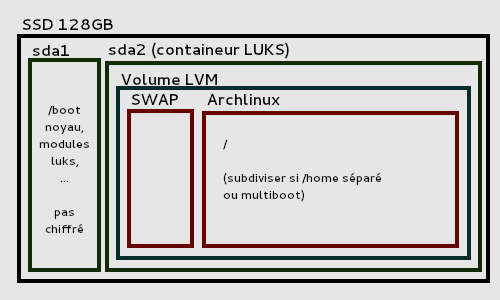
<p class="figcaption"><br />
<img src="/assets/img/blog/over_engineered_home_lab_docker_kubernetes_bare_metal.png" alt="fernando-cejas" class="image-center image-border" />
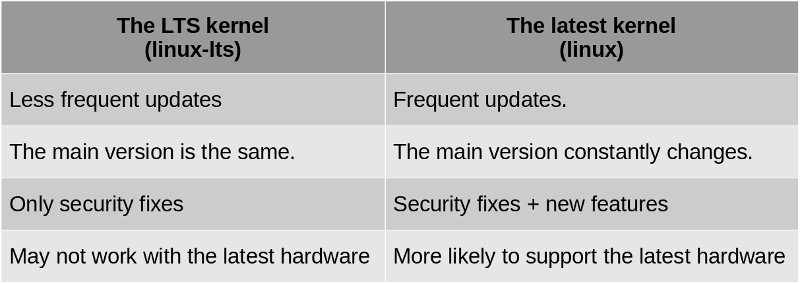
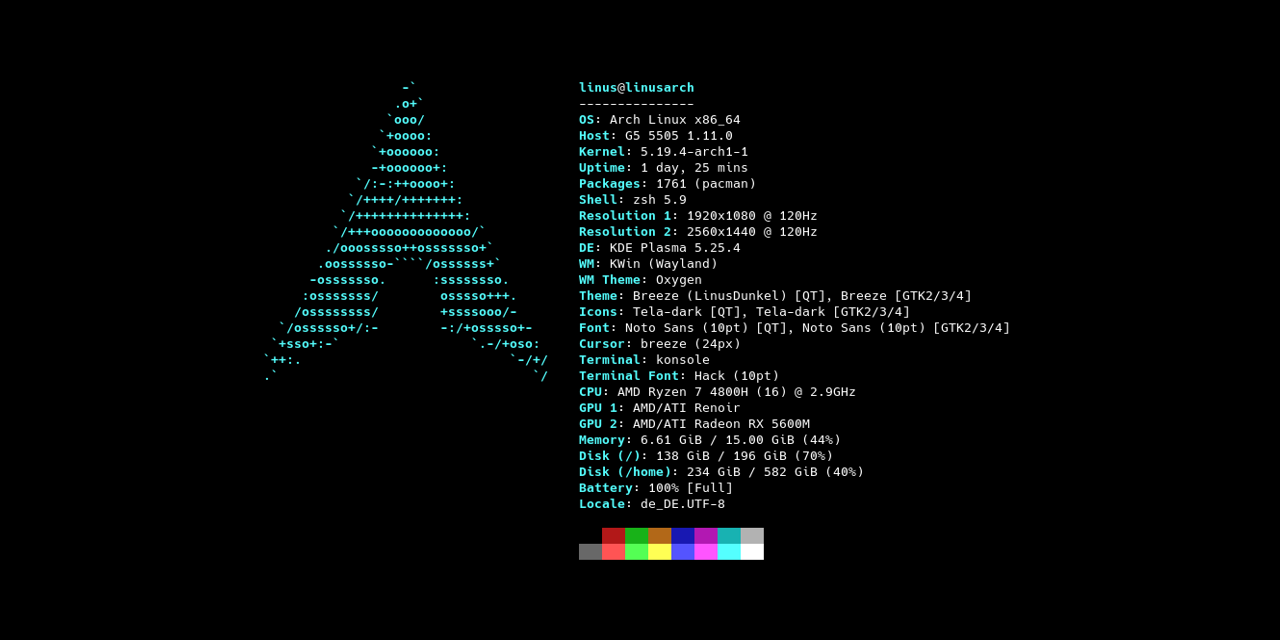
Arch Linux with LTS Kernel is my choice as my Home Lab Server.</p>
<h2 id="main-software-stack">Main Software Stack</h2>

<ul>
  <li><strong><a href="https://kubernetes.io/" target="_blank">Kubernetes</a>:</strong> for managing containerized workloads and services.</li>
  <li><strong><a href="https://www.docker.com/" target="_blank">Docker</a>:</strong> for managing containerized applications.</li>
  <li><strong><a href="https://linux.fernandocejas.com/" target="_blank">Linux</a></strong>.</li>
  <li><strong><a href="/blog/engineering/2020-12-28-install-arch-linux-full-disk-encryption/" target="_blank">Arch</a>:</strong> with LTS Kernel (for stability) as the main OS for the Servers.</li>
  <li><strong><a href="https://openwrt.org/" target="_blank">OpenWRT</a>:</strong> for network handling (DNS, Port Forwarding, DHCP, etc) inside my router.</li>
  <li><strong><a href="https://www.wireguard.com/" target="_blank">Wireguad</a>:</strong> for the encrypted virtual private network (VPN).</li>
</ul>

<h2 id="the-kubernetes-approach">The Kubernetes Approach</h2>

<p>This was my <strong>first approach</strong>, based on <a href="https://kubernetes.io/" target="_blank">Kubernetes</a>, so in order to understand what tha means, here is what the official website writes down:</p>

<blockquote>
  <p>“Kubernetes is a portable, extensible, open source platform for managing containerized workloads and services, that facilitates both declarative configuration and automation. It has a large, rapidly growing ecosystem. Kubernetes services, support, and tools are widely available.”</p>
</blockquote>

<p>At first I set up the <a href="https://kubernetes.io/" target="_blank">official Kubernetes (k8s)</a> but then I realized that there is a more <a href="https://github.com/k3s-io" target="_blank">lightweight version</a> of it, which fulfilled my needs. 
It is also called <a href="https://k3s.io/" target="_blank">Kubernetes (k3s)</a>, and it is basically a single binary that only takes up around <strong>50 MB of space</strong> and has low resource usage of around <strong>300 MB of RAM</strong>.
Even thought <a href="https://docs.k3s.io/" target="_blank">there are tiny differences</a>, <strong>they are both mostly compatible, so learning one will pretty much cover the other.</strong> That is perfect!!!</p>

<h3 id="kubernetes-the-main-components">Kubernetes: The Main Components</h3>

<p>Before continuing, it is <strong>VERY IMPORTANT</strong> to understand some of the <strong>concepts or fundamental</strong> <a href="https://kubernetes.io/docs/concepts/overview/" target="_blank">blocks</a> that are part of <a href="https://kubernetes.io/" target="_blank">Kubernetes</a>. 
Here is a summary in a very simplistic way:</p>

<ul>
  <li><strong>Cluster:</strong> When we deploy Kubernetes, we get a cluster.</li>
  <li><strong>Node:</strong> A node is a working machine in Kubernetes.</li>
  <li><strong><a href="https://kubernetes.io/docs/concepts/workloads/pods/" target="_blank">Pod</a>:</strong> A Pod represents a set of running containers in our cluster.</li>
  <li><strong>Control Plane:</strong> The container orchestration layer that exposes the API and interfaces to define, deploy and manage the lifecycle of containers.</li>
</ul>

<p class="message"><strong>In essence, a Kubernetes cluster consists of a set of worker machines, called nodes,</strong> that run containerized applications. <strong>Every cluster has at least one worker node.</strong>
The worker node(s) host the <strong>Pods that are the components of the application workload. The control plane manages the worker nodes and the Pods in the cluster.</strong>
In production environments, the control plane usually runs across multiple computers and a cluster usually runs multiple nodes, providing <strong>fault-tolerance</strong> and high <strong>availability</strong>.</p>

<p>Of course <strong>we are just scratching the surface</strong> here, but for our purpose, that is enough. 
There is way more, and for a deeper explanation, <a href="https://kubernetes.io/docs/concepts/">refer to the official Kubernetes Documentation</a>.</p>

<h3 id="kubernetes-home-lab-architecture">Kubernetes: Home Lab Architecture</h3>

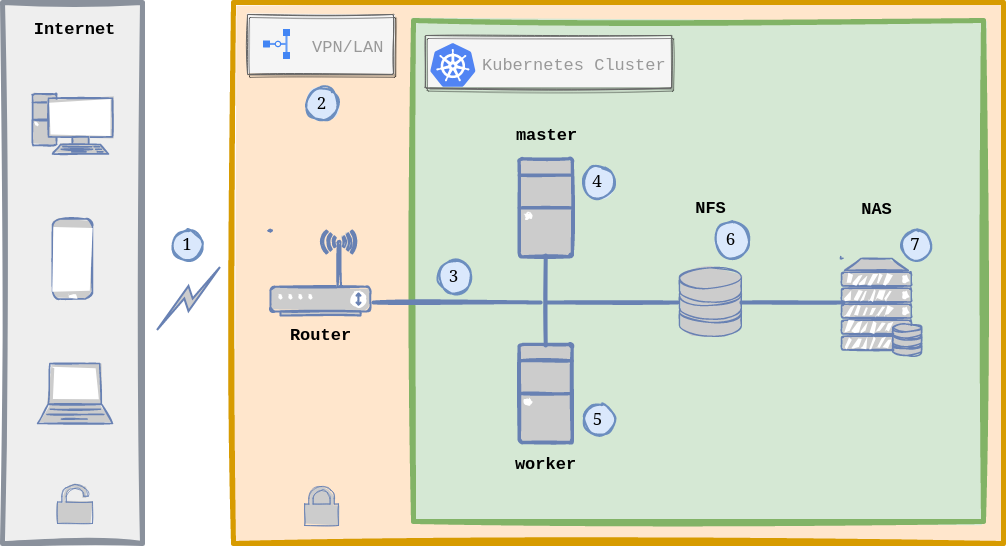
<p>Now that we understand the <strong>Kubernetes main concepts</strong>, here is a raw picture of my <strong>Home Lab Infrastructure with Kubernetes (k3s)</strong>:</p>

<p class="figcaption"><br />
<img src="/assets/img/blog/over_engineered_home_lab_docker_kubernetes_kubernetes_approach.png" alt="fernando-cejas" class="image-center image-border" />
Home Lab General Architecture with Kubernetes.</p>
<p><strong>WHAT IS GOING ON?</strong> In a nutshell, here is the normal flow when accessing any of the hosted services in my <a href="/blog/engineering/2020-12-28-install-arch-linux-full-disk-encryption/" target="_blank">Arch Linux</a> servers:</p>

<ol>
  <li><strong>Traffic</strong> comming from the Internet (via <a href="https://en.wikipedia.org/wiki/Dynamic_DNS" target="_blank">Dynamic DNS</a>) <strong>is received by the Router.</strong></li>
  <li>The <strong>router</strong> runs <a href="https://openwrt.org/" target="_blank">OpenWRT</a> as OS and hosts and <strong>manages the VPN</strong> using Wireguard (more on this in the <a href="#security">Security Section</a>).</li>
  <li>Once the request passes the <a href="#security">security</a> checks of the <a href="https://simple.wikipedia.org/wiki/Virtual_private_network" target="_blank">VPN</a>, <strong>we are inside our Local Area Network (LAN), zone of Linux Servers</strong> and for instance, the <strong>Kubernetes Cluster.</strong></li>
  <li><strong>The Kubernetes Cluster is composed by 2 Nodes running Linux:</strong> one node being the master <strong>(Kubernetes Control Plane)</strong> and the other is a worker.</li>
  <li><strong>In Reality both Kubernetes Nodes can act as workers,</strong> meaning that the load is distributed between both nodes via <a href="https://kubernetes.io/docs/concepts/services-networking/ingress/" target="_blank">Ingress</a> (usually NGINX), which acts as a <a href="https://en.wikipedia.org/wiki/Load_balancing_(computing)" target="_blank">Load Balancer</a> and <a href="https://en.wikipedia.org/wiki/Reverse_proxy" target="_blank">Reverse Proxy</a>.</li>
  <li><strong>Persistence is handled by <a href="https://wiki.archlinux.org/title/NFS" target="_blank">NFS</a> (Network File System),</strong> which means that there is only one single point where I store my data/information.</li>
  <li><strong>The NAS</strong> (Network Attached Storage) contains some services specific to it (from Synology) and <strong>acts as a drive (via NFS)</strong> that both Linux Servers see as a local drive.</li>
</ol>

<h3 id="kubernetes-application-flow">Kubernetes: Application Flow</h3>

<p>Now that we have the big picture on what is going on, mostly at hardware level (mentioned in the previous section), <strong>the next step would be to answer the following question</strong>:</p>

<blockquote>
  <p><strong>What happens when I reach any hosted app contained in the Kubernetes Cluster?</strong></p>
</blockquote>

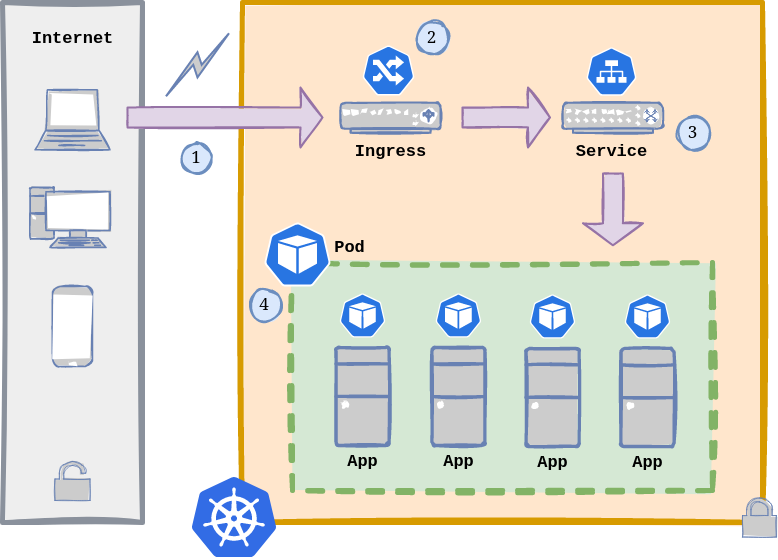
<p><strong>A picture is worth a thousand words:</strong></p>

<p class="figcaption"><br />
<img src="/assets/img/blog/over_engineered_home_lab_docker_kubernetes_kubernetes_application.png" alt="fernando-cejas" class="image-center image-border" />
Kubernetes Application Flow.</p>

<p>As we can see, <strong>this is the flow:</strong></p>

<ol>
  <li><strong>A request enters our Kubernetes cluster from the outside</strong> (either from the Internet or LAN).</li>
  <li>As mentioned before, an <strong><a href="https://kubernetes.io/docs/concepts/services-networking/ingress/" target="_blank">Ingress</a> has these main functions:</strong>
    <ul>
      <li><strong><a href="https://en.wikipedia.org/wiki/Load_balancing_(computing)" target="_blank">Load Balancer</a>:</strong> when it is declared as <a href="https://kubernetes.io/docs/concepts/services-networking/service/#loadbalancer" target="_blank"><code class="language-plaintext highlighter-rouge">Service.Type=LoadBalancer</code></a>.</li>
      <li><strong><a href="https://en.wikipedia.org/wiki/Reverse_proxy" target="_blank">Reverse Proxy</a>:</strong> exposes HTTP and HTTPS routes from outside the cluster to services within the cluster.</li>
    </ul>
  </li>
  <li>A <strong><a href="https://kubernetes.io/docs/concepts/services-networking/service/" target="_blank">Service</a> is a method for exposing a network application</strong> that is running as one or more Pods in our cluster (if we skip setting up a service, we are not gonna be able to reach our containerized apps).</li>
  <li><strong><a href="https://kubernetes.io/docs/concepts/workloads/pods/" target="_blank">Pods</a> are the smallest deployable units of computing</strong> that we can create and manage. Each of them is a group of one or more containers, with shared storage and network resources, and a specification for how to run the containers.</li>
</ol>

<p class="message"><strong>Pods in Kubernetes are EPHIMERAL</strong>: they are intended to be <strong>disposable</strong> and <strong>replaceable</strong>. <strong>We cannot add a container to a Pod once it has been created</strong>. Instead, we usually <strong>delete and replace Pods</strong> in a controlled fashion using <a href="https://kubernetes.io/docs/concepts/workloads/controllers/deployment/" target="_blank">deployments</a>.</p>

<h3 id="kubernetes-cluster-setup">Kubernetes: Cluster setup</h3>

<p>Now we have to get our hands dirty and <strong>start setting up our cluster</strong>.</p>

<p>At this point in time, I assume that we have <strong>the minimum set of requirements</strong> in place:</p>

<ul>
  <li><strong>A <a href="/blog/engineering/2020-12-28-install-arch-linux-full-disk-encryption/" target="_blank">LINUX SERVER</a> up and running</strong> (if it is just for testing, we could also use a couple of <a href="https://simple.wikipedia.org/wiki/Virtual_machine" target="_blank">VMs</a>).</li>
  <li><strong>SSH (or <a href="https://mosh.org/">alternative</a>/){: target=”_blank” }) <a href="https://linux.fernandocejas.com/docs/guides/configure-ssh-access-on-your-linux-machine" target="_blank">properly configure</a></strong> in our <a href="https://en.wikipedia.org/wiki/Headless_computer" target="_blank">headless server</a> in order to manage it.</li>
  <li><strong>OPTIONAL: NFS up and running</strong> in our server, in case we want to <strong>store our data/information in an external network drive</strong> outside of our Linux Server.</li>
</ul>

<p class="message"><strong>DISCLAIMER:</strong> Since documentation tends to get out of date, this initial Kubernetes setup will be done by pointing to the <strong>official documentation</strong> for each of the <strong>components we have to configure/install</strong>.</p>

<p><strong>These are the steps and list of ingredients we need for our recipe:</strong></p>

<p><strong>1.</strong> <a href="https://docs.k3s.io/quick-start" target="_blank">Install <code class="language-plaintext highlighter-rouge">k3s</code> MASTER and WORKER nodes</a>.</p>

<p><strong>2.</strong> <a href="https://docs.k3s.io/cluster-access#accessing-the-cluster-from-outside-with-kubectl" target="_blank">Install <code class="language-plaintext highlighter-rouge">kubectl</code></a> (if not <a href="https://docs.k3s.io/cli" target="_blank">already installed</a> after <strong>Step 1</strong>) in order to <a href="https://docs.k3s.io/cluster-access#accessing-the-cluster-from-outside-with-kubectl" target="_blank">connect remotely to the cluster</a>.</p>

<p><strong>3.</strong> <a href="https://docs.k3s.io/helm" target="_blank">Install Helm if necessary</a>, <strong>a package manager for Kubernetes</strong>, which will facilitate actually installing packages in our cluster.</p>

<p><strong>4.</strong> <a href="https://docs.k3s.io/networking#service-load-balancer" target="_blank">Setup a Load Balancer</a>. <code class="language-plaintext highlighter-rouge">k3s</code> already comes with <code class="language-plaintext highlighter-rouge">ServiceLB</code>, but I found <a href="https://metallb.universe.tf/installation/#installation-with-helm" target="_blank">MetalLB</a> the <strong>right option for bare metal,</strong> because it makes the setup easier on <strong>clusters that are not running on cloud providers</strong> (we have to disable <a href="https://docs.k3s.io/networking#disabling-servicelb"><code class="language-plaintext highlighter-rouge">ServiceLB</code></a> though){: target=”_blank” }.</p>

<p><strong>5.</strong> <a href="https://docs.nginx.com/nginx-ingress-controller/installation/installation-with-helm/" target="_blank">Install Nginx Web/Reverse Proxy</a>, which is our <a href="https://kubernetes.io/docs/concepts/services-networking/ingress/" target="_blank">Ingress</a>, in order to <strong>expose HTTP and HTTPS routes</strong> from outside the cluster to services within the cluster. <code class="language-plaintext highlighter-rouge">k3s</code> recommends another option too: <a href="https://docs.k3s.io/networking#traefik-ingress-controller" target="_blank">Traefik</a>, so up to you.</p>

<p><strong>6.</strong> <a href="https://cert-manager.io/docs/installation/helm/" target="_blank">Install</a> and <a href="https://cert-manager.io/docs/configuration/selfsigned/" target="_blank">configure cert-manager</a>. I would label this as <strong>OPTIONAL</strong> but I guess we want to be able to have <a href="https://github.com/FiloSottile/mkcert" target="_blank">valid SSL/TSL Certificates</a> to <strong>avoid our browser warning us when accessing our hosted applications</strong>.</p>

<p><strong>7.</strong> <a href="https://docs.k3s.io/installation/kube-dashboard" target="_blank">Deploy and configure</a> <a href="https://kubernetes.io/docs/tasks/access-application-cluster/web-ui-dashboard/" target="_blank">Kubernetes Dashboard</a>, which is a <strong>web-based Kubernetes user interface</strong>.</p>

<p>If everything went well so far, <strong>we should be able to see information about our cluster</strong> by running:</p>

<div class="language-bash highlighter-rouge"><div class="highlight"><pre class="highlight"><code><span class="nv">$ </span>kubectl get nodes <span class="nt">-o</span> wide

NAME           STATUS   ROLES    AGE     VERSION         INTERNAL-IP    EXTERNAL-IP
kube-master    Ready    master   44h     v1.25.0+k3s.1   192.168.0.22   &lt;none&gt;
kube-worker    Ready    &lt;none&gt;   2m47s   v1.25.0+k3s.1   192.168.0.23   &lt;none&gt;
</code></pre></div></div>

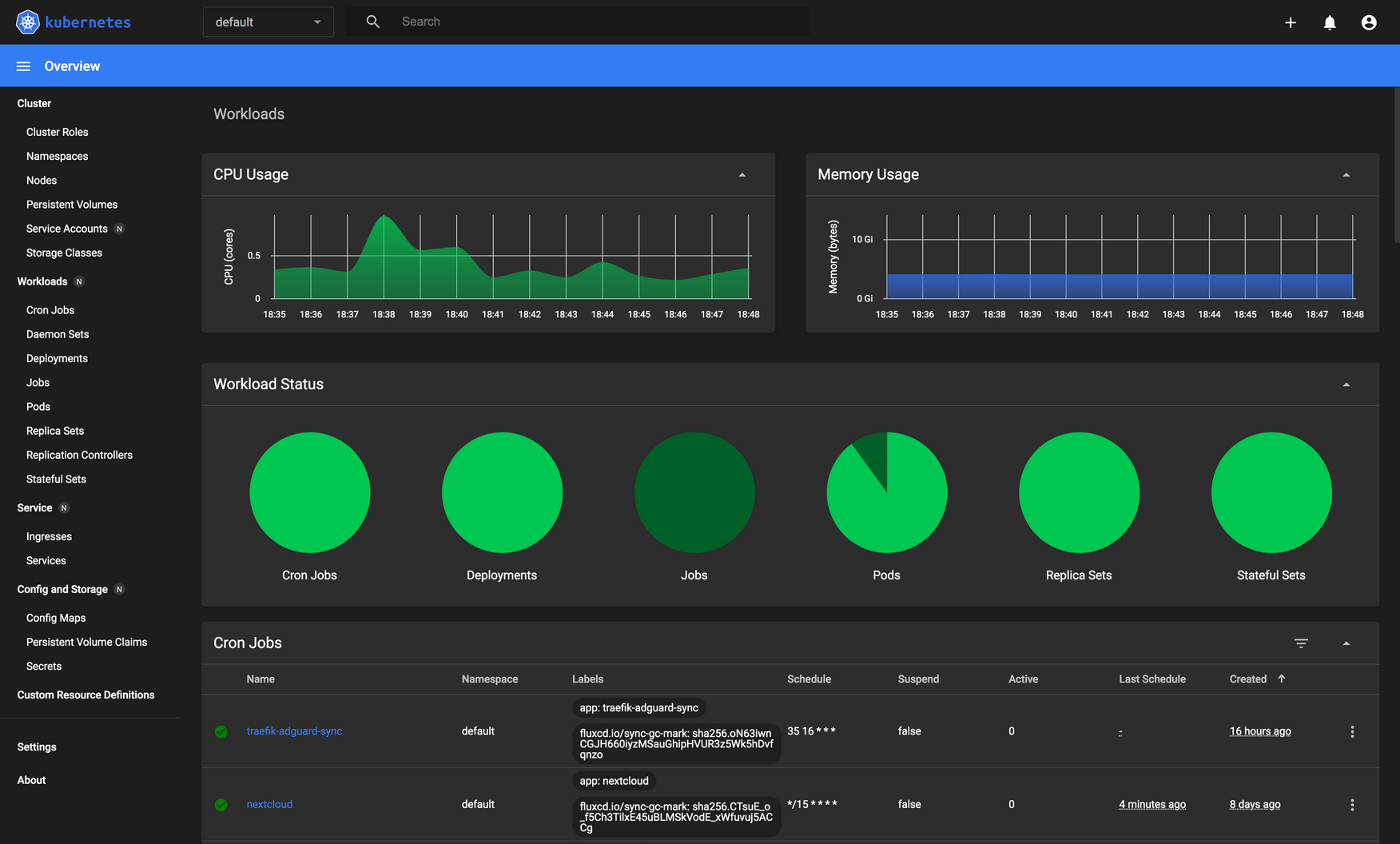
<p>Or we can also <strong>access our Kubernetes Dashboard</strong> (sample picture):</p>

<p class="figcaption"><br />
<img src="/assets/img/blog/over_engineered_home_lab_docker_kubernetes_kubernetes_dashboard.png" alt="fernando-cejas" class="image-center image-border" />
The kubernetes-dashboard provides a great UI to manage our cluster.</p>
<h3 id="kubernetes-administration">Kubernetes: Administration</h3>

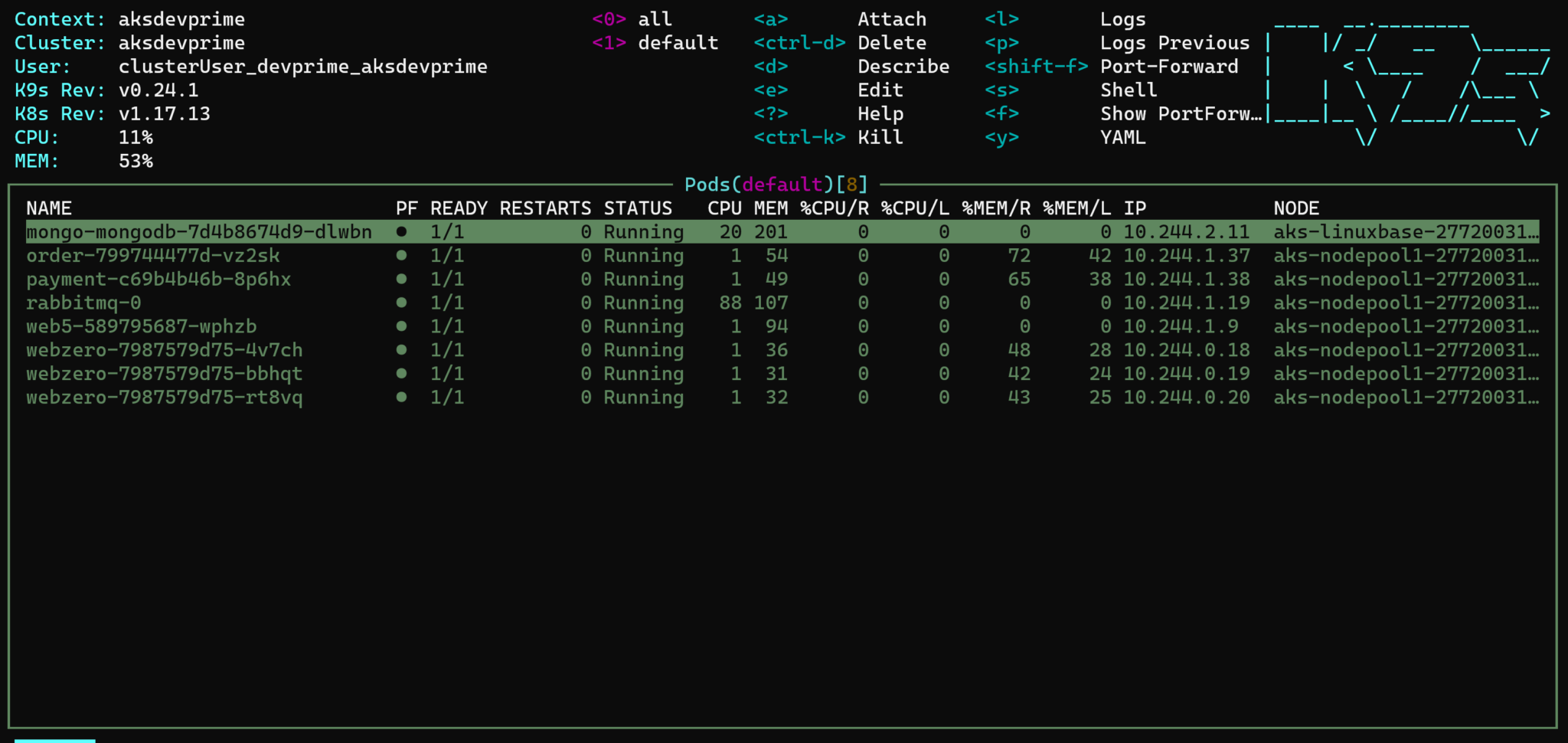
<p>We have a <strong>variety of tools</strong> in this area:</p>

<ul>
  <li><a href="https://kubernetes.io/docs/reference/kubectl/" target="_blank"><code class="language-plaintext highlighter-rouge">kubectl</code></a> <strong>(already installed).</strong></li>
  <li><a href="https://docs.k3s.io/installation/kube-dashboard" target="_blank">Kubernetes Dashboard</a> <strong>(already installed).</strong></li>
  <li><a href="https://github.com/lensapp/lens" target="_blank">Lens</a>.</li>
  <li><a href="https://github.com/kubenav/kubenav" target="_blank">kuvenav</a>.</li>
  <li><a href="https://k9scli.io/" target="_blank">k9s</a>.</li>
</ul>

<p>I would say that it is up to you, <strong>to choose the one that better fulfills your requirements</strong>.</p>

<p>Also, let’s not forget to check <a href="https://kubernetes.io/docs/concepts/cluster-administration/addons/">the Addons sections in the Kubernetes Official Documentation</a>.</p>

<p class="figcaption"><br />
<img src="/assets/img/blog/over_engineered_home_lab_docker_kubernetes_k9s.png" alt="fernando-cejas" class="image-center image-border" />
<code class="language-plaintext highlighter-rouge">k9s</code> is such a powerful Kubernetes Terminal Client.</p>

<h3 id="kubernetes-application-example">Kubernetes: Application Example</h3>

<p><strong>This is a simple example</strong> where we will be <strong>deploying <a href="https://draw.io/" target="_blank">https://draw.io/</a></strong> to our Kubernetes cluster.</p>

<ul>
  <li><strong>First, we create a <a href="https://kubernetes.io/docs/concepts/overview/working-with-objects/namespaces/" target="_blank">namespace</a></strong> for our <a href="https://draw.io/" target="_blank">draw.io</a> application called <code class="language-plaintext highlighter-rouge">home-cloud-drawio</code></li>
</ul>

<div class="language-bash highlighter-rouge"><div class="highlight"><pre class="highlight"><code><span class="nv">$ </span>kubectl create namespace home-cloud-drawio
</code></pre></div></div>

<ul>
  <li><strong>Second, we create a file</strong> called <code class="language-plaintext highlighter-rouge">drawio-app.yml</code> with the <strong>following content</strong>:</li>
</ul>

<div class="language-yml highlighter-rouge"><div class="highlight"><pre class="highlight"><code><span class="na">apiVersion</span><span class="pi">:</span> <span class="s">apps/v1</span>
<span class="na">kind</span><span class="pi">:</span> <span class="s">Deployment</span>
<span class="na">metadata</span><span class="pi">:</span>
  <span class="na">namespace</span><span class="pi">:</span> <span class="s">home-cloud-drawio</span>
  <span class="na">name</span><span class="pi">:</span> <span class="s">drawio</span>
<span class="na">spec</span><span class="pi">:</span>
  <span class="na">replicas</span><span class="pi">:</span> <span class="m">1</span>
  <span class="na">selector</span><span class="pi">:</span>
    <span class="na">matchLabels</span><span class="pi">:</span>
      <span class="na">app</span><span class="pi">:</span> <span class="s">drawio</span>
  <span class="na">template</span><span class="pi">:</span>
    <span class="na">metadata</span><span class="pi">:</span>
      <span class="na">labels</span><span class="pi">:</span>
        <span class="na">app</span><span class="pi">:</span> <span class="s">drawio</span>
    <span class="na">spec</span><span class="pi">:</span>
      <span class="na">containers</span><span class="pi">:</span>
      <span class="pi">-</span> <span class="na">name</span><span class="pi">:</span> <span class="s">drawio</span>
        <span class="na">image</span><span class="pi">:</span> <span class="s">jgraph/drawio</span>
        <span class="na">resources</span><span class="pi">:</span>
          <span class="na">limits</span><span class="pi">:</span>
            <span class="na">memory</span><span class="pi">:</span> <span class="s2">"</span><span class="s">256Mi"</span>
            <span class="na">cpu</span><span class="pi">:</span> <span class="s2">"</span><span class="s">800m"</span>
        <span class="na">ports</span><span class="pi">:</span>
        <span class="pi">-</span> <span class="na">containerPort</span><span class="pi">:</span> <span class="m">8080</span>
<span class="nn">---</span>
<span class="na">apiVersion</span><span class="pi">:</span> <span class="s">v1</span>
<span class="na">kind</span><span class="pi">:</span> <span class="s">Service</span>
<span class="na">metadata</span><span class="pi">:</span>
  <span class="na">namespace</span><span class="pi">:</span> <span class="s">home-cloud-drawio</span>
  <span class="na">name</span><span class="pi">:</span> <span class="s">drawio-service</span>
<span class="na">spec</span><span class="pi">:</span>
  <span class="na">selector</span><span class="pi">:</span>
    <span class="na">app</span><span class="pi">:</span> <span class="s">drawio</span>
  <span class="na">ports</span><span class="pi">:</span>
  <span class="pi">-</span> <span class="na">port</span><span class="pi">:</span> <span class="m">5001</span>
    <span class="na">targetPort</span><span class="pi">:</span> <span class="m">8080</span>
<span class="nn">---</span>
<span class="na">apiVersion</span><span class="pi">:</span> <span class="s">networking.k8s.io/v1</span>
<span class="na">kind</span><span class="pi">:</span> <span class="s">Ingress</span>
<span class="na">metadata</span><span class="pi">:</span>
  <span class="na">namespace</span><span class="pi">:</span> <span class="s">home-cloud-drawio</span>
  <span class="na">name</span><span class="pi">:</span> <span class="s">drawio-ingress</span>
  <span class="na">labels</span><span class="pi">:</span>
    <span class="na">name</span><span class="pi">:</span> <span class="s">drawio-ingress</span>
<span class="na">spec</span><span class="pi">:</span>
  <span class="na">rules</span><span class="pi">:</span>
  <span class="pi">-</span> <span class="na">host</span><span class="pi">:</span> <span class="s">home-cloud-drawio</span>
    <span class="na">http</span><span class="pi">:</span>
      <span class="na">paths</span><span class="pi">:</span>
      <span class="pi">-</span> <span class="na">pathType</span><span class="pi">:</span> <span class="s">Prefix</span>
        <span class="na">path</span><span class="pi">:</span> <span class="s2">"</span><span class="s">/"</span>
        <span class="na">backend</span><span class="pi">:</span>
          <span class="na">service</span><span class="pi">:</span>
            <span class="na">name</span><span class="pi">:</span> <span class="s">drawio-service</span>
            <span class="na">port</span><span class="pi">:</span> 
              <span class="na">number</span><span class="pi">:</span> <span class="m">5001</span>
  <span class="na">ingressClassName</span><span class="pi">:</span> <span class="s2">"</span><span class="s">nginx"</span>
</code></pre></div></div>

<ul>
  <li><strong>As a third step, we apply the configuration</strong> contained in the <code class="language-plaintext highlighter-rouge">drawio-app.yml</code> file:</li>
</ul>

<div class="language-bash highlighter-rouge"><div class="highlight"><pre class="highlight"><code><span class="nv">$ </span>kubectl apply <span class="nt">-f</span> drawio-app.yml
</code></pre></div></div>

<p><strong>BOOM!!!</strong> We have basically created a <strong><a href="https://kubernetes.io/docs/concepts/workloads/controllers/deployment/" target="_blank">Deployment</a></strong>, which includes a <strong><a href="https://kubernetes.io/docs/concepts/services-networking/service/" target="_blank">Service</a></strong> and <strong><a href="https://kubernetes.io/docs/concepts/services-networking/ingress/" target="_blank">Ingress</a></strong> configuration <strong>to access our hosted app from outside the cluster</strong>.</p>

<p><strong>Now let’s check the running services to corroborate that everything works as expected:</strong></p>

<div class="language-bash highlighter-rouge"><div class="highlight"><pre class="highlight"><code>kubectl get services <span class="nt">-o</span> wide <span class="nt">--all-namespaces</span>

NAMESPACE            NAME              TYPE           CLUSTER-IP      EXTERNAL-IP
default              kubernetes        ClusterIP      10.43.0.1       &lt;none&gt;           
kube-system          kube-dns          ClusterIP      10.43.0.10      &lt;none&gt;           
kube-system          metrics-server    ClusterIP      10.43.33.97     &lt;none&gt;           
kube-system          nginx-ingress     LoadBalancer   10.43.196.229   192.168.0.200   
home-cloud-drawio    drawio            ClusterIP      10.43.35.88     &lt;none&gt;
</code></pre></div></div>

<p><strong>We can access our application by visiting <code class="language-plaintext highlighter-rouge">http://192.168.0.200</code> in our browser (avoid the SSL/TSL warning).</strong></p>

<p>In this example <strong>we have not added any extra complexity (for learning purpose)</strong>, but if a hosted app requires <strong><a href="https://kubernetes.io/docs/concepts/storage/" target="_blank">Storage</a></strong>, we will have to create <strong><a href="https://kubernetes.io/docs/concepts/storage/persistent-volumes/" target="_blank">Kubernetes Persistent Volumes</a></strong> too. Same with, for example <strong><a href="https://kubernetes.io/docs/tasks/tls/managing-tls-in-a-cluster/" target="_blank">Let’s Encrypt Certificates</a></strong></p>

<p class="message"><strong>TIP:</strong> As a rule of thumb, all our infrastructure logic and files should be in a <strong>VCS like git</strong>.</p>

<h3 id="kubernetes-useful-commands">Kubernetes: Useful Commands</h3>

<p><strong><code class="language-plaintext highlighter-rouge">kubectl</code> is a very powerful CLI,</strong> it has <a href="https://kubernetes.io/docs/reference/kubectl/" target="_blank">great documentation</a> and a very <a href="https://kubernetes.io/docs/reference/kubectl/cheatsheet/" target="_blank">useful cheatsheet</a>.</p>

<p>These are some of the <strong>most common commands I use:</strong></p>

<div class="language-bash highlighter-rouge"><div class="highlight"><pre class="highlight"><code><span class="c"># Cluster information</span>
<span class="nv">$ </span>kubectl cluster-info
<span class="nv">$ </span>kubectl get nodes <span class="nt">-o</span> wide

<span class="c"># Check runnint Services</span>
<span class="nv">$ </span>kubectl get services <span class="nt">-o</span> wide <span class="nt">--all-namespaces</span>

<span class="c"># Check running Ingress</span>
<span class="nv">$ </span>kubectl get ingresses <span class="nt">--all-namespaces</span>

<span class="c"># Display all the running Pod</span>
<span class="nv">$ </span>kubectl get pods <span class="nt">-A</span> <span class="nt">-o</span> wide

<span class="c"># Get logs for an specific Pod</span>
<span class="nv">$ </span>kubectl logs <span class="nt">-f</span> &lt;your_pod&gt; <span class="nt">-n</span> &lt;your_pod_namespace&gt;

<span class="c"># Get information about an specific Pod</span>
<span class="nv">$ </span>kubectl describe pod &lt;your_pod&gt; <span class="nt">-n</span> &lt;your_pod_namespace&gt;
</code></pre></div></div>

<h2 id="rules-of-over-complexity">Rules of (Over)-Complexity</h2>

<p>Ok, so at this point in time…<strong>I LEARNED A LOT (and invested a lot of time too)…but I also HAD HEADACHES</strong>, and this is where the <strong><a href="https://en.wikipedia.org/wiki/The_Magical_Number_Seven,_Plus_or_Minus_Two" target="_blank">Rule of Seven</a></strong> applied:</p>

<p class="message"><strong>THE RULE OF SEVEN:</strong> never try to juggle <strong>more than seven mental balls</strong>.</p>

<p>In the end, I had a <strong>bunch of moving parts (with Kubernetes) which turned to be super complicated for what I really needed</strong>, plus I had a cluster with <strong>a lot of capacity that I was barely using</strong> (refer to the <a href="#monitoring">Monitoring Section</a> for more on this).</p>

<p>That is why I decided to apply <a href="/blog/culture/2019-11-11-organization-culture-and-humanity/#engineering-culture">what I ALWAYS encourage in my daily work life</a>:</p>

<ul>
  <li><strong>Reduce complexity by removing balls.</strong></li>
  <li><strong>Do not reinvent the wheel.</strong></li>
  <li><strong>YAGNI: You Aren’t Gonna Need It.</strong></li>
</ul>

<h2 id="a-simpler-docker-approach">A simpler Docker Approach</h2>

<p><strong>Based on my previous points</strong>, then a pure <a href="https://docs.docker.com/compose/install/" target="_blank">Docker</a> approach (with <code class="language-plaintext highlighter-rouge">docker compose</code>) <strong>was the way to go</strong>:</p>

<p class="figcaption"><br />
<img src="/assets/img/blog/over_engineered_home_lab_docker_kubernetes_docker_approach.png" alt="fernando-cejas" class="image-center image-border" />
Home Lab General Architecture with Docker.</p>
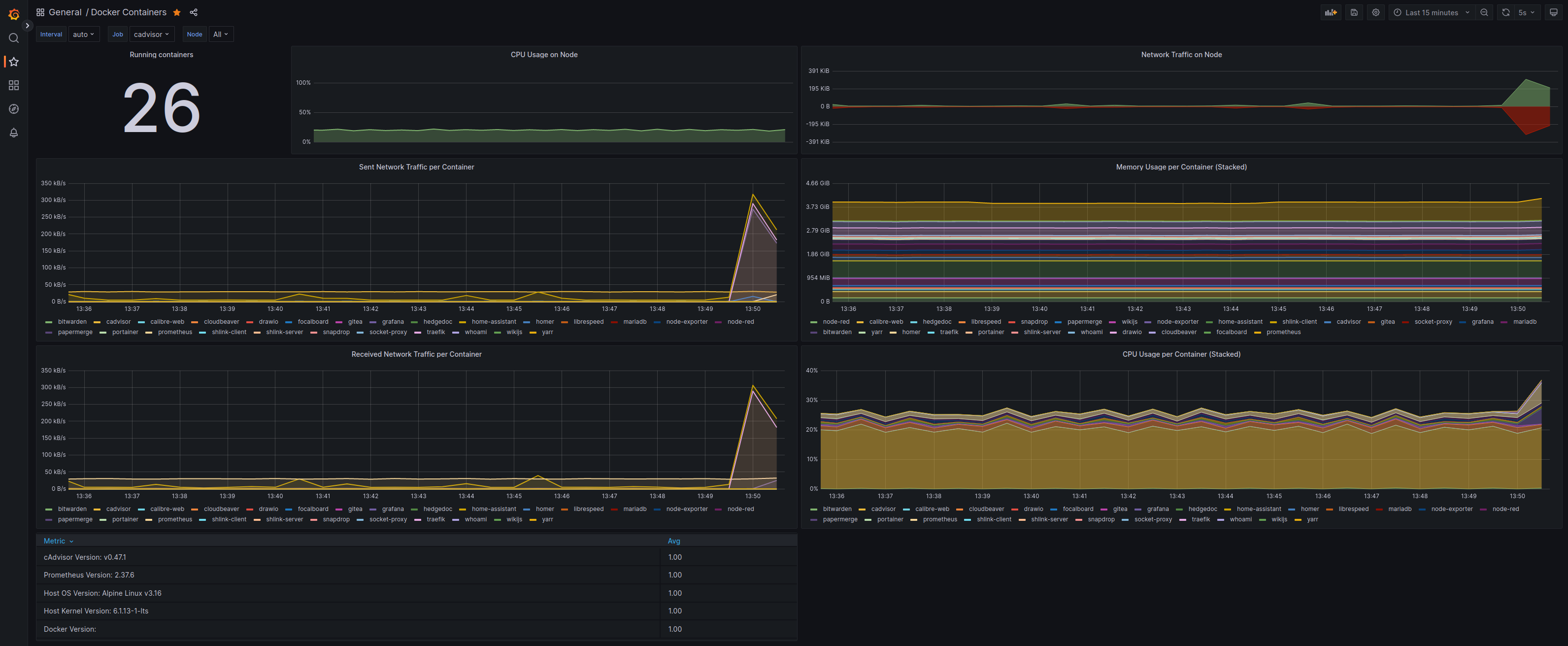
<p>Upfront, this <strong>infrastructure architecture seems very similar to the one defined with Kubernetes</strong>, and indeed it is, <strong>the flow is the same</strong> as <a href="#kubernetes-home-lab-architecture">described above</a> and <strong>server configuration is equal too</strong>. The <strong>biggest changeset</strong> has to do with <strong>implementation details</strong>:</p>

<ul>
  <li><strong>I only need one server (load distribution is off here).</strong></li>
  <li><strong>Handling configuration files with <code class="language-plaintext highlighter-rouge">docker</code> is easier.</strong></li>
  <li><strong>Less moving parts, les complexity, for instance, less to maintain.</strong></li>
  <li><strong>I do not need a system for Microservices Orchestration.</strong></li>
</ul>

<p>As an example, we will setup the <a href="#kubernetes-application-example">same application as above: draw.io</a> with <a href="https://docs.docker.com/compose/install/" target="_blank"><code class="language-plaintext highlighter-rouge">docker compose</code></a>:</p>

<ul>
  <li>We add <strong>this content</strong> to our <a href="https://docs.docker.com/compose/compose-file/" target="_blank">docker compose file</a> called <code class="language-plaintext highlighter-rouge">home-lab.yml</code>:</li>
</ul>

<div class="language-yml highlighter-rouge"><div class="highlight"><pre class="highlight"><code><span class="na">version</span><span class="pi">:</span> <span class="s2">"</span><span class="s">3.8"</span>

<span class="na">services</span><span class="pi">:</span>

  <span class="na">traefik</span><span class="pi">:</span>
    <span class="na">image</span><span class="pi">:</span> <span class="s">traefik:latest</span>
    <span class="na">container_name</span><span class="pi">:</span> <span class="s">traefik</span>
    <span class="na">command</span><span class="pi">:</span>
      <span class="c1"># Dynamic Configuration: mostly used for TSL certificates</span>
      <span class="pi">-</span> <span class="s">--providers.file.filename=/etc/traefik/dynamic_conf.yml</span>
      <span class="c1"># Entrypoints configuration</span>
      <span class="pi">-</span> <span class="s">--entrypoints.web-secure.address=:443</span>
    <span class="na">labels</span><span class="pi">:</span>
      <span class="pi">-</span> <span class="s">traefik.http.routers.traefik_route.rule=Host(`traefik.home.lab`)</span>
      <span class="pi">-</span> <span class="s">traefik.http.routers.traefik_route.tls=true</span>
      <span class="pi">-</span> <span class="s">traefik.http.routers.traefik_route.service=traefik_service</span>
      <span class="pi">-</span> <span class="s">traefik.http.services.traefik_service.loadbalancer.server.port=8080</span>
    <span class="na">ports</span><span class="pi">:</span>
      <span class="pi">-</span> <span class="s">80:80</span>
      <span class="pi">-</span> <span class="s">443:443</span>
    <span class="na">volumes</span><span class="pi">:</span>
      <span class="pi">-</span> <span class="s">~/traefik/dynamic_conf.yml:/etc/traefik/dynamic_conf.yml</span>
      <span class="pi">-</span> <span class="s">~/traefik/_wildcard.home.lab.pem:/etc/traefik/_wildcard.home.lab.pem</span>
      <span class="pi">-</span> <span class="s">~/traefik/_wildcard.home.lab-key.pem:/etc/traefik/_wildcard.home.lab-key.pem</span>
    <span class="na">networks</span><span class="pi">:</span>
      <span class="pi">-</span> <span class="s">home-lab-network</span>
    <span class="na">restart</span><span class="pi">:</span> <span class="s">always</span>

  <span class="na">drawio</span><span class="pi">:</span>
    <span class="na">image</span><span class="pi">:</span> <span class="s">jgraph/drawio:latest</span>
    <span class="na">container_name</span><span class="pi">:</span> <span class="s">drawio</span>
    <span class="na">labels</span><span class="pi">:</span>
      <span class="pi">-</span> <span class="s">traefik.http.routers.drawio_route.rule=Host(`drawio.home.lab`)</span>
      <span class="pi">-</span> <span class="s">traefik.http.routers.drawio_route.tls=true</span>
      <span class="pi">-</span> <span class="s">traefik.http.routers.drawio_route.service=drawio_service</span>
      <span class="pi">-</span> <span class="s">traefik.http.services.drawio_service.loadbalancer.server.port=8080</span>
    <span class="na">networks</span><span class="pi">:</span>
      <span class="pi">-</span> <span class="s">home-lab-network</span>
    <span class="na">restart</span><span class="pi">:</span> <span class="s">always</span>
</code></pre></div></div>

<p><strong>Let’s understand first what is going on within this file:</strong></p>

<ol>
  <li>We define <strong>2 services:</strong> <a href="https://traefik.io/traefik/" target="_blank">traefik</a> and <a href="https://draw.io" target="_blank">drawio</a>.</li>
  <li><strong>Traefik</strong> is our <a href="https://doc.traefik.io/traefik/" target="_blank">reverse proxy</a>:
    <ul>
      <li><strong>Acts as our home lab entry point and forward requests to app containers.</strong></li>
      <li><strong>Manages SSL/TSL Certificates:</strong> I use <strong>self-signed certificates</strong> with <a href="https://github.com/android10/mkcert" target="_blank"><code class="language-plaintext highlighter-rouge">mkcert</code></a> for my custom domain: <code class="language-plaintext highlighter-rouge">home.lab</code>.</li>
    </ul>
  </li>
  <li><strong>Traefik <a href="https://doc.traefik.io/traefik/https/tls/" target="_blank">SSL/TLS configuration</a></strong> uses the <code class="language-plaintext highlighter-rouge">dynamic_conf.yml</code> defined in our docker <code class="language-plaintext highlighter-rouge">home-lab.yml</code> file, volumes section, <strong>which looks like this:</strong></li>
</ol>

<div class="language-yml highlighter-rouge"><div class="highlight"><pre class="highlight"><code><span class="na">tls</span><span class="pi">:</span>
  <span class="na">certificates</span><span class="pi">:</span>
    <span class="pi">-</span> <span class="na">certFile</span><span class="pi">:</span> <span class="s">/etc/traefik/_wildcard.home.lab.pem</span>
      <span class="na">keyFile</span><span class="pi">:</span> <span class="s">/etc/traefik/_wildcard.home.lab-key.pem</span>
      <span class="na">stores</span><span class="pi">:</span>
        <span class="pi">-</span> <span class="s">default</span>

  <span class="na">stores</span><span class="pi">:</span>
    <span class="na">default</span><span class="pi">:</span>
      <span class="na">defaultCertificate</span><span class="pi">:</span>
        <span class="na">certFile</span><span class="pi">:</span> <span class="s">/etc/traefik/_wildcard.home.lab.pem</span>
        <span class="na">keyFile</span><span class="pi">:</span> <span class="s">/etc/traefik/_wildcard.home.lab-key.pem</span>
</code></pre></div></div>

<ul>
  <li>As a next step, we execute the <strong>following command to run our containers:</strong></li>
</ul>

<div class="language-bash highlighter-rouge"><div class="highlight"><pre class="highlight"><code><span class="nv">$ </span>docker compose <span class="nt">-f</span> home-lab.yml
</code></pre></div></div>

<ul>
  <li><strong>BOOM!!!</strong> Working!!! <strong>Let’s double check:</strong></li>
</ul>

<div class="language-bash highlighter-rouge"><div class="highlight"><pre class="highlight"><code><span class="nv">$ </span>docker ps <span class="nt">-a</span>

CONTAINER ID   IMAGE           STATUS       PORTS                    NAMES
de20745cda65   traefik:latest  Up 5 hours   0.0.0.0:80-&gt;80/tcp       traefik
as24545tda76   drawio:latest   Up 5 hours   0.0.0.0:8080-&gt;8080/tcp   drawio
</code></pre></div></div>

<p><strong>To access our hosted app</strong>, let’s just open a browser and <strong>go to</strong> <code class="language-plaintext highlighter-rouge">https://drawio.home.lab</code>.</p>

<h3 id="useful-docker-commands">Useful Docker Commands</h3>

<p>First, <strong>it is mandatory</strong> to check the <a href="https://docs.docker.com/engine/reference/commandline/cli/" target="_blank">official documentation</a> and the <a href="https://docs.docker.com/get-started/docker_cheatsheet.pdf" target="_blank">docker CLI cheatsheet</a>.</p>

<div class="language-bash highlighter-rouge"><div class="highlight"><pre class="highlight"><code><span class="c"># Running containers</span>
<span class="nv">$ </span>docker ps <span class="nt">-a</span> 
<span class="nv">$ </span>docker container <span class="nb">ls</span> <span class="nt">-a</span>

<span class="c"># Container management/handling</span>
<span class="nv">$ </span>docker container stop &lt;container_name&gt;
<span class="nv">$ </span>docker container restart &lt;container_name&gt;
<span class="nv">$ </span>docker container <span class="nb">rm</span> &lt;container_name&gt;

<span class="c"># Image management/handling</span>
<span class="nv">$ </span>docker images 
<span class="nv">$ </span>docker image <span class="nb">rm</span> &lt;image_id&gt;

<span class="c"># Existent Volumes</span>
<span class="nv">$ </span>docker volume <span class="nb">ls</span>
</code></pre></div></div>

<h2 id="monitoring">Monitoring</h2>

<p><strong>We can use 4 main services for Alerting and Monitoring:</strong></p>

<ul>
  <li><a href="https://prometheus.io/docs/introduction/overview/" target="_blank"><strong>Prometheus:</strong></a> an <strong>open-source systems monitoring and alerting toolkit</strong> originally built at <a href="https://soundcloud.com/" target="_blank">SoundCloud</a>.</li>
  <li><a href="https://grafana.com/oss/grafana/" target="_blank"><strong>Grafana:</strong></a> allows us to query, visualize, alert on and <strong>understand metrics</strong>.</li>
  <li><a href="https://github.com/google/cadvisor" target="_blank"><strong>cAdvisor:</strong></a> provides an understanding of the <strong>resource usage and performance characteristics of running containers.</strong></li>
  <li><a href="https://www.portainer.io/" target="_blank"><strong>Portainer:</strong></a> is one of the <strong>most popular container management platform nowadays.</strong></li>
</ul>

<p><strong>Useful official setup guides:</strong></p>

<ul>
  <li><a href="https://prometheus.io/docs/guides/cadvisor/" target="_blank">Prometheus: Monitoring Docker container metrics using cAdvisor</a></li>
  <li><a href="https://prometheus.io/docs/tutorials/visualizing_metrics_using_grafana/#installing-and-setting-up-grafana" target="_blank">Prometheus: Installing and Setting up Grafana</a></li>
  <li><a href="https://grafana.com/docs/grafana/latest/dashboards/" target="_blank">Grafana: Dashboards Official Documentation</a></li>
  <li><a href="https://grafana.com/docs/grafana/latest/alerting/" target="_blank">Grafana: Alerting Official Documentation</a></li>
  <li><a href="https://docs.portainer.io/start/install/server/docker/linux" target="_blank">Portainer: Install with Docker on Linux</a></li>
</ul>

<p><strong>Here a screenshot</strong> of my <strong>Home Lab Monitoring/Alerting</strong> via the mentioned services/tools, <strong>where Prometheus scraps cAdvisor performance data and it is display on a Grafana dashboard:</strong></p>

<p class="figcaption"><br />
<img src="/assets/img/blog/over_engineered_home_lab_docker_kubernetes_grafana.png" alt="fernando-cejas" class="image-center image-border" />
Grafana - Prometheus - cAdvisor combo for Alerting and Monitoring.</p>
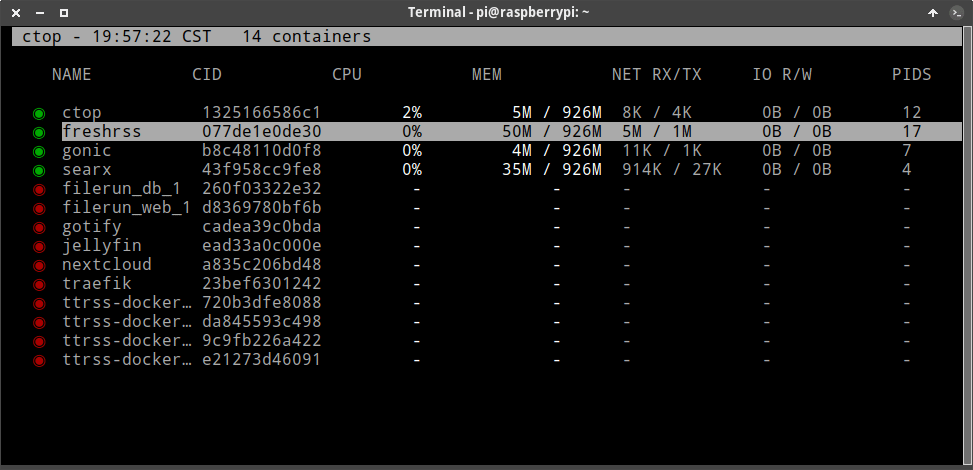
<p><strong>Extra ball:</strong> We can use <a href="https://github.com/bcicen/ctop" target="_blank"><code class="language-plaintext highlighter-rouge">ctop</code></a> locally in our <a href="(2020-12-28-install-arch-linux-full-disk-encryption.md)" target="_blank">Linux Server</a>:</p>

<p class="figcaption"><br />
<img src="/assets/img/blog/over_engineered_home_lab_docker_kubernetes_ctop.png" alt="fernando-cejas" class="image-center image-border" />
<code class="language-plaintext highlighter-rouge">ctop</code> provides a concise overview of real-time metrics for multiple containers.</p>

<h2 id="security">Security</h2>

<p><strong>There is ‘NO 100%’ secure system, but we can always reduce risk.</strong> Personally:</p>

<ul>
  <li><strong>I do not expose my NAS or Services to the Internet.</strong></li>
  <li><strong>I only have a random port open in my router for my <a href="https://www.wireguard.com/" target="_blank">Wireguard</a> <a href="https://linux.fernandocejas.com/docs/guides/install-and-configure-wireguard" target="_blank">VPN access</a>.</strong></li>
  <li><strong>Server and <a href="https://linux.fernandocejas.com/docs/how-to/encrypt-an-external-hard-drive" target="_blank">NAS are both encrypted</a>.</strong></li>
  <li><strong>I apply the latest security updates/patches (OS, Services and Infrastructure).</strong></li>
</ul>

<h3 id="alternatives-to-a-vpn">Alternatives to a VPN?</h3>

<p>So far, I have mentioned that <strong>probably the safest way to access our Home Lab is to setup a <a href="https://linux.fernandocejas.com/docs/guides/install-and-configure-wireguard" target="_blank">Wireguard VPN</a></strong>, but there are a <strong>couple of alternatives</strong> to still <strong>setup our Home Lab for external access:</strong></p>

<ul>
  <li><a href="https://www.cloudflare.com/products/tunnel/" target="_blank">Cloudflare Tunnel</a>: an <strong>encrypted tunnel</strong> between our origin web server and Cloudflare’s nearest data center, all <strong>without opening any public inbound ports</strong>.</li>
  <li><a href="https://tailscale.com/kb/1151/what-is-tailscale/" target="_blank">Tailscale</a>: in the end a bit of a <strong>Zero-Config VPN</strong>.</li>
</ul>

<p class="message"><strong>Honestly, I have no experience with them</strong>, since one of <strong>my main goals is PRIVACY</strong>, and it would be <strong>hard to proof whether they store META-DATA or INFORMATION</strong> about traffic.</p>

<h2 id="fault-tolerance-and-resilience">Fault Tolerance and Resilience</h2>

<blockquote>
  <p><strong>Fault Tolerance</strong> simply means a system’s ability to <strong>continue operating uninterrupted</strong> despite the failure of one or more of its components.</p>
</blockquote>

<blockquote>
  <p>A system <strong>is resilient</strong> if it continues to carry out its mission in the <strong>face of adversity</strong>.</p>
</blockquote>

<p><strong>Revisiting these concepts</strong> trigger a <strong>couple of questions</strong> we need to answer…</p>

<h3 id="how-can-we-make-sure-our-home-lab-is-highly-available">How can we make sure our Home Lab is highly available?</h3>

<p><strong>No silver bullets here</strong>, and I also gotta say that in this space <strong>our approach with Kubernetes clearly wins</strong>, especially due to the capacity of having multiple worker nodes <strong>(<a href="https://kubernetes.io/docs/setup/production-environment/tools/kubeadm/ha-topology/" target="_blank">high availability</a> by nature), thus if one of them fails, the other could continue operating and take the load of the down one.</strong> The downside is <strong>whether our Kubernetes control plane fails,</strong> then we are in the <strong>same situation as with our single Server approach with docker</strong> (<a href="https://betterstack.com/community/guides/scaling-docker/ha-docker-swarm/" target="_blank">check docker swarm for high availability</a>).</p>

<p><strong>In case of failure with our simpler docker approach</strong>, we have an <strong>ADVANTAGE</strong> too: <strong>it is relatively easy to re-run the entire infrastructure,</strong> which means only <strong>ONE COMMAND</strong>. And as this happened to me (so far once and fingers crossed), I just <a href="https://linux.fernandocejas.com/docs/guides/mount-luks-partition-for-system-recovery" target="_blank">grabbed a backup</a> of my data and <strong>configured everything in NO TIME</strong> on my local computer until I <strong>figured out the issue</strong>.</p>

<h3 id="how-can-we-keep-our-datainformation-safe">How can we keep our data/information safe?</h3>

<blockquote>
  <p><strong>Data redundancy</strong> occurs when the <strong>same piece of data is stored in two or more separate places</strong>.</p>
</blockquote>

<p>My approach for <strong>DATA REDUNDACY</strong> includes <strong>2 practices</strong>:</p>

<ul>
  <li>I use <a href="https://linux.fernandocejas.com/docs/guides/mount-luks-partition-for-system-recovery#file-system-btrfs" target="_blank">btrfs as file system</a> with <a href="https://en.wikipedia.org/wiki/Standard_RAID_levels" target="_blank">RAID 5</a> (4 hard drives) <strong>for data redundacy in case of a hardware failure</strong>.</li>
  <li><a href="https://www.seagate.com/blog/what-is-a-3-2-1-backup-strategy/" target="_blank">3-2-1 Backup Strategy</a>.</li>
</ul>

<h2 id="server-administration">Server Administration</h2>

<p class="message"><strong>NOTE:</strong> The server should be <strong>HEADLESS</strong>, meaning that <strong>we should be able to fully CONTROL and RESTART it REMOTELY without the need of peripherals like a mouse or keyboard</strong>.</p>

<p><strong>Assuming that our Server/NAS hard drives <a href="https://linux.fernandocejas.com/docs/how-to/encrypt-an-external-hard-drive" target="_blank">are encrypted</a> and need to be decrypted remotely when restarting our Linux Server,</strong> we have a couple of options:</p>

<ul>
  <li><a href="https://linux.fernandocejas.com/docs/guides/decrypt-luks-partition-remotely-via-ssh" target="_blank">Start an SSH Service in our Server Initial RAM Disk</a> <strong>(FREE)</strong>.</li>
  <li><a href="https://en.wikipedia.org/wiki/KVM_switch" target="_blank">Use a KVM Switch</a> <strong>(MOSTLY EXPENSIVE)</strong>.</li>
  <li><a href="https://pikvm.org/" target="_blank">Open and inexpensive DIY IP-KVM on Raspberry Pi</a> <strong>(CHEAP)</strong>.</li>
</ul>

<h3 id="maintenance">Maintenance</h3>

<ul>
  <li><a href="https://linux.fernandocejas.com/docs/how-to/update-your-system" target="_blank">Update your system periodically</a>.</li>
  <li><a href="" target="_blank">Use the LTS Kernel for stability</a>.</li>
  <li><a href="https://github.com/containrrr/watchtower" target="_blank">Update your docker images and infrastructure tools</a>.</li>
  <li><a href="https://www.seagate.com/blog/what-is-a-3-2-1-backup-strategy/" target="_blank">Backup your data</a>.</li>
  <li><a href="https://en.wikipedia.org/wiki/Firmware" target="_blank">Upgrade your Hardware Firmware: Routers, Switches, Hubs</a>.</li>
</ul>

<h2 id="the-final-result">The final Result</h2>

<p class="figcaption"><br />
<img src="/assets/img/blog/over_engineered_home_lab_docker_kubernetes_docker_dashboard.png" alt="fernando-cejas" class="image-center image-border" />
My Home Lab Dashboard using Homer.</p>

<h2 id="tips-and-tricks">Tips and Tricks</h2>

<ul>
  <li><strong><a href="https://js.wiki/" target="_blank">Always document: a WIKI is our friend</a>:</strong></li>
  <li>Have a <strong><a href="https://en.wikipedia.org/wiki/Troubleshooting" target="_blank">troubleshooting</a></strong> section.</li>
  <li><strong><a href="https://en.wikipedia.org/wiki/Runbook" target="_blank">Runbook</a></strong> approach.</li>
  <li><strong><a href="https://www.ansible.com/" target="_blank">Automate ALL the things</a></strong>.</li>
</ul>

<h2 id="alternatives">Alternatives</h2>

<p>If you reachead this point of the article and <strong>you are not convinced of using one or the other</strong>, then here I have a <strong>couple more alternatives</strong> to explore:</p>

<ul>
  <li><strong><a href="https://www.proxmox.com/en/" target="_blank">Proxmox</a>:</strong> is an open-source virtualization platform.</li>
  <li><strong><a href="https://docs.docker.com/engine/swarm/" target="_blank">Docker Swarm</a>:</strong> is for natively managing a cluster of Docker Engines called a swarm.</li>
</ul>

<h2 id="other-infrastructure-tooling">Other Infrastructure tooling</h2>

<p><strong>I would not finish this article without mentioning some of the biggest players in <a href="https://en.wikipedia.org/wiki/IT_infrastructure" target="_blank">IT-Infrastructure</a>:</strong></p>

<ul>
  <li><strong><a href="https://www.terraform.io/" target="_blank">Terraform</a>:</strong> it enables infrastructure automation for provisioning, compliance, and management of any cloud, datacenter, and service.</li>
  <li><strong><a href="" target="_blank">Ansible</a>:</strong> is the simplest solution for automating routine IT tasks.</li>
  <li><strong><a href="https://www.packer.io/" target="_blank">Packer</a>:</strong> used for creating identical machine images for multiple platforms from a single source configuration.</li>
</ul>

<h2 id="conclusion">Conclusion</h2>

<p>Well, <strong>after many months or hard work</strong>, I’m finally writing this conclusion: <strong>It has been (and still is) a long journey,</strong> which let me dive into this amazing <strong>world of Infrastructure</strong>, full of <strong>challenges</strong> but also with tons of <strong>lessons learned.</strong> 
I can only say that <strong>this post aims to be a time saver for you, and a source of knowledge share and struggles.</strong></p>

<p>As ALWAYS, <strong>any feedback is more than welcome!</strong> See you soon :).</p>

<h2 id="references">References</h2>

<ul>
  <li><a href="https://kubernetes.io/" target="_blank">Kubernetes Official Website</a>.</li>
  <li><a href="https://k3s.io/" target="_blank">K3S Official Website</a>.</li>
  <li><a href="https://helm.sh/" target="_blank">Helm Official Website</a>.</li>
  <li><a href="https://www.docker.com/" target="_blank">Docker Official Website</a>.</li>
  <li><a href="https://github.com/awesome-selfhosted/awesome-selfhosted" target="_blank">Awesome-Selfhosted</a>.</li>
  <li><a href="https://medium.com/@NoLongerSet/managing-software-complexity-the-rule-of-seven-ad970302a57a" target="_blank">Managing Software Complexity: The rule of seven</a>.</li>
  <li><a href="https://insights.sei.cmu.edu/blog/system-resilience-what-exactly-is-it/" target="_blank">System Resilience: What Exactly is it?</a>.</li>
  <li><a href="https://avinetworks.com/glossary/fault-tolerance/" target="_blank">What is Fault Tolerance?</a>.</li>
  <li><a href="https://devopscube.com/devops-tools-for-infrastructure-automation/" target="_blank">Devops Tools for Infrastructure Automation</a>.</li>
</ul>]]></content><author><name>Fernando Cejas</name><email>me@fernandocejas.com</email></author><category term="engineering" /><category term="infrastructure" /><summary type="html"><![CDATA[**Setting up a personal Home Lab is not a task for lazy people**: it incurrs a **big cost of maintenance** and **issues arise** even though we might use the **best IT-Infrastructure practices...** but we can always **learn a lot** out of it and make it also **super fun**. In this post I would like to share **my journey** and share some **tips and tricks and issues** I bumped into. **Let's jump in!**]]></summary><media:thumbnail xmlns:media="http://search.yahoo.com/mrss/" url="http://fernandocejas.com/assets/img/blog/over_engineered_home_lab_docker_kubernetes_featured.jpg" /><media:content medium="image" url="http://fernandocejas.com/assets/img/blog/over_engineered_home_lab_docker_kubernetes_featured.jpg" xmlns:media="http://search.yahoo.com/mrss/" /></entry><entry><title type="html">Arch Linux System Maintainance.</title><link href="http://fernandocejas.com/blog/engineering/2022-03-30-arch-linux-system-maintance/" rel="alternate" type="text/html" title="Arch Linux System Maintainance." /><published>2022-03-30T00:00:00+00:00</published><updated>2022-03-30T00:00:00+00:00</updated><id>http://fernandocejas.com/blog/engineering/arch-linux-system-maintance</id><content type="html" xml:base="http://fernandocejas.com/blog/engineering/2022-03-30-arch-linux-system-maintance/"><![CDATA[<p class="lead"><strong>“No matter what you’re going through, there’s a light at the end of the tunnel.”</strong></p>

<ul class="large-only" id="markdown-toc">
  <li><a href="#introduction" id="markdown-toc-introduction">Introduction</a></li>
  <li><a href="#system-updateupgrade" id="markdown-toc-system-updateupgrade">System update/upgrade</a>    <ul>
      <li><a href="#troubleshooting" id="markdown-toc-troubleshooting">Troubleshooting</a></li>
    </ul>
  </li>
  <li><a href="#clean-pacman-cache" id="markdown-toc-clean-pacman-cache">Clean pacman cache</a></li>
  <li><a href="#remove-orphan-packages" id="markdown-toc-remove-orphan-packages">Remove orphan packages</a>    <ul>
      <li><a href="#troubleshooting-1" id="markdown-toc-troubleshooting-1">Troubleshooting</a></li>
    </ul>
  </li>
  <li><a href="#remove-unwanted-packages" id="markdown-toc-remove-unwanted-packages">Remove unwanted packages</a></li>
  <li><a href="#clean-home-directory-cache" id="markdown-toc-clean-home-directory-cache">Clean /home directory cache</a></li>
  <li><a href="#system-logs-clean-up" id="markdown-toc-system-logs-clean-up">System logs clean-up</a></li>
  <li><a href="#conclusion" id="markdown-toc-conclusion">Conclusion</a></li>
  <li><a href="#references" id="markdown-toc-references">References</a></li>
</ul>

<h2 id="introduction">Introduction</h2>

<p><strong>System maintainance (and software maintainance in general) is an ongoing process that requires attention and responsibility.</strong></p>

<p>So  in this blog post I will summarize the <strong>key actions we can take in order to keep our arch linux installation healthy, optmized and fully working.</strong></p>

<p><strong>BTW, If you are NOT using Arch yet</strong>, I have a guide explaining <a href="https://fernandocejas.com/blog/engineering/2020-12-28-install-arch-linux-full-disk-encryption/">how to install it from scracth</a> and also a <a href="https://linux.fernandocejas.com/">tiny wiki</a> with information about daily tasks, process and guides.</p>

<p class="message"><strong>DISCLAIMER:</strong> <strong>There is NO better place to everything related to Arch than the</strong> <a href="https://wiki.archlinux.org/title/System_maintenance">Arch Linux Wiki</a>, but in this ocassion, I would like to <strong>save us some time</strong>, and summarize and pin point the most basic/important stuff.</p>

<h2 id="system-updateupgrade">System update/upgrade</h2>

<p>It is very important to have the latest version of the system up and running (including users apps and packages). I gotta say that sometimes things get broken due to the nature of the rolling release model, but since each installation is different, we are responsible for <a href="https://archlinux.org/">checking Arch Linux latest news in the Arch Linux website.</a>.</p>

<p>Once done, we can proceed to perform a system update/upgrade by running:</p>

<div class="language-shell highlighter-rouge"><div class="highlight"><pre class="highlight"><code><span class="nv">$ </span><span class="nb">sudo </span>pacman <span class="nt">-Syu</span> 
</code></pre></div></div>

<p>or if you are using any <a href="https://wiki.archlinux.org/title/AUR_helpers">AUR helper</a> (in my case <code class="language-plaintext highlighter-rouge">yay</code>):</p>

<div class="language-shell highlighter-rouge"><div class="highlight"><pre class="highlight"><code><span class="nv">$ </span>yay <span class="nt">-Syu</span> 
</code></pre></div></div>

<h4 id="troubleshooting">Troubleshooting</h4>

<ul>
  <li>In case of <code class="language-plaintext highlighter-rouge">package as marginal trust</code>:</li>
</ul>

<div class="language-shell highlighter-rouge"><div class="highlight"><pre class="highlight"><code>error: &lt;package&gt;: signature from <span class="s2">"Someone &lt;mail.of.someone&gt;"</span> is marginal trust
 ...
Do you want to delete it? <span class="o">[</span>Y/n] 
</code></pre></div></div>

<p>Then <strong>update the keyrings</strong> as following and <strong>run again the full system upgrade command</strong>:</p>

<div class="language-shell highlighter-rouge"><div class="highlight"><pre class="highlight"><code><span class="nv">$ </span><span class="nb">sudo </span>pacman <span class="nt">-Sy</span> archlinux-keyring
</code></pre></div></div>

<h2 id="clean-pacman-cache">Clean pacman cache</h2>

<p>The <strong>package manager is our source of truth when it comes to what we use in our system but its cache grows exponentially</strong> since it keeps ALL versions that we are installing/upgrading. This is of course usefull when it comes to <strong>system stability</strong> and <strong>rolling things back</strong> (by using <code class="language-plaintext highlighter-rouge">pacman -U /var/cache/pacman/pkg/name-version.pkg.tar.gz</code>) but it requires maintenance.</p>

<p>Let’s perform a bunch of checks before:</p>

<div class="language-shell highlighter-rouge"><div class="highlight"><pre class="highlight"><code><span class="nv">$ </span><span class="nb">sudo ls</span> /var/cache/pacman/pkg/ | <span class="nb">wc</span> <span class="nt">-l</span>  //cached packages
<span class="nv">$ </span><span class="nb">du</span> <span class="nt">-sh</span> /var/cache/pacman/pkg/           //space used
</code></pre></div></div>

<p>We can use <a href="https://gitlab.archlinux.org/pacman/pacman-contrib">paccache</a> for this purpose, so let’s install it first (if we do not already have it):</p>

<div class="language-shell highlighter-rouge"><div class="highlight"><pre class="highlight"><code><span class="nv">$ </span><span class="nb">sudo </span>pacman <span class="nt">-Sy</span> pacman-contrib
</code></pre></div></div>

<p>Now <strong>we can easily clean everything up and keep the latest 3 versions</strong> (default behavior):</p>

<div class="language-shell highlighter-rouge"><div class="highlight"><pre class="highlight"><code><span class="nv">$ </span><span class="nb">sudo </span>paccache <span class="nt">-r</span>
</code></pre></div></div>

<h2 id="remove-orphan-packages">Remove orphan packages</h2>

<p><strong>Orphans are no more than unneeded dependencies that are a result of a package which was uninstalled.</strong> They waste storage space so they required attention too.</p>

<p>Let’s <strong>list all the orphans</strong> in our system:</p>

<div class="language-shell highlighter-rouge"><div class="highlight"><pre class="highlight"><code><span class="nv">$ </span><span class="nb">sudo </span>pacman <span class="nt">-Qdtq</span>
</code></pre></div></div>

<p>To <strong>remove all orphans</strong> let’s run:</p>

<div class="language-shell highlighter-rouge"><div class="highlight"><pre class="highlight"><code><span class="nv">$ </span><span class="nb">sudo </span>pacman <span class="nt">-Qtdq</span> | <span class="nb">sudo </span>pacman <span class="nt">-Rns</span> -
</code></pre></div></div>

<h4 id="troubleshooting-1">Troubleshooting</h4>

<ul>
  <li>In case of <code class="language-plaintext highlighter-rouge">error: argument '-' specified with empty stdin</code>:</li>
</ul>

<p><strong>We do not have to worry, that means there are no orphans in our system. :)</strong></p>

<h2 id="remove-unwanted-packages">Remove unwanted packages</h2>

<p><strong>Let’s list all the installed packages</strong> first in order to check whether <strong>we have software we are no longer using:</strong></p>

<div class="language-shell highlighter-rouge"><div class="highlight"><pre class="highlight"><code><span class="nv">$ </span>pacman <span class="nt">-Qei</span> | <span class="nb">awk</span> <span class="s1">'/^Name/{name=$3} /^Installed Size/{print $4$5, name}'</span> | <span class="nb">sort</span> <span class="nt">-h</span>
</code></pre></div></div>

<p>We can also list <strong>the ones installed from the <a href="https://aur.archlinux.org/">AUR</a>:</strong></p>

<div class="language-shell highlighter-rouge"><div class="highlight"><pre class="highlight"><code><span class="nv">$ </span>pacman <span class="nt">-Qim</span> | <span class="nb">awk</span> <span class="s1">'/^Name/{name=$3} /^Installed Size/{print $4$5, name}'</span> | <span class="nb">sort</span> <span class="nt">-h</span>
</code></pre></div></div>

<p>If we want to <strong>unistall all unneeded packages and their unused dependencies and configuration files:</strong></p>

<div class="language-shell highlighter-rouge"><div class="highlight"><pre class="highlight"><code><span class="nv">$ </span><span class="nb">sudo </span>pacman <span class="nt">-Rns</span> <span class="si">$(</span>pacman <span class="nt">-Qdtq</span><span class="si">)</span>
</code></pre></div></div>

<p>In case we want to <strong>individually uninstall packages,</strong> we use this command instead:</p>

<div class="language-shell highlighter-rouge"><div class="highlight"><pre class="highlight"><code><span class="nv">$ </span><span class="nb">sudo </span>pacman <span class="nt">-Rns</span> &lt;package-name&gt;
</code></pre></div></div>

<h2 id="clean-home-directory-cache">Clean /home directory cache</h2>

<p><strong>Our cache takes a lot of space as long as we use our system</strong>, so it is a good idea to check it out and clean it up accordingly. With the following command we can check its size:</p>

<div class="language-shell highlighter-rouge"><div class="highlight"><pre class="highlight"><code><span class="nv">$ </span><span class="nb">sudo du</span> <span class="nt">-sh</span> ~/.cache
<span class="nv">$ </span>32G  /home/fernando/.cache
</code></pre></div></div>

<p>If we want <strong>to clear it up, we just remove its content:</strong></p>

<div class="language-shell highlighter-rouge"><div class="highlight"><pre class="highlight"><code><span class="nv">$ </span><span class="nb">rm</span> <span class="nt">-rf</span> ~/.cache/<span class="k">*</span>
</code></pre></div></div>

<h2 id="system-logs-clean-up">System logs clean-up</h2>

<p><strong>System logs are always important to fix issues and to know what is going on within our Linux distro</strong> but again, they need a bit of maintenance.</p>

<p>Let’s first <strong>perform a system check to see how much space is being consumed by our logs:</strong></p>

<div class="language-shell highlighter-rouge"><div class="highlight"><pre class="highlight"><code><span class="nv">$ </span>journalctl <span class="nt">--disk-usage</span>
</code></pre></div></div>

<p>In order to remove logs <strong>we use the same command by limiting it by time</strong> (check the <code class="language-plaintext highlighter-rouge">man</code> for size limit and other alternatives):</p>

<div class="language-shell highlighter-rouge"><div class="highlight"><pre class="highlight"><code><span class="nv">$ </span><span class="nb">sudo </span>journalctl <span class="nt">--vacuum-time</span><span class="o">=</span>7d
</code></pre></div></div>

<p><strong>If we want to permantely set this up by size,</strong> we can uncomment <code class="language-plaintext highlighter-rouge">SystemMaxUse</code> in <code class="language-plaintext highlighter-rouge">/etc/systemd/journald.conf</code> configuration file, <strong>to limit the disk usage</strong> used by these files by, for example: <code class="language-plaintext highlighter-rouge">SystemMaxUse=500M</code> in my case.</p>

<h2 id="conclusion">Conclusion</h2>

<p><strong>That is it… at the least the minimum and basic things…</strong>. Just know, that not all the mentioned steps are mandatory and should be done in one shot one after the other, but <strong>we want to make sure we care about the healthiness of our system by from time to time giving it a bit of love.</strong></p>

<h2 id="references">References</h2>

<ul>
  <li><a href="https://wiki.archlinux.org/index.php" target="_blank">Arch Linux Official Wiki</a>.</li>
  <li><a href="https://wiki.archlinux.org/title/System_maintenance" target="_blank">Arch Linux Wiki: System Maintainance</a>.</li>
  <li><a href="https://www.fuzzygrim.com/posts/arch-maintenance" target="_blank">Arch Maintainance</a>.</li>
  <li><a href="https://www.howtoforge.com/tutorial/arch-linux-maintenance/" target="_blank">General Maintenance of Arch Linux Systems</a>.</li>
  <li><a href="https://www.vultr.com/docs/reclaim-storage-space-on-arch-linux-with-pacman-and-paccache/" target="_blank">Reclaim Storage Space on Arch Linux with Pacman and Paccache</a>.</li>
</ul>]]></content><author><name>Fernando Cejas</name><email>me@fernandocejas.com</email></author><category term="engineering" /><category term="infrastructure" /><summary type="html"><![CDATA[In this guide we will walk through the most important practices **regarding system maintainance for Linux home computers.** Most of them are **Arch Linux** (and variants) specific but we can get ideas on how other distros can use and apply the same principles.]]></summary><media:thumbnail xmlns:media="http://search.yahoo.com/mrss/" url="http://fernandocejas.com/assets/img/blog/arch_linux_system_maintenance_featured.jpg" /><media:content medium="image" url="http://fernandocejas.com/assets/img/blog/arch_linux_system_maintenance_featured.jpg" xmlns:media="http://search.yahoo.com/mrss/" /></entry><entry><title type="html">Cooking Effective Code Reviews.</title><link href="http://fernandocejas.com/blog/engineering/2021-08-04-cooking-effective-code-reviews/" rel="alternate" type="text/html" title="Cooking Effective Code Reviews." /><published>2021-08-04T00:00:00+00:00</published><updated>2021-08-04T00:00:00+00:00</updated><id>http://fernandocejas.com/blog/engineering/cooking-effective-code-reviews</id><content type="html" xml:base="http://fernandocejas.com/blog/engineering/2021-08-04-cooking-effective-code-reviews/"><![CDATA[<p class="lead"><strong>“HAPPINESS is not something ready made. It comes from your OWN ACTIONS.”</strong></p>

<ul class="large-only" id="markdown-toc">
  <li><a href="#introduction" id="markdown-toc-introduction">Introduction</a></li>
  <li><a href="#purpose-and-importance" id="markdown-toc-purpose-and-importance">Purpose and Importance</a></li>
  <li><a href="#pr-size" id="markdown-toc-pr-size">PR Size</a></li>
  <li><a href="#pr-description" id="markdown-toc-pr-description">PR Description</a></li>
  <li><a href="#attitude-and-communication" id="markdown-toc-attitude-and-communication">Attitude and Communication</a></li>
  <li><a href="#code-quality" id="markdown-toc-code-quality">Code Quality</a>    <ul>
      <li><a href="#tests" id="markdown-toc-tests">Tests</a></li>
      <li><a href="#design" id="markdown-toc-design">Design</a></li>
    </ul>
  </li>
  <li><a href="#tooling" id="markdown-toc-tooling">Tooling</a></li>
  <li><a href="#conclusion" id="markdown-toc-conclusion">Conclusion</a></li>
</ul>

<h2 id="introduction">Introduction</h2>

<p><strong>Reviewing code is not an easy task.</strong> Most of the time code reviews come in a format of <a href="https://docs.github.com/en/github/collaborating-with-pull-requests/proposing-changes-to-your-work-with-pull-requests/about-pull-requests">Pull Requests</a> (<strong>PRs from now on</strong>). We all have our own style and guidelines when addressing them, so in this post I will share my own tips in order to make them effective and valuable.</p>

<p>As a starting point I would like to bring up a couple of <strong>inspirational coding quotes, which I keep in mind when writing code</strong>:</p>

<blockquote>
  <p><strong>“Always code as if the guy who ends up maintaining your code will be a violent psychopath who knows where you live.”</strong> - John F. Woods</p>
</blockquote>

<blockquote>
  <p><strong>“Programs must be written for people to read, and only incidentally for machines to execute.”</strong> - Harold Abelson</p>
</blockquote>

<blockquote>
  <p><strong>“I’m not a great programmer; I’m just a good programmer with great habits.”</strong> - Kent Beck</p>
</blockquote>

<p class="figcaption"><img src="/assets/img/blog/cooking_effective_code_reviews_works_on_my_machine.jpg" alt="Cooking Effective Code Reviews" class="image-center image-margin" />
IT WORKS ON MY MACHINE…</p>

<p>Let’s get started by exploring a bunch of areas, which will help us to <strong>create structure and organization within our code reviews</strong>, plus <strong>things to pay attention</strong> to within the process.</p>

<h2 id="purpose-and-importance">Purpose and Importance</h2>

<p>Before jumping into the process of reviewing code, <strong>we need to understand the whys behind code reviews and how they contribute to better software development</strong>.</p>

<p>Let’s enumerate them:</p>

<ul>
  <li><strong>They ensure code quality:</strong> four eyes see more than two.</li>
  <li><strong>They act as documentation:</strong> they could be used to understand, learn and go back in time to check technical decision making.</li>
  <li><strong>They encourage collaboration and contribution:</strong> team work for the win.</li>
  <li><strong>They cultivate engineering culture:</strong> a great opportunity to ask questions, share expertise and suggest changes and fixes.</li>
</ul>

<p class="figcaption"><img src="/assets/img/blog/cooking_effective_code_reviews_breaking_the_system.jpg" alt="Cooking Effective Code Reviews" class="image-center image-margin" />
Effective code reviews ensure code quality.</p>
<h2 id="pr-size">PR Size</h2>

<p><strong>The first and most important part of a code review is its PR size</strong>. It is key to provide a <strong>concise size</strong> in order to facilitate the review: <strong>keep it short and straight to the point</strong>.</p>

<p>As a rule of thumb and in my experience:</p>

<ul>
  <li><strong>200 lines of code</strong> are great.</li>
  <li><strong>400 lines of code</strong> are fine and manageable.</li>
  <li>More than <strong>500 lines of code</strong> is where things start to become overwhelming.</li>
</ul>

<p>Remember that <strong>effective code reviews are small and often</strong> and if you feel you are breaking this rule, try to break code down into tinier chunks.</p>

<p class="note" title="NOTE">In situations like <strong>renamings</strong> or <strong>refactors</strong> which involve a <strong>bigger changeset</strong> (due to coupling, legacy code or tech debt: we have already been there right?), you can <strong>specify in the PR description</strong> or even <em>*pair with someone</em> and commit the changes directly.</p>

<h2 id="pr-description">PR Description</h2>

<p><strong>A good PR description is key in order to rapidly acquire context</strong> on what needs to be reviewed. Descriptions and PR themselves should follow the <strong>Single Responsibility Principle</strong>: <strong>do one thing and do it well</strong>.</p>

<p>They should basically contain <strong>(as short as possible)</strong>:</p>

<ul>
  <li><strong>Ticket:</strong> Link to a ticket from the issue tracker you are using.</li>
  <li><strong>Purpose:</strong> What?</li>
  <li><strong>Reason:</strong> Why?</li>
  <li><strong>Implementation Details:</strong> How?</li>
  <li><strong>Testing:</strong> Quick explanation of the test cases.</li>
  <li><strong>Documentation:</strong> Link to the documentation if required.</li>
</ul>

<p class="note" title="NOTE"><strong>Boy Scout Rule:</strong> I know it is tempting to refactor something out of scope of a PR and include it in it, but… try to not fall into this trap and be gentle with the person reviewing your code. Being strict in this sense is important: you can always create another small PR with this changeset.</p>

<p class="message"><strong>PRO TIP:</strong> If you are using <a href="https://github.com/android10">Github</a>, you can <a href="https://docs.github.com/en/communities/using-templates-to-encourage-useful-issues-and-pull-requests/creating-a-pull-request-template-for-your-repository">create templates</a> (for consistency) with your desired fields to include within the PR description. <strong>This template will be triggered every time you create a PR.</strong>. <a href="https://github.com/android10/Android-CleanArchitecture-Kotlin/blob/main/.github/pull_request_template.md">Here is an example</a></p>

<h2 id="attitude-and-communication">Attitude and Communication</h2>

<p><strong>Communication in PRs is by nature asynchronous</strong> and because of this fact, we need to be careful to <strong>not block people</strong>. <strong>Reviewing code is a responsibility,</strong> it is not a “touch and go” process, so let’s ensure that we monitor our conversations and/or requested changes.</p>

<p>When it comes to <strong>attitude</strong> my tips are:</p>

<ul>
  <li>Always provide <strong>constructive feedback</strong>: Positive comments.</li>
  <li><strong>Remain objective</strong>: try to remove personal taste and always have technical reasons that back up your technical arguments.</li>
  <li>Do not take <strong>any comment personally</strong>.</li>
  <li><strong>Impersonate comments and discussions:</strong> “Could you rename this constant?” Should be “this constant needs to be renamed”.</li>
</ul>

<p class="figcaption"><img src="/assets/img/blog/cooking_effective_code_reviews_irreproducible_bug.jpg" alt="Cooking Effective Code Reviews" class="image-center image-margin" />
We should always have a positive attitude and provide constructive feedback.</p>
<h2 id="code-quality">Code Quality</h2>

<p>In the beginning of the article we have highlighted <strong>code quality as one of the strongest benefits of reviewing code</strong>, which rises the questions of: <strong>What do we need to pay attention to at this level?</strong></p>

<h3 id="tests">Tests</h3>

<p>The first thing I do when reviewing code is to scroll down to the bottom of the PR in order <strong>to see the existence of tests</strong>:</p>

<ul>
  <li><strong>if I do not find any, then I will automatically request changes.</strong></li>
  <li><strong>If I do find them</strong>, then I make sure:
    <ul>
      <li><strong>I understand them,</strong> which helps to better understand the scope and purpose of the PR (tests by nature act as documentation).</li>
      <li><strong>They are well designed.</strong></li>
    </ul>
  </li>
</ul>

<p class="message"><strong>PRO TIP:</strong> There is <strong>existent tooling to measure code coverage</strong> overall in your codebase or per PR, like <a href="https://about.codecov.io/">codecov</a>:</p>

<p class="figcaption"><img src="/assets/img/blog/cooking_effective_code_reviews_code_coverage.jpg" alt="Cooking Effective Code Reviews" class="image-center image-margin" />
It is very important to include code coverage within PRs.</p>
<h3 id="design">Design</h3>

<p>To detect issues at code level, even though <strong>it is key to be proficient with the technology we are evaluating</strong>, <strong>it is even more important to be familiar with code anti-patterns, code smells, software engineering design principle and best practices</strong>, thus, we have this knowledge which will provide us with extra tools to easily detect potential issues.</p>

<p>In this aspect, I check:</p>

<ul>
  <li><strong>Code smells:</strong> God classes/functions, magic numbers, naming conventions, code intention, etc.</li>
  <li><strong>Code is well-designed and consistent</strong> with the rest of the codebase.</li>
  <li>There is <strong>no unnecessary complexity.</strong></li>
  <li>The functionality is <strong>friendly for the rest of developers to use/read/understand.</strong></li>
  <li>Changes look <strong>good If there is UI involved.</strong></li>
  <li><strong>Parallel programming,</strong> <strong>security</strong> and any other aspect that belong to the scope of the PR.</li>
  <li><strong>Code Style:</strong> indentation, spaces/tabs/lines or any other aspect that conforms to the style guidelines we have.</li>
  <li><strong>Code documentation:</strong> for example an api or open source project.</li>
</ul>

<p class="figcaption"><br />
<img src="/assets/img/blog/cooking_effective_code_reviews_code_quality.jpg" alt="Cooking Effective Code Reviews" class="image-center image-margin" />
Effective Code Reviews contribute to increase code quality.</p>

<h2 id="tooling">Tooling</h2>

<ul>
  <li><strong>Your IDE:</strong> The best way is to actually pull your PR branch and run it locally.</li>
  <li><strong>Your Git repository hosting service:</strong> For example <a href="https://github.com/android10">Github</a> or <a href="https://gitlab.com/fernandocejas">Gitlab</a>, they offer friendly web tooling to compare code, comment, highlight, track changes, commit, etc.</li>
  <li><strong>If you manage your own Git Service</strong>, then <a href="https://www.gerritcodereview.com/">Gerrit</a> is a well known open source alternative developed by Google.</li>
  <li>A couple of paid tools: <a href="https://www.atlassian.com/software/crucible">Crucible</a> or <a href="https://www.jetbrains.com/upsource/">Upsource</a>.</li>
</ul>

<h2 id="conclusion">Conclusion</h2>

<p><strong>Code reviews done wrong could become a big evil, leading to critical issues, not only at a technical level but also around collaboration and team morale.</strong> <strong>If we create consistency, structure and organization when reviewing our code, we will be contributing to better processes, discussions and higher software quality.</strong></p>

<p>There’s a lot to gain out of conducting effective code reviews and I hope this post has shaded some light on the topic. As usual, <strong>any feedback or tips are more than welcome!</strong> <strong>Happy Coding!</strong></p>]]></content><author><name>Fernando Cejas</name><email>me@fernandocejas.com</email></author><category term="engineering" /><category term="programming" /><category term="processes" /><summary type="html"><![CDATA[**Reviewing code (PRs) is not an easy task**, so in this post I will share **tips and tricks** on how your code reviews can better contribute to **code quality**, **be more effective and increase team morale** by following a structured and organized process. **Let's jump in!**]]></summary><media:thumbnail xmlns:media="http://search.yahoo.com/mrss/" url="http://fernandocejas.com/assets/img/blog/cooking_effective_code_reviews_featured.jpg" /><media:content medium="image" url="http://fernandocejas.com/assets/img/blog/cooking_effective_code_reviews_featured.jpg" xmlns:media="http://search.yahoo.com/mrss/" /></entry><entry><title type="html">Writing First-Class Features: BDD and Gherkin.</title><link href="http://fernandocejas.com/blog/engineering/2021-01-23-writing-first-class-features-bdd-gherkin/" rel="alternate" type="text/html" title="Writing First-Class Features: BDD and Gherkin." /><published>2021-01-23T00:00:00+00:00</published><updated>2021-01-23T00:00:00+00:00</updated><id>http://fernandocejas.com/blog/engineering/writing-first-class-features-bdd-gherkin</id><content type="html" xml:base="http://fernandocejas.com/blog/engineering/2021-01-23-writing-first-class-features-bdd-gherkin/"><![CDATA[<p class="lead"><strong>“Simple things should be SIMPLE, complex things should be POSSIBLE”</strong></p>

<ul class="large-only" id="markdown-toc">
  <li><a href="#introduction" id="markdown-toc-introduction">Introduction</a></li>
  <li><a href="#the-search-of-a-common-language" id="markdown-toc-the-search-of-a-common-language">The search of a common language</a></li>
  <li><a href="#what-is-behavior-driven-development" id="markdown-toc-what-is-behavior-driven-development">What is Behavior Driven Development?</a></li>
  <li><a href="#what-is-gherkin" id="markdown-toc-what-is-gherkin">What is Gherkin?</a>    <ul>
      <li><a href="#basic-syntax" id="markdown-toc-basic-syntax">Basic Syntax</a></li>
      <li><a href="#multiple-scenarios" id="markdown-toc-multiple-scenarios">Multiple Scenarios</a></li>
      <li><a href="#scenario-outlines" id="markdown-toc-scenario-outlines">Scenario Outlines</a></li>
      <li><a href="#backgrounds" id="markdown-toc-backgrounds">Backgrounds</a></li>
    </ul>
  </li>
  <li><a href="#real-world-example" id="markdown-toc-real-world-example">Real World Example</a>    <ul>
      <li><a href="#step-1-feature-description" id="markdown-toc-step-1-feature-description">Step 1: Feature Description</a></li>
      <li><a href="#step-2-tasks-break-down" id="markdown-toc-step-2-tasks-break-down">Step 2: Tasks Break Down</a></li>
      <li><a href="#step-3-define-scenarios" id="markdown-toc-step-3-define-scenarios">Step 3: Define Scenarios</a></li>
    </ul>
  </li>
  <li><a href="#tips-for-writing-user-stories" id="markdown-toc-tips-for-writing-user-stories">Tips for Writing User Stories</a></li>
  <li><a href="#conclusion" id="markdown-toc-conclusion">Conclusion</a></li>
  <li><a href="#references" id="markdown-toc-references">References</a></li>
</ul>

<h2 id="introduction">Introduction</h2>

<p>The title of this article might be <strong>a bit confusing</strong>…but in this post we are not going to talk about <a href="/tag-programming/">programming</a> languages or <a href="(/tag-architecture/)">architecture</a>…</p>

<p>I do not want to <strong>break your expectations</strong> though, in essence, <strong>we are going to go a bit technical</strong>…but we will mostly focus on a <strong>Core Part of Product Development</strong>:</p>

<blockquote class="lead">
  <p>How to write <strong>First Class Features</strong>, always keeping in mind <strong>Engineering</strong> and its impact on the rest of the organization.</p>
</blockquote>

<p class="note" title="NOTE">We are going to use the term <strong>Functionality</strong>, <strong>Feature</strong> and <strong>User Story</strong> interchangeably.</p>

<p>You can find <a href="https://engineering.fernandocejas.com/docs/engineering/processes/writing-features/#issue-types">more info on these definitions here</a>.</p>

<h2 id="the-search-of-a-common-language">The search of a common language</h2>

<p><strong>One of the problems that arise and that I see in organizations is global communication</strong>. Something that on paper should be easy to manage is most of the time compromised because of the <strong>lack of frameworks, tools or common language/vocabulary</strong>, thus, <strong>leading to misundestandings, incoordination and of course creating stress, pressure and friction</strong>.</p>

<p class="figcaption"><img src="/assets/img/blog/writing_first_class_features_miscommunication.jpg" alt="Writing First Class Features" class="image-center image-margin" />
<strong>Dealing with communication</strong> is one of the most <strong>challenging</strong> parts in an organization.</p>

<blockquote class="lead">
  <p>As our product evolves, <strong>there is the need to adopt a common vocabulary/language</strong>, interpreted by all the moving parts of our organization: business users, analysts, managers, engineers, etc. <strong>The idea is to effectively bridge communication gaps between different areas of an organization</strong>.</p>
</blockquote>

<p><strong>BDD (framework) and Gherkin (language) could help us to achieve this goal by favoring a more consistent communication channel</strong>, so let’s define both and see how we can make a good use of them.</p>

<h2 id="what-is-behavior-driven-development">What is Behavior Driven Development?</h2>

<p>Let me quote <a href="https://en.wikipedia.org/wiki/Behavior-driven_development">Wikipedia</a> here, which perfectly describes this concept:</p>

<blockquote class="lead">
  <p><strong>Behavior-driven development (BDD) is a process that encourages collaboration among developers, QA and non-technical or business participants in a software project.</strong> It encourages teams to use conversation and concrete examples to formalize a shared understanding of how the application should behave.</p>
</blockquote>

<p>Fundamentally <strong>BDD advocates the usage of a common vocabulary to create a domain specific language (DSL) in order to convert structured natural language statements into scenarios with acceptance criteria</strong> for a given function, and the tests used to validate that functionality.</p>

<p>Here is a representation if you are comming from the technical side of things:</p>

<p class="figcaption"><img src="/assets/img/blog/writing_first_class_features_bdd.png" alt="Writing First Class Features" class="image-center image-margin" />
<strong>GIVEN-WHEN-THEN</strong> are fundamental in <strong>BDD</strong>.</p>

<h2 id="what-is-gherkin">What is Gherkin?</h2>

<p><strong>Gherkin is a Business Readable, Domain Specific Language created especially for behavior descriptions</strong>. It gives us the ability to remove logic details from behavior tests, which turns it into a language that could be understood by anyone without getting deep into implementation details (from an Engineering Perspective).</p>

<p>It serves two main purposes:</p>

<ul>
  <li><strong>Project’s documentation.</strong></li>
  <li><strong>Automated tests.</strong></li>
</ul>

<p>As we can see, there is a <strong>strong relationship between Gherkin and BDD</strong>, so for instance, we can also agree that <strong>Gherkin is an implementation of BDD</strong>, thus, reponding very well to the approach <strong>GIVEN-WHEN-THEN</strong> and <strong>THREE AMIGOS</strong> collaboration:</p>

<p class="figcaption"><img src="/assets/img/blog/writing_first_class_features_three_amigos.jpg" alt="Writing First Class Features" class="image-center image-margin" />
<strong>Three amigos</strong> working together to get the best <strong>possible outcome</strong>.</p>

<p class="note" title="NOTE">Do not worry if you are a bit confused and you did not get it yet, an <strong>example</strong> and a <strong>real case scenario</strong> will make it <strong>more clear</strong>. Keep reading :).</p>

<h3 id="basic-syntax">Basic Syntax</h3>

<p><strong>The most basic building block consists of a feature description plus an scenario</strong>. This scenario consists of a list of steps, which must start with one of the keywords <strong>Given</strong>, <strong>When</strong>, <strong>Then</strong>. <strong>But</strong> or <strong>And</strong> are also allowed keyboards.</p>

<p>Here a quick example for a <strong>login functionality</strong>:</p>

<div class="language-plaintext highlighter-rouge"><div class="highlight"><pre class="highlight"><code>FEATURE: User Login
  In order to use our mobile client, users should be 
  able to authenticate.  

  SCENARIO 1: Login with email 
    GIVEN there is a login screen
    AND I have introduce my email and password
    WHEN I press the login button
    THEN I should be authenticated
    AND taken to the welcome screen
</code></pre></div></div>

<p class="message"><strong>TIP:</strong> I tend to use <strong>Gherkin keyboards in uppercase</strong> in order to distinguish between <strong>COMMON LANGUAGE and DSL</strong>.</p>

<h3 id="multiple-scenarios">Multiple Scenarios</h3>

<p><strong>It is very common to have multiple scenarios that satisfy a functionality</strong>. Let’s take our example above to a new level by adding 2 more scenarios:</p>

<div class="language-plaintext highlighter-rouge"><div class="highlight"><pre class="highlight"><code>FEATURE: User Login
  In order to use our mobile client, users should be 
  able to authenticate.  

  SCENARIO 1: Login with email 
    GIVEN there is a login screen
    AND I have introduce my email and password
    WHEN I press the login button
    THEN I should be authenticated
    AND taken to the welcome screen

  SCENARIO 2: Login with phone number 
    GIVEN there is a login screen
    AND I have introduce my phone number and pin
    WHEN I press the login button
    THEN I should be authenticated
    AND taken to the welcome screen
</code></pre></div></div>

<h3 id="scenario-outlines">Scenario Outlines</h3>

<p><strong>When we have similar scenarios with similar information, copying and pasting can become tedious and repetitive</strong>. There is a way to avoid this given the following example:</p>

<div class="language-plaintext highlighter-rouge"><div class="highlight"><pre class="highlight"><code>FEATURE: Tip Calculator
  After calculaing the total of the check, users
  should be able to optionally provide a tip. 

  SCENARIO 1: Tip out 5% of the total
    GIVEN the total of the bill is 100 euros
    WHEN I tip out 5% of the total
    THEN I should pay 105 euros

  SCENARIO 2: Tip out 10% of the total
    GIVEN the total of the bill is 200 euros
    WHEN I tip out 10% of the total
    THEN I should pay 220 euros 

  SCENARIO 2: Tip out 15% of the total
    GIVEN the total of the bill is 100 euros
    WHEN I tip out 15% of the total
    THEN I should pay 115 euros 
</code></pre></div></div>

<p><strong>By using scenario outlining, we translate our previous example into</strong>:</p>

<div class="language-plaintext highlighter-rouge"><div class="highlight"><pre class="highlight"><code>FEATURE: Tip Calculator
  ...

  SCENARIO OUTLINE: Calculating tips
    GIVEN the total of the bill is &lt;TOTAL&gt;
    WHEN I tip out &lt;TIP&gt; of the total
    THEN I should pay &lt;PAYMENT&gt; euros

    EXAMPLES:
      | TOTAL | TIP  | PAYMENT |
      |  100  |  5%  |   105   |
      |  200  | 10%  |   220   |
      |  100  | 15%  |   115   |
</code></pre></div></div>

<h3 id="backgrounds">Backgrounds</h3>

<p><strong>Backgrounds allows us to add some context to all scenarios in a single feature</strong>:</p>

<div class="language-plaintext highlighter-rouge"><div class="highlight"><pre class="highlight"><code>FEATURE: Conversation Administrator Role
  ...

  BACKGROUNG:
    GIVEN A global administrator named "Fernando"
    AND A conversation group called "Android"
    AND a user called "Antje" not belonging to any conversation

  SCENARIO 1: Fernando rename conversation
    GIVEN I am logged in as Fernando
    WHEN I change the conversation name to "iOS"
    THEN I should see the new conversation name "iOS"
    AND I should see a message "Conversation name changed"

  SCENARIO 2: Fernando add member to conversation
    GIVEN I am logged in as Fernando
    WHEN I add "Antje" to the "Android" conversation
    THEN I should see a message "Antje added to the conversation"
</code></pre></div></div>

<h2 id="real-world-example">Real World Example</h2>

<p><a href="https://wire.com/en/">@Wire</a> is secure collaboration platform and as part of leadership, <strong>one of my responsibilities is to contribute with product coordination between stakeholders and mobile engineering</strong>. Currently we are in the process of improving the platform, and in this case, I wanted to share the <strong>re-writing</strong> of one of our functionalities: <strong>Email Verification</strong>.</p>

<h3 id="step-1-feature-description">Step 1: Feature Description</h3>

<p><strong>The global description of the functionality is in plain english and has an overview of it</strong>. There is <strong>no scenario definition</strong> and we can add here any kind of <strong>useful information</strong> that we consider useful for the <strong>understanding</strong> and <strong>further development</strong>.</p>

<p class="figcaption"><img src="/assets/img/blog/writing_first_class_features_email_verification_functionality.jpg" alt="Writing First Class Features" class="image-center image-border image-margin" />
<strong>Human-readable</strong> feature description with <strong>extra information</strong>.</p>

<h3 id="step-2-tasks-break-down">Step 2: Tasks Break Down</h3>

<p><strong>It is worth mentioning that level of granularity in terms of breaking down tasks into smaller ones, will depend on the complexity of the feature</strong>. Always keep in mind the <a href="https://en.wikipedia.org/wiki/Divide-and-conquer_algorithm">Divide and Conquer</a> approach.</p>

<p class="figcaption"><img src="/assets/img/blog/writing_first_class_features_email_verification_subtasks.jpg" alt="Writing First Class Features" class="image-center image-border image-margin" />
<strong>Diving and Conquer</strong> and <strong>Keep it simple</strong> are very important in <strong>sub-diving</strong> tasks.</p>

<h3 id="step-3-define-scenarios">Step 3: Define Scenarios</h3>

<p>At this point, we can fully apply what we have learned so far: <strong>Scenario definition and acceptance criteria with Gerkin at sub-task level</strong>.</p>

<p class="figcaption"><img src="/assets/img/blog/writing_first_class_features_email_verification_gherkin.jpg" alt="Writing First Class Features" class="image-center image-border image-margin" />
<strong>Gherkin is a Business Readable, Domain Specific Language created especially for behavior descriptions</strong>.</p>

<h2 id="tips-for-writing-user-stories">Tips for Writing User Stories</h2>

<p><strong>Writing features is not straightforward: many different people profiles are involved and they ALL should understand what they mean.</strong></p>

<p>As an <strong>Extra Ball</strong>, here are some <strong>useful tips</strong>, which could help in order to <strong>write better Feature/Functionalities/Issues/User Stories</strong>, apart from the ones reviewed so far:</p>

<ul>
  <li><strong>Create Features in a collaborative way.</strong> You might start by yourself but involve stakeholders as much as possible without creating a communication overhead.</li>
  <li><strong>Users Come first.</strong> A Feature/User Story describes how a potential user utilizes the functionality.</li>
  <li><strong>Keep Features simple and concise.</strong> As mentioned, they should be short and easy to understand using a commong language.</li>
  <li><strong>Start with Epics.</strong> You might start simple and move towards complexity, you get the global picture and afterwards you can refine it by breaking it down into smaller Features/User Stories.</li>
  <li><strong>Refine the Stories until they are ready.</strong> A good technique would be by using a <a href="https://engineering.fernandocejas.com/docs/engineering/processes/backlog-refinement/">Product Backlog Refinement Session</a>.</li>
  <li><strong>Add Acceptance Criteria.</strong> This is a must since it will allow you to describe the conditions that have to be fulfilled so that the story/feature is done.</li>
  <li><strong>Keep everything visible.</strong> Use a board or a tool like an Isuues Tracker which is accessible and visible for everyone in the organization.</li>
</ul>

<p class="figcaption"><img src="/assets/img/blog/writing_first_class_features_tips.jpg" alt="Writing First Class Features" class="image-center image-margin" />
Writing Features in a <strong>collaborative way</strong> is a must.</p>

<h2 id="conclusion">Conclusion</h2>

<blockquote class="lead">
  <p><strong>Communications is very important and it dictates how well structured and coordinated an organization is.</strong></p>
</blockquote>

<p>In this post we have seen how a <strong>Cross-Communication Framework like BDD in combination with A DSL like Gherkin can help us to mitigate communication issues</strong>. <strong>Gherkin</strong> is also <strong>adaptable</strong> and <strong>flexible</strong>, we can even establish your own rules to take it to the next level.</p>

<p><strong>Are you using BDD or Gherkin?</strong> As usual, I will finish this way: <strong>Any Feedback is more than welcome</strong>, feel free to <a href="https://twitter.com/fernando_cejas">ping me</a> in order to share your thoughts and ideas.</p>

<h2 id="references">References</h2>

<ul>
  <li><a href="https://docs.behat.org/en/v2.5/guides/1.gherkin.html">Writing Features: Gherkin Language</a>.</li>
  <li><a href="https://www.romanpichler.com/blog/10-tips-writing-good-user-stories/">10 Tips for Writing Good User Stories</a>.</li>
  <li><a href="https://www.departmentofproduct.com/blog/how-to-communicate-with-your-engineers/">How to Communicate with Engineers</a>.</li>
</ul>]]></content><author><name>Fernando Cejas</name><email>me@fernandocejas.com</email></author><category term="engineering" /><category term="processes" /><summary type="html"><![CDATA[As our product evolves, **there is the need to adopt a common vocabulary**, interpreted by all the moving parts of our organization: business users, analysts, managers, engineers, etc. **A technique like BDD and the Gherkin language can help us to achieve this goal**.]]></summary><media:thumbnail xmlns:media="http://search.yahoo.com/mrss/" url="http://fernandocejas.com/assets/img/blog/writing_first_class_features_featured.jpg" /><media:content medium="image" url="http://fernandocejas.com/assets/img/blog/writing_first_class_features_featured.jpg" xmlns:media="http://search.yahoo.com/mrss/" /></entry><entry><title type="html">Learn Linux… Install Arch with Full Disk Encryption.</title><link href="http://fernandocejas.com/blog/engineering/2020-12-28-install-arch-linux-full-disk-encryption/" rel="alternate" type="text/html" title="Learn Linux… Install Arch with Full Disk Encryption." /><published>2020-12-28T00:00:00+00:00</published><updated>2020-12-28T00:00:00+00:00</updated><id>http://fernandocejas.com/blog/engineering/install-arch-linux-full-disk-encryption</id><content type="html" xml:base="http://fernandocejas.com/blog/engineering/2020-12-28-install-arch-linux-full-disk-encryption/"><![CDATA[<p class="lead"><strong>“There are 10 kinds of people in the world: those who understand binary numerals, and those who don’t.”</strong></p>

<ul class="large-only" id="markdown-toc">
  <li><a href="#updates" id="markdown-toc-updates">UPDATES</a></li>
  <li><a href="#introduction" id="markdown-toc-introduction">Introduction</a></li>
  <li><a href="#why-arch-linux" id="markdown-toc-why-arch-linux">Why Arch Linux?</a></li>
  <li><a href="#assumptions" id="markdown-toc-assumptions">Assumptions</a></li>
  <li><a href="#hardware-for-this-guide" id="markdown-toc-hardware-for-this-guide">Hardware for this Guide</a></li>
  <li><a href="#preparing-the-terrain" id="markdown-toc-preparing-the-terrain">Preparing the Terrain</a></li>
  <li><a href="#why-disk-encryption" id="markdown-toc-why-disk-encryption">Why Disk Encryption?</a>    <ul>
      <li><a href="#what-is-block-device-encryption" id="markdown-toc-what-is-block-device-encryption">What is Block Device Encryption?</a></li>
      <li><a href="#encrypting-with-dm-cryptluks" id="markdown-toc-encrypting-with-dm-cryptluks">Encrypting with dm-crypt/LUKS</a></li>
      <li><a href="#lvm-logical-volume-manager" id="markdown-toc-lvm-logical-volume-manager">LVM: Logical Volume Manager</a></li>
      <li><a href="#lvm-on-luks" id="markdown-toc-lvm-on-luks">LVM on LUKS</a></li>
      <li><a href="#lesson-summary" id="markdown-toc-lesson-summary">Lesson Summary</a></li>
    </ul>
  </li>
  <li><a href="#booting-from-arch-linux-live" id="markdown-toc-booting-from-arch-linux-live">Booting from Arch Linux Live</a></li>
  <li><a href="#first-steps" id="markdown-toc-first-steps">First steps</a></li>
  <li><a href="#disk-partitioning" id="markdown-toc-disk-partitioning">Disk Partitioning</a>    <ul>
      <li><a href="#setting-up-disk-encryption" id="markdown-toc-setting-up-disk-encryption">Setting up Disk Encryption</a></li>
      <li><a href="#setting-up-lvm" id="markdown-toc-setting-up-lvm">Setting up LVM</a></li>
      <li><a href="#format-all-the-partitions" id="markdown-toc-format-all-the-partitions">Format All The Partitions</a></li>
    </ul>
  </li>
  <li><a href="#installing-the-base-system" id="markdown-toc-installing-the-base-system">Installing The Base System</a>    <ul>
      <li><a href="#mounting-all-the-partitions" id="markdown-toc-mounting-all-the-partitions">Mounting All The Partitions</a></li>
      <li><a href="#setting-up-the-mirrorlist" id="markdown-toc-setting-up-the-mirrorlist">Setting Up The Mirrorlist</a></li>
      <li><a href="#installing-basic-components" id="markdown-toc-installing-basic-components">Installing Basic Components</a></li>
    </ul>
  </li>
  <li><a href="#configuring-the-new-installation" id="markdown-toc-configuring-the-new-installation">Configuring the new installation</a>    <ul>
      <li><a href="#fstab" id="markdown-toc-fstab">Fstab</a></li>
      <li><a href="#locale" id="markdown-toc-locale">Locale</a></li>
      <li><a href="#timezone" id="markdown-toc-timezone">Timezone</a></li>
      <li><a href="#vconsole" id="markdown-toc-vconsole">Vconsole</a></li>
      <li><a href="#hostname" id="markdown-toc-hostname">Hostname</a></li>
      <li><a href="#gpu-power-saving" id="markdown-toc-gpu-power-saving">GPU Power Saving</a></li>
      <li><a href="#mkinitcpio" id="markdown-toc-mkinitcpio">Mkinitcpio</a></li>
      <li><a href="#microcode" id="markdown-toc-microcode">Microcode</a></li>
      <li><a href="#setting-up-the-bootloader" id="markdown-toc-setting-up-the-bootloader">Setting Up The Bootloader</a></li>
      <li><a href="#optional-windows-dual-boot" id="markdown-toc-optional-windows-dual-boot">OPTIONAL: Windows Dual-Boot</a></li>
      <li><a href="#sudo" id="markdown-toc-sudo">Sudo</a></li>
      <li><a href="#creating-a-user-account" id="markdown-toc-creating-a-user-account">Creating a User Account</a></li>
      <li><a href="#installing-gnome" id="markdown-toc-installing-gnome">Installing GNOME</a></li>
    </ul>
  </li>
  <li><a href="#booting-into-the-system" id="markdown-toc-booting-into-the-system">Booting into the System</a></li>
  <li><a href="#one-last-upgrade" id="markdown-toc-one-last-upgrade">One Last Upgrade</a></li>
  <li><a href="#post-installation-musts" id="markdown-toc-post-installation-musts">Post Installation MUSTs</a>    <ul>
      <li><a href="#lts-kernel" id="markdown-toc-lts-kernel">LTS Kernel</a></li>
      <li><a href="#aur-helper" id="markdown-toc-aur-helper">AUR Helper</a>        <ul>
          <li><a href="#installing-pacaur" id="markdown-toc-installing-pacaur">Installing Pacaur</a></li>
          <li><a href="#installing-yay" id="markdown-toc-installing-yay">Installing Yay</a></li>
        </ul>
      </li>
      <li><a href="#updating-the-efi-boot-manager" id="markdown-toc-updating-the-efi-boot-manager">Updating the EFI Boot Manager</a></li>
    </ul>
  </li>
  <li><a href="#extras" id="markdown-toc-extras">Extras</a>    <ul>
      <li><a href="#tools-and-utilities" id="markdown-toc-tools-and-utilities">Tools and Utilities</a></li>
      <li><a href="#default-shell" id="markdown-toc-default-shell">Default Shell</a></li>
      <li><a href="#developer-tools" id="markdown-toc-developer-tools">Developer Tools</a></li>
    </ul>
  </li>
  <li><a href="#troubleshooting" id="markdown-toc-troubleshooting">Troubleshooting</a></li>
  <li><a href="#conclusion" id="markdown-toc-conclusion">Conclusion</a></li>
  <li><a href="#references" id="markdown-toc-references">References</a></li>
</ul>

<h2 id="updates">UPDATES</h2>

<ul>
  <li><strong>APRIL 2023</strong>:
    <ul>
      <li>Some <strong>typos and commands fixed</strong>. <strong>Thanks <a href="https://twitter.com/juantelez" target="_blank">@juantelez</a></strong> for the feedback.</li>
    </ul>
  </li>
  <li><strong>NOVEMBER 2022:</strong>
    <ul>
      <li><strong>Arch</strong> has a <strong>built-in installer</strong> (it is basically a <a href="https://wiki.archlinux.org/title/Archinstall" target="_blank">python script</a>) which can <strong>facilitate part of this process</strong>. So after booting, we can run it with this command:</li>
    </ul>
  </li>
</ul>

<div class="language-bash highlighter-rouge"><div class="highlight"><pre class="highlight"><code><span class="nv">$ </span>archinstall <span class="nt">--script</span> guided
</code></pre></div></div>

<p>It is <strong>ALSO VERY IMPORTANT</strong> to use the <a href="https://wiki.archlinux.org/title/Installation_guide" target="_blank">Arch Linux Official Installation Guide</a> and  <strong>follow this guide</strong> to understand what is going on, thus, you acquire knowledge and polish/customize your installation. 
<strong>Trust me, the lessons learned here are inmense!!!</strong></p>

<h2 id="introduction">Introduction</h2>

<p><strong>I’m a Linux fan</strong>, and the main reason is because of its <strong>open source nature</strong>: I have been using it for years and I gotta say a lot has changed since the early days… <strong>If you remember re-compiling the kernel</strong> in order to install an application, <strong>you know what I’m talking about…</strong> Fortunately that does not happen anymore(?), so do not freak out, not yet :).</p>

<p>This <strong>article</strong> will act as a <strong>looooong guide</strong>, which is goint to help you to <strong>install (and understand) Arch Linux</strong> with <strong>full disk encryption</strong>. We will review some of the concepts involved during our process, thus, we have a better picture of what we are doing.</p>

<p class="message"><strong>DISCLAIMER:</strong> <strong>Installing ARCH LINUX is about learning the OS</strong>, so give yourself time, it is a process, and of course you will need patience, but I promise <strong>you will learn, have fun and in the end it will pay off</strong>. Keep also in mind that if you are not a <strong>DO-IT-YOURSELF</strong> person, then <strong>ARCH LINUX might not be the right distro</strong> for you and other based on it could fit way better(Ex. <a href="https://manjaro.org/" target="_blank">Manjaro</a>).</p>

<h2 id="why-arch-linux">Why Arch Linux?</h2>

<p><strong>In the past, I used SuSe, Red Hat, Debian, Ubuntu and Arch, in that order</strong>. I gotta say with <strong>Arch</strong>… was <strong>Love at First Sight</strong> (also <strong>thanks</strong> to my friend <a href="https://twitter.com/oriolj?lang=en">Oriol</a>).</p>

<p>Here are some of the reasons which motivated me:</p>

<ul>
  <li><strong>100% Community based</strong>, built from scratch independent of any other Linux distribution.</li>
  <li>The <strong><a href="https://wiki.archlinux.org">Arch Wiki</a></strong>.</li>
  <li>The <strong>Arch Linux Community</strong>.</li>
  <li>Perfect <strong>Learning</strong> Base.</li>
  <li><strong>Community driven <a href="https://wiki.archlinux.org/index.php/Arch_User_Repository" target="_blank">Arch User Repository</a></strong>.</li>
  <li><strong>Rolling release</strong> with always the latest versions of everything.</li>
  <li><strong><a href="https://wiki.archlinux.org/index.php/pacman" target="_blank">Pacman Package Manager</a>(pacman)</strong>.</li>
  <li>Full <strong>Flexibility</strong> and <strong>Customization</strong>.</li>
  <li><strong>Stability</strong> and <strong>Reliability</strong>.</li>
</ul>

<h2 id="assumptions">Assumptions</h2>

<ol>
  <li>You have basic knowledge about using the <strong>command line</strong>.</li>
  <li>You have already tried out <strong>any other linux distro</strong>: I will do my best to explain but I might take basic concepts for granted.</li>
  <li>You know how to <strong>flash a USB Device</strong> with a <code class="language-plaintext highlighter-rouge">.iso</code> image in order to create a <strong>bootable disk for an Operating System</strong>.</li>
</ol>

<h2 id="hardware-for-this-guide">Hardware for this Guide</h2>

<p><strong>I have an Intel based system</strong>, in this case a <strong><a href="https://wiki.archlinux.org/index.php/Dell_XPS_13_(9310)">Dell XPS 13 (9310)</a></strong> where we will install everything <strong>from scratch</strong>. I have also used this guide for installing my <strong><a href="https://wiki.archlinux.org/index.php/Intel_NUC" target="_blank">Intel NUC</a></strong> too, so most of the content in this article <strong>would apply to other hardware</strong>. In case there are some specifics I will mention them.</p>

<p class="note" title="AS A RULE OF THUMB"><strong>It is important that you check your hardware</strong> in the <a href="https://wiki.archlinux.org/">Official Arch Linux Wiki</a> for <strong>tips</strong>, <strong>tricks</strong>, <strong>troubleshooting</strong> and <strong>extra specific steps when setting up your linux environment</strong>.</p>

<h2 id="preparing-the-terrain">Preparing the Terrain</h2>

<p>As a first step <strong>we need a bootable USB Disk</strong>, so in order to create it we need an <code class="language-plaintext highlighter-rouge">.iso</code> we can <a href="https://archlinux.org/download/" target="_blank">download from here</a>.</p>

<p><strong>Plug your USB Drive Stick and check its location</strong> by running <a href="https://wiki.archlinux.org/index.php/Device_file#lsblk" target="_blank"><code class="language-plaintext highlighter-rouge">lsblk</code></a>:</p>

<div class="language-bash highlighter-rouge"><div class="highlight"><pre class="highlight"><code>NAME            MAJ:MIN RM   SIZE RO TYPE  MOUNTPOINT
sda               8:0    1   7,6G  0 disk  
├─sda1            8:1    1   621M  0 part  /run/media/fernando/ARCH_202012
├─sda2            8:2    1    61M  0 part  
└─sda3            8:3    1   300K  0 part  
</code></pre></div></div>

<p>In my computer that was <code class="language-plaintext highlighter-rouge">/dev/sda</code>, so <strong>let’s burn the <code class="language-plaintext highlighter-rouge">.iso</code></strong> with the <a href="https://wiki.archlinux.org/index.php/Dd" target="_blank"><code class="language-plaintext highlighter-rouge">dd</code> tool</a>:</p>

<div class="language-bash highlighter-rouge"><div class="highlight"><pre class="highlight"><code><span class="nb">dd </span><span class="nv">bs</span><span class="o">=</span>4M <span class="k">if</span><span class="o">=</span>/&lt;path&gt;/archlinux-2020.12.01-x86_64.iso <span class="nv">of</span><span class="o">=</span>/dev/sda <span class="nv">status</span><span class="o">=</span>progress <span class="nv">oflag</span><span class="o">=</span><span class="nb">sync</span>
</code></pre></div></div>

<p>That is <strong>ALL WE NEED at the moment</strong>, so let’s get to the next section to <strong>start learning</strong> :).</p>

<h2 id="why-disk-encryption">Why Disk Encryption?</h2>

<p><strong>There is a short answer for this: Security</strong>. In a time where <strong>(almost) all our information is binary</strong> and for instance, our lives, are mostly inside of devices, I personally want to ensure that <strong>my sensitive information is hard to get</strong> even if my laptop lands on the street, due to it being stolen or lost (hopefully not but <strong>never say never…</strong>).</p>

<p>So it is time to jump deeper in the <strong>core of this article</strong>:</p>

<p class="lead">The result is going to be a <strong>Full Arch Linux installation with Disk Encryption(FDE)</strong>.</p>

<h3 id="what-is-block-device-encryption">What is Block Device Encryption?</h3>

<p><strong>Block device encryption encrypts/decrypts the data transparently as it is written/read from block devices, the underlying block device sees only encrypted data.</strong> To mount encrypted block devices we must provide a passphrase to activate the decryption key.</p>

<p class="note" title="NOTE"><em>Some systems require the encryption key to be the same as for decryption, and other systems require a specific key for encryption and specific second key for enabling decryption.</em></p>

<h3 id="encrypting-with-dm-cryptluks">Encrypting with dm-crypt/LUKS</h3>

<p><strong><a href="https://gitlab.com/cryptsetup/cryptsetup/">LUKS</a> (Linux Unified Key Setup) is a specification for block device encryption (nowadays a standard for Linux).</strong> It establishes an on-disk format for the data, as well as a passphrase/key management policy.</p>

<p><strong>LUKS uses the kernel device mapper subsystem via the <code class="language-plaintext highlighter-rouge">dm-crypt</code> module.</strong> This arrangement provides a low-level mapping that handles encryption and decryption of the device’s data. User-level operations, such as creating and accessing encrypted devices, are accomplished through <strong>the use of the <code class="language-plaintext highlighter-rouge">cryptsetup</code> utility.</strong></p>

<ul>
  <li><strong>What LUKS does:</strong>
    <ul>
      <li>LUKS encrypts entire block devices
        <ul>
          <li>LUKS is thereby well-suited for protecting the contents of mobile devices such as:
            <ul>
              <li>Removable storage media</li>
              <li>Laptop disk drives</li>
            </ul>
          </li>
        </ul>
      </li>
      <li>The underlying contents of the encrypted block device are arbitrary.
        <ul>
          <li>This makes it useful for encrypting swap devices.</li>
          <li>This can also be useful with certain databases that use specially formatted block devices for data storage.</li>
        </ul>
      </li>
      <li>LUKS uses the existing device mapper kernel subsystem.
        <ul>
          <li>This is the same subsystem used by LVM, so it is well tested.</li>
        </ul>
      </li>
      <li>LUKS provides passphrase strengthening.
        <ul>
          <li>This protects against dictionary attacks.</li>
        </ul>
      </li>
      <li>LUKS devices contain multiple key slots.
        <ul>
          <li>This allows users to add backup keys/passphrases.</li>
        </ul>
      </li>
    </ul>
  </li>
  <li><strong>What LUKS does not do:</strong>
    <ul>
      <li>LUKS is not well-suited for applications requiring many (more than eight) users to have distinct access keys to the same device.</li>
      <li>LUKS is not well-suited for applications requiring file-level encryption.</li>
    </ul>
  </li>
</ul>

<p class="note" title="SOURCE"><a href="https://fedoraproject.org/wiki/Disk_Encryption_User_Guide" target="_blank">Fedora Project</a></p>

<h3 id="lvm-logical-volume-manager">LVM: Logical Volume Manager</h3>

<p><strong>Logical Volume Management utilizes the kernel’s device-mapper feature to provide a system of partitions independent of underlying disk layout</strong>. With LVM you abstract your storage and have <strong>“virtual partitions”</strong>, making extending/shrinking easier (subject to potential filesystem limitations).</p>

<p><strong>Virtual partitions allow addition and removal without worry of whether you have enough contiguous space on a particular disk</strong>, getting caught up fdisking a disk in use (and wondering whether the kernel is using the old or new partition table), or, having to move other partitions out of the way.</p>

<h3 id="lvm-on-luks">LVM on LUKS</h3>

<p><strong>The straightforward method is to set up LVM on top of the encrypted partition</strong>. Technically the <strong><a href="https://wiki.archlinux.org/index.php/LVM" target="_blank">LVM</a></strong> is setup inside one big encrypted blockdevice:</p>

<div class="language-bash highlighter-rouge"><div class="highlight"><pre class="highlight"><code>+-----------------------------------------------------------------------+ +----------------+
| Logical volume 1      | Logical volume 2      | Logical volume 3      | | Boot partition |
|                       |                       |                       | |                |
| <span class="o">[</span>SWAP]                | /                     | /home                 | | /boot          |
|                       |                       |                       | |                |
| /dev/MyVolGroup/swap  | /dev/MyVolGroup/root  | /dev/MyVolGroup/home  | |                |
|_ _ _ _ _ _ _ _ _ _ _ _|_ _ _ _ _ _ _ _ _ _ _ _|_ _ _ _ _ _ _ _ _ _ _ _| | <span class="o">(</span>may be on     |
|                                                                       | | other device<span class="o">)</span>  |
|                         LUKS encrypted partition                      | |                |
|                           /dev/sda1                                   | | /dev/sdb1      |
+-----------------------------------------------------------------------+ +----------------+
</code></pre></div></div>

<h3 id="lesson-summary">Lesson Summary</h3>

<p class="message"><strong>LUKS</strong> is the <strong>encryption type</strong>; <code class="language-plaintext highlighter-rouge">dm-crypt</code> is the <strong>device mapper</strong> target mechanism which encrypts/decrypts <strong>LVM</strong> volumes; <code class="language-plaintext highlighter-rouge">cryptsetup</code> is the utility you use <strong>to configure it all</strong>.</p>

<p class="figcaption"><img src="/assets/img/blog/arch_linux_disk_encryption_luks_lvm.jpg" alt="Arch Linux Full Disk Encryption" class="image-center image-border image-margin" />
Example of encrypted disk layout using LVM on LUKS</p>

<h2 id="booting-from-arch-linux-live">Booting from Arch Linux Live</h2>

<p>That is enough theory for now and it is (finally?) time to dip our toe in <strong>practical linux</strong> water.</p>

<p><strong>As a first step we need to boot our system with our <a href="#preparing-the-terrain">already created Arch Linux Bootable USB Disk</a></strong>.</p>

<p class="message"><strong>Note:</strong> Arch Linux installation images do not support <strong>Secure Boot</strong>.</p>

<ul>
  <li>
    <p>We will have to <strong>disable <a href="https://trustedcomputinggroup.org/resource/trusted-platform-module-tpm-summary" target="_blank">TPM</a></strong> and <strong><a href="https://wiki.archlinux.org/index.php/Unified_Extensible_Firmware_Interface/Secure_Boot" target="_blank">SecureBoot</a></strong>, otherwise our USB drive with the Arch Linux <code class="language-plaintext highlighter-rouge">.iso</code> image will not be recognized. <strong>Do not worry</strong>, <a href="https://wiki.archlinux.org/index.php/Unified_Extensible_Firmware_Interface/Secure_Boot" target="_blank">you can enable it later</a>.</p>
  </li>
  <li>
    <p><strong>We also have to Disable RAID and enable AHCI/NVMe</strong> (or disable all Operating Mode of the integrated storage device controller). Apparently in many DELL Laptops with Windows, <strong>this is only for compatibility</strong> and some Intel Features which depend on this functionality under Windows. By the way, <strong>RAID mode offers no benefit in this case</strong> (on an XPS 13 that only supports a single SSD). <a href="https://www.dell.com/community/XPS/Pros-Cons-AHCI-vs-Raid-On-XPS13-9300-NVMe/td-p/7636984" target="_blank">Check this official thread for more info</a>.</p>
  </li>
</ul>

<p class="note" title="ATTENTION"><strong>If you want to have a dual-boot with Windows, disabling RAID will make it unusable but you can follow the next steps to avoid this.</strong></p>

<p><strong>On Windows in order to switch RAID to AHCI (AVOID THIS if you do not want dual-boot Linux-Windows)</strong>:</p>

<ol>
  <li>Open the Command Prompt as an administrator. Right Click and <code class="language-plaintext highlighter-rouge">Run as administrator</code>.</li>
  <li>Type the following command: <code class="language-plaintext highlighter-rouge">bcdedit/set safeboot minimal</code>.</li>
  <li>Reboot the system pressing the F2 key to open the BIOS menu.</li>
  <li>Under System Configuration-&gt;SATA Operation, you’ll observe <code class="language-plaintext highlighter-rouge">RAID on</code>.</li>
  <li>Switch to <code class="language-plaintext highlighter-rouge">AHCI mode</code>, ignoring the warnings and applying and rebooting.</li>
  <li>Repeat step 1 by typing: <code class="language-plaintext highlighter-rouge">bcdedit/deletevalue safeboot</code>.</li>
  <li>Reboot Windows and Voila! You have finally switched from RAID to AHCI.</li>
</ol>

<p><strong>If we have reached this point, that means that we have loaded the Arch Linux Live USB and booted from it</strong>. The proof is that we find ourselves at a prompt: <code class="language-plaintext highlighter-rouge">root@archiso ~ #</code>. Well done!</p>

<h2 id="first-steps">First steps</h2>

<p class="message"><strong>TIP:</strong> Even though I try to keep this article up to date for reference, it is a good practice to check the <a href="https://wiki.archlinux.org/index.php/installation_guide" target="_blank">Official Arch Linux Intallation Guide</a> and have it as a reference.</p>

<p><strong>At this point we should be in front of a prompt</strong>:</p>

<div class="language-bash highlighter-rouge"><div class="highlight"><pre class="highlight"><code>root@archiso ~ <span class="c">#</span>
</code></pre></div></div>
<p class="figcaption">This is our root prompt and I’ll be shortening that to <code class="language-plaintext highlighter-rouge">$</code> in this post.</p>

<p><strong>This is an OPTIONAL step but if the console font is too small or not readable, we can set it up</strong>:</p>

<div class="language-bash highlighter-rouge"><div class="highlight"><pre class="highlight"><code><span class="nv">$ </span>setfont latarcyrheb-sun32
</code></pre></div></div>

<p><strong>We need an internet connection, so let’s configure the network.</strong> I connected via ethernet so everything worked out of the box. if you need WiFi, you can set it up
by launching <code class="language-plaintext highlighter-rouge">iwctl</code> (interaction mode with autocompletion). Here are some useful commands:</p>

<div class="language-bash highlighter-rouge"><div class="highlight"><pre class="highlight"><code><span class="sb">`</span>iwctl<span class="sb">`</span>
<span class="sb">`</span>station list<span class="sb">`</span>                        <span class="c"># Display your wifi stations</span>
<span class="sb">`</span>station &lt;INTERFACE&gt; scan<span class="sb">`</span>            <span class="c"># Start looking for networks with a station</span>
<span class="sb">`</span>station &lt;INTERFACE&gt; get-networks<span class="sb">`</span>    <span class="c"># Display the networks found by a station</span>
<span class="sb">`</span>station &lt;INTERFACE&gt; connect &lt;SSID&gt;<span class="sb">`</span>  <span class="c"># Connect to a network with a station</span>
</code></pre></div></div>

<p><strong>We also need to update our system clock</strong>. Let’s use <a href="https://jlk.fjfi.cvut.cz/arch/manpages/man/timedatectl.1" target="_blank">timedatectl(1)</a> to ensure the system clock is accurate:</p>

<div class="language-bash highlighter-rouge"><div class="highlight"><pre class="highlight"><code><span class="nv">$ </span>timedatectl set-ntp <span class="nb">true</span>
</code></pre></div></div>

<p>To check the <strong>service status</strong>, we can use <code class="language-plaintext highlighter-rouge">timedatectl status</code>.</p>

<p class="message">My <strong>hostname</strong> for my system is <strong><code class="language-plaintext highlighter-rouge">android10-xps-arch</code></strong>. I tend to use this <strong>personal naming convention</strong> to identify my hardware with different operating systems, you will see this name around when setting things up in a few places, especially when setting up the volumes in LVM. Swap it out for your own :).</p>

<p><strong>Once that’s done, we can start building up to the installation.</strong></p>

<h2 id="disk-partitioning">Disk Partitioning</h2>

<p class="message"><strong>Note:</strong> If we want a <strong>dual-boot setup with Windows</strong>, it is very likely that we already have an <strong><a href="https://wiki.archlinux.org/index.php/EFI_system_partition" target="_blank">EFI Boot Partition</a></strong>, so we can <strong>AVOID ITS CREATION</strong> and we also <strong>DO NOT HAVE TO WIPE OUT THE ENTIRE PARTITION TABLE</strong>, only create the linux ones by using the <strong>remaining empty space</strong>. On Windows we can <code class="language-plaintext highlighter-rouge">shrink</code> our <code class="language-plaintext highlighter-rouge">C:\</code> by going to the Device Manager, right click and <code class="language-plaintext highlighter-rouge">Shrink Hard Drive</code>.</p>

<p><strong>This is my disk layout</strong> (run <code class="language-plaintext highlighter-rouge">lsblk</code> to get this output):</p>

<div class="language-bash highlighter-rouge"><div class="highlight"><pre class="highlight"><code>NAME            MAJ:MIN RM   SIZE RO TYPE  MOUNTPOINT
nvme0n1         259:0    0 476,9G  0 disk  
├─nvme0n1p1     259:1    0   512M  0 part  /boot
└─nvme0n1p2     259:2    0 476,4G  0 part  
  └─luks        254:0    0 476,4G  0 crypt 
    ├─main-root 254:1    0    50G  0 lvm   /
    └─main-home 254:2    0   110G  0 lvm   /home
</code></pre></div></div>

<p>This results in a <strong>System with Full Disk Encryption (FDE)</strong>, aside from the <code class="language-plaintext highlighter-rouge">boot</code> partition.</p>

<p>For this I used the <a href="https://wiki.archlinux.org/index.php/Parted" target="_blank">parted utility</a> for <strong>manipulating the partition table</strong>:</p>

<div class="language-bash highlighter-rouge"><div class="highlight"><pre class="highlight"><code><span class="nv">$ </span>parted /dev/nvme0n1

<span class="o">(</span>parted<span class="o">)</span> mklabel gpt  <span class="c"># WARNING: wipes out existing partitioning</span>
<span class="o">(</span>parted<span class="o">)</span> mkpart ESP fat32 1MiB 513MiB  <span class="c"># create the UEFI boot partition</span>
<span class="o">(</span>parted<span class="o">)</span> <span class="nb">set </span>1 boot on  <span class="c"># mark the first partition as bootable</span>
<span class="o">(</span>parted<span class="o">)</span> mkpart primary  <span class="c"># turn the remaining space in one big partition</span>
      File system <span class="nb">type</span>: ext2  <span class="c"># don't worry about this, we'll format it after anyway</span>
      Start: 514MiB
      End: 100%
</code></pre></div></div>

<p><strong>Now you can check the created layout:</strong></p>

<div class="language-bash highlighter-rouge"><div class="highlight"><pre class="highlight"><code><span class="o">(</span>parted<span class="o">)</span> print
  Model: Unknown <span class="o">(</span>unknown<span class="o">)</span>
  Disk /dev/nvme0n1: 512GB
  Sector size <span class="o">(</span>logical/physical<span class="o">)</span>: 512B/512B
  Partition Table: gpt
  Disk Flags: 
      
  Number  Start   End    Size   File system  Name  Flags
    1      1049kB  538MB  537MB  fat32              boot, esp
    2      539MB   512GB  512GB  ext2

<span class="o">(</span>parted<span class="o">)</span> <span class="nb">exit</span>
</code></pre></div></div>

<h3 id="setting-up-disk-encryption">Setting up Disk Encryption</h3>

<p><strong>This will encrypt the second partition, which we’ll then hand off to LVM to manage the rest of our partitions</strong>. Doing it this way means everything is
protected by a single password.</p>

<div class="language-bash highlighter-rouge"><div class="highlight"><pre class="highlight"><code><span class="nv">$ </span>cryptsetup luksFormat /dev/nvme0n1p2
    WARNING!
    <span class="o">========</span>
    This will overwrite data on /dev/nvme0n1p2 irrevocably.
    
    Are you sure? <span class="o">(</span>Type uppercase <span class="nb">yes</span><span class="o">)</span>: YES
    Enter passphrase: 
    Verify passphrase:
</code></pre></div></div>

<p><strong>Now we need to open the encrypted disk so LVM can do its thing:</strong></p>

<div class="language-bash highlighter-rouge"><div class="highlight"><pre class="highlight"><code><span class="nv">$ </span>cryptsetup open /dev/nvme0n1p2 luks

Enter passphrase <span class="k">for</span> /dev/nvme0n1p2: 
</code></pre></div></div>

<h3 id="setting-up-lvm">Setting up LVM</h3>

<p>In this section (since <a href="#lvm-logical-volume-manager" target="_blank">we already know about LVM</a>) we will need:</p>

<ul>
  <li><strong>A Physical Volume</strong>: mandatory as a container for LVM.</li>
  <li><strong>A Volume Group</strong>: where we will add our partitions:
    <ul>
      <li><strong>Root</strong> Partition.</li>
      <li><strong>Home</strong> Partition.</li>
      <li><strong>Swap</strong>.</li>
    </ul>
  </li>
</ul>

<p><strong>Let’s proceed with the commands then:</strong></p>

<div class="language-bash highlighter-rouge"><div class="highlight"><pre class="highlight"><code><span class="nv">$ </span>pvcreate /dev/mapper/luks  <span class="c"># create the physical volume</span>
Physical volume <span class="s2">"/dev/mapper/luks"</span> <span class="o">(</span>Fernando<span class="o">)</span> successfully created.? 

<span class="nv">$ </span>vgcreate main /dev/mapper/luks  <span class="c"># create the volume group (Fernando)</span>
 Volume group <span class="s2">"luks"</span> successfully created

<span class="nv">$ </span>lvcreate <span class="nt">-L</span> 100G main <span class="nt">-n</span> root  <span class="c"># create a 100GB root partition</span>
 Logical volume <span class="s2">"root"</span> created.

<span class="nv">$ </span>lvcreate <span class="nt">-L</span> 18G main <span class="nt">-n</span> swap  <span class="c"># create a RAM+2GB swap, bigger than RAM for hibernate</span>
 Logical volume <span class="s2">"swap"</span> created.

<span class="nv">$ </span>lvcreate <span class="nt">-l</span> 100%FREE main <span class="nt">-n</span> home  <span class="c"># assign the rest to home</span>
 Logical volume <span class="s2">"home"</span> created.
</code></pre></div></div>

<p><strong>We can check the layout</strong> by running <code class="language-plaintext highlighter-rouge">lvs</code>:</p>

<div class="language-bash highlighter-rouge"><div class="highlight"><pre class="highlight"><code><span class="nv">$ </span>lvs
  LV   VG    Attr       LSize   Pool Origin Data%  Meta%  Move Log Cpy%Sync Convert
  home main      <span class="nt">-wi-a-----</span> 308.43g                                                    
  root main      <span class="nt">-wi-a-----</span> 100.00g                                                    
  swap main      <span class="nt">-wi-a-----</span>  18.00g                                                    
</code></pre></div></div>

<h3 id="format-all-the-partitions">Format All The Partitions</h3>

<p><strong>Now we’re going to format all the partitions we’ve created so we can actually use them.</strong></p>

<ul>
  <li>First the <strong>root partition</strong>.</li>
</ul>

<div class="language-bash highlighter-rouge"><div class="highlight"><pre class="highlight"><code><span class="nv">$ </span>mkfs.ext4 /dev/mapper/main-root
...
Allocating group tables: <span class="k">done                            
</span>Writing inode tables: <span class="k">done                            
</span>Creating journal <span class="o">(</span>65536 blocks<span class="o">)</span>: <span class="k">done
</span>Writing superblocks and filesystem accounting information: <span class="k">done</span>
</code></pre></div></div>

<ul>
  <li>Now our <strong>home partition</strong>.</li>
</ul>

<div class="language-bash highlighter-rouge"><div class="highlight"><pre class="highlight"><code><span class="nv">$ </span>mkfs.ext4 /dev/mapper/main-home
...
Writing superblocks and filesystem accounting information: <span class="k">done</span>
</code></pre></div></div>

<ul>
  <li>Time for the <strong>Swap</strong>.</li>
</ul>

<div class="language-bash highlighter-rouge"><div class="highlight"><pre class="highlight"><code><span class="nv">$ </span>mkswap /dev/mapper/main-swap
Setting up swapspace version 1, size <span class="o">=</span> 18 GiB <span class="o">(</span>19327348736 bytes<span class="o">)</span>
...
</code></pre></div></div>

<ul>
  <li>Finally <strong>boot partition</strong> <strong>ONLY</strong> when you <strong>DO NOT WANT</strong> a <strong>DUAL-BOOT</strong> setup. This must be a <strong>FAT32</strong> formatted partition b/c UEFI.</li>
</ul>

<div class="language-bash highlighter-rouge"><div class="highlight"><pre class="highlight"><code><span class="nv">$ </span>mkfs.fat <span class="nt">-F32</span> /dev/nvme0n1p1
...
</code></pre></div></div>

<h2 id="installing-the-base-system">Installing The Base System</h2>

<p><strong>It’s time to install the base system, which we can then chroot into in order to further customise our installation.</strong></p>

<p class="note" title="DEFINITION"><strong>A <a href="https://wiki.archlinux.org/index.php/chroot" target="_blank">chroot</a> is an operation that changes the apparent root directory for the current running process and their children</strong>. A program that is run in such a modified environment cannot access files and commands outside that environmental directory tree. This modified environment is called a <code class="language-plaintext highlighter-rouge">chroot jail</code>.</p>

<h3 id="mounting-all-the-partitions">Mounting All The Partitions</h3>

<p><strong>Before we can install the OS we need to mount all the partitions</strong> and then <a href="https://wiki.archlinux.org/index.php/chroot" target="_blank">chroot</a> into the <strong>mountpoint of the root partition</strong>.</p>

<div class="language-bash highlighter-rouge"><div class="highlight"><pre class="highlight"><code>mount /dev/mapper/main-root /mnt
mount /dev/mapper/main-home /mnt/home
mount /dev/nvme0n1p1 /mnt/boot
swapon /dev/mapper/main-swap
</code></pre></div></div>

<h3 id="setting-up-the-mirrorlist">Setting Up The Mirrorlist</h3>

<p><strong>Next step</strong> is to edit <code class="language-plaintext highlighter-rouge">/etc/pacman.d/mirrorlist</code> and put the mirrors closest to us at the top. <strong>This’ll help speed up the installation.</strong></p>

<p>It is <strong>highly recommended</strong> that we <a href="https://www.archlinux.org/mirrorlist/" target="_blank">generate a mirrorlist</a> and unckeck the <code class="language-plaintext highlighter-rouge">http</code> checkbox so we only use mirrors we can fetch from over <code class="language-plaintext highlighter-rouge">https</code>. (Feel free to mark <code class="language-plaintext highlighter-rouge">IPv6</code> if your connection supports it.)</p>

<p><strong>In my case I generated it for Germany and used curl to get them. Here the steps</strong>:</p>

<div class="language-bash highlighter-rouge"><div class="highlight"><pre class="highlight"><code><span class="nb">mv</span> /etc/pacman.d/mirrorlist /etc/pacman.d/mirrorlist.bak <span class="c">#Backup just in case.</span>
</code></pre></div></div>

<div class="language-bash highlighter-rouge"><div class="highlight"><pre class="highlight"><code>curl https://archlinux.org/mirrorlist/?country<span class="o">=</span>DE&amp;protocol<span class="o">=</span>https&amp;ip_version<span class="o">=</span>4&amp;ip_version<span class="o">=</span>6 
      <span class="o">&gt;&gt;</span> /etc/pacman.d/mirrorlist <span class="c">#Get the mirror list.</span>
</code></pre></div></div>

<div class="language-bash highlighter-rouge"><div class="highlight"><pre class="highlight"><code><span class="nb">rm</span> /etc/pacman.d/mirrorlist.backup <span class="c">#Success: remove the backup file.</span>
</code></pre></div></div>

<p class="message"><strong>TIP:</strong> Uncomment <strong>8 favorite mirrors</strong> and place them at the top of the mirrorlist file. That way it’s easy to find them and move them around if the first mirror on the list has problems. It also makes merging mirrorlist updates easier. <strong>HTTP mirrors are faster than FTP due to persistent HTTP connection</strong>.</p>

<div class="language-bash highlighter-rouge"><div class="highlight"><pre class="highlight"><code>vim /etc/pacman.d/mirrorlist
</code></pre></div></div>

<p>We can also have a look at the <a href="https://archlinux.org/mirrors/status/" target="_blank">status of the mirrors</a> and even for more info, as usual, we can go to the <a href="https://wiki.archlinux.org/index.php/mirrors" target="_blank">Arch Linux Wiki</a>.</p>

<h3 id="installing-basic-components">Installing Basic Components</h3>

<p><strong>Now that everything is set up we need to bootstrap the OS:</strong></p>

<div class="language-bash highlighter-rouge"><div class="highlight"><pre class="highlight"><code><span class="c"># In case the below command FAILS, we can first run: </span>
<span class="c"># pacman-key --init</span>
<span class="c"># pacman-key --populate archlinux`</span>

pacstrap <span class="nt">-i</span> /mnt base linux linux-firmware base-devel lvm2 vim
</code></pre></div></div>

<p>Let’s break down all these <a href="https://archlinux.org/packages/" target="_blank">packages</a> we are <strong>installing</strong>:</p>

<ul>
  <li><strong>base</strong>: Minimal package set to define a basic Arch Linux installation.</li>
  <li><strong>linux</strong>: The Linux kernel.</li>
  <li><strong>linux-firmware</strong>: Firmware files for Linux</li>
  <li><strong>base-devel</strong>: <a href="https://archlinux.org/groups/" target="_blank">Package group</a> that includes tools needed for building (compiling and linking).</li>
  <li><strong>lvm2</strong>: Logical Volume Manager 2 utilities.</li>
  <li><strong>vim</strong>: Vim editor for customising configurations.</li>
</ul>

<p><strong>It’ll now prompt us to confirm our package selection</strong> and then start with the installation of the base system. Picking the <strong><code class="language-plaintext highlighter-rouge">defaults</code></strong> should be safe and fine.</p>

<h2 id="configuring-the-new-installation">Configuring the new installation</h2>

<p>Now that the base system is there, we can chroot into it to customise our installation and finish it.</p>

<h3 id="fstab">Fstab</h3>

<p class="message"><strong>DEFINITION::</strong> The <a href="https://wiki.archlinux.org/index.php/Fstab" target="_blank">fstab(5)</a> file can be used to define <strong>how disk partitions</strong>, various other block devices, or remote filesystems <strong>should be mounted into the filesystem</strong>.</p>

<p><strong>First we generate an fstab file</strong> (use -U or -L to define by UUID or labels, respectively):</p>

<div class="language-bash highlighter-rouge"><div class="highlight"><pre class="highlight"><code><span class="nv">$ </span>genfstab <span class="nt">-U</span> /mnt <span class="o">&gt;&gt;</span> /mnt/etc/fstab
</code></pre></div></div>

<p><strong>Check</strong> the resulting <code class="language-plaintext highlighter-rouge">/mnt/etc/fstab</code> file, and <strong>edit it in case of errors</strong>.</p>

<div class="language-bash highlighter-rouge"><div class="highlight"><pre class="highlight"><code><span class="nv">$ </span><span class="nb">cat</span> /mnt/etc/fstab
</code></pre></div></div>

<p><strong>Here is an example</strong> of my <code class="language-plaintext highlighter-rouge">/etc/fstab</code>:</p>

<div class="language-bash highlighter-rouge"><div class="highlight"><pre class="highlight"><code><span class="nv">$ </span><span class="nb">cat </span>etc/fstab

<span class="c"># Static information about the filesystems.</span>
<span class="c"># See fstab(5) for details.</span>

<span class="c"># &lt;file system&gt; &lt;dir&gt; &lt;type&gt; &lt;options&gt; &lt;dump&gt; &lt;pass&gt;</span>
<span class="c"># /dev/mapper/main-root</span>
<span class="nv">UUID</span><span class="o">=</span>xxxxxxx-3c01-xxxx-xxxx-ab120fexxxxx	/ ext4 rw,relatime	0 1

<span class="c"># /dev/nvme0n1p1</span>
<span class="nv">UUID</span><span class="o">=</span>52CE-47A9 /boot vfat  rw,relatime,fmask<span class="o">=</span>0022,dmask<span class="o">=</span>0022,
                           <span class="nv">codepage</span><span class="o">=</span>437,iocharset<span class="o">=</span>iso8859-1,
                           <span class="nv">shortname</span><span class="o">=</span>mixed,utf8,errors<span class="o">=</span>remount-ro	0 2

<span class="c"># /dev/mapper/main-home</span>
<span class="nv">UUID</span><span class="o">=</span>xxxxxxx-3c01-xxxx-xxxx-ab120xxxxxxx	/home ext4 rw,relatime	0 2
</code></pre></div></div>

<p><strong>Now change root into the new system</strong>:</p>

<div class="language-bash highlighter-rouge"><div class="highlight"><pre class="highlight"><code><span class="nv">$ </span>arch-chroot /mnt
</code></pre></div></div>

<p>Your prompt will now change to: <code class="language-plaintext highlighter-rouge">[root@archiso /]#</code>.</p>

<h3 id="locale">Locale</h3>

<p class="message"><strong>DEFINITION::</strong> <a href="https://wiki.archlinux.org/index.php/Locale" target="_blank">Locales</a> are used by <code class="language-plaintext highlighter-rouge">glibc</code> and other locale-aware programs or libraries <strong>for rendering text, correctly displaying regional monetary values, time and date formats, alphabetic idiosyncrasies, and other locale-specific standards</strong>.</p>

<p><strong>Let’s edit our Locale Information</strong> by opening the <code class="language-plaintext highlighter-rouge">/etc/locale.gen</code> file and uncommenting <code class="language-plaintext highlighter-rouge">en_US.UTF-8 UTF-8</code> and other needed locales: In my case also: <code class="language-plaintext highlighter-rouge">de_DE.UTF-8 UTF 8</code> (since I live in Germany).</p>

<p><strong>Once we are done</strong>, we need to generate them by running:</p>

<div class="language-bash highlighter-rouge"><div class="highlight"><pre class="highlight"><code><span class="nv">$ </span>locale-gen
</code></pre></div></div>

<p><strong>As a last step in this section</strong>, let’s execute the following in order to create the <a href="https://jlk.fjfi.cvut.cz/arch/manpages/man/locale.conf.5" target="_blank">locale.conf(5)</a> file and set the <a href="https://wiki.archlinux.org/index.php/Locale#Setting_the_system_locale" target="_blank">LANG variable</a> accordingly:</p>

<div class="language-bash highlighter-rouge"><div class="highlight"><pre class="highlight"><code><span class="nv">$ </span><span class="nb">echo </span><span class="nv">LANG</span><span class="o">=</span>en_US.UTF-8 <span class="o">&gt;</span> /etc/locale.conf
<span class="nv">$ </span><span class="nb">export </span><span class="nv">LANG</span><span class="o">=</span>en_US.UTF-8
</code></pre></div></div>

<h3 id="timezone">Timezone</h3>

<p><strong>Let’s set our timezone by running</strong>:</p>

<div class="language-bash highlighter-rouge"><div class="highlight"><pre class="highlight"><code><span class="nv">$ </span>tzselect
</code></pre></div></div>

<p><strong>Once we have selected our timezone we need to update a few more things</strong>. First override the <code class="language-plaintext highlighter-rouge">/etc/localtime</code> file and symlink it to your timezone with this format:</p>

<div class="language-bash highlighter-rouge"><div class="highlight"><pre class="highlight"><code><span class="nv">$ </span><span class="nb">ln</span> <span class="nt">-sf</span> /usr/share/zoneinfo/&lt;continent&gt;/&lt;location&gt; /etc/localtime
</code></pre></div></div>

<p><strong>In my case (Berlin)</strong>:</p>

<div class="language-bash highlighter-rouge"><div class="highlight"><pre class="highlight"><code><span class="nv">$ </span><span class="nb">ln</span> <span class="nt">-sf</span> /usr/share/zoneinfo/Europe/Berlin /etc/localtime
</code></pre></div></div>

<p><strong>Time so sync the clock settings and set the hardware clock to UTC</strong> by running <a href="https://jlk.fjfi.cvut.cz/arch/manpages/man/hwclock.8" target="_blank">hwclock(8)</a> to generate <code class="language-plaintext highlighter-rouge">/etc/adjtime</code>:</p>

<div class="language-bash highlighter-rouge"><div class="highlight"><pre class="highlight"><code><span class="nv">$ </span>hwclock <span class="nt">--systohc</span> <span class="nt">--utc</span>
</code></pre></div></div>

<h3 id="vconsole">Vconsole</h3>

<p>This part will set the <strong>keyboard layout</strong> and <strong>font</strong> to be used by the <strong>virtual console</strong> as default values.</p>

<p><strong>Let’s create the <code class="language-plaintext highlighter-rouge">/etc/vconsole.conf</code> configuration file</strong> and add keyboard configuration:</p>

<div class="language-bash highlighter-rouge"><div class="highlight"><pre class="highlight"><code><span class="nv">$ </span>vim /etc/vconsole.conf

<span class="nv">KEYMAP</span><span class="o">=</span>us
</code></pre></div></div>

<p><strong>At this point</strong> we could also (<strong>OPTIONAL</strong>) <strong>set another font</strong> by adding this to the mentioned file:</p>

<div class="language-bash highlighter-rouge"><div class="highlight"><pre class="highlight"><code><span class="nv">FONT</span><span class="o">=</span>latarcyrheb-sun32
<span class="nv">KEYMAP</span><span class="o">=</span>us
</code></pre></div></div>

<h3 id="hostname">Hostname</h3>

<p><strong>Time to give your system a name</strong> by adding that to <code class="language-plaintext highlighter-rouge">/etc/hostname</code>. As mentioned earlier, <strong>I am</strong>:</p>

<div class="language-bash highlighter-rouge"><div class="highlight"><pre class="highlight"><code>android10-xps-arch
</code></pre></div></div>

<p><strong>Also, add a line for that same hostname</strong> to <code class="language-plaintext highlighter-rouge">/etc/hosts</code>:</p>

<div class="language-bash highlighter-rouge"><div class="highlight"><pre class="highlight"><code><span class="nv">$ </span>vim /etc/hosts

<span class="c"># Static table lookup for hostnames.</span>
<span class="c"># See hosts(5) for details.</span>
127.0.0.1	localhost
::1               localhost
127.0.1.1	android10-xps-arch.localdomain android10-xps-arch
</code></pre></div></div>

<p class="note" title="NOTE">If the system has a <strong>permanent IP address</strong>, it should be used <strong>instead of 127.0.1.1</strong>.</p>

<h3 id="gpu-power-saving">GPU Power Saving</h3>

<p><strong>For this purpose</strong>, we have to create <code class="language-plaintext highlighter-rouge">/etc/modprobe.d/i915.conf</code> with the following content:</p>

<div class="language-bash highlighter-rouge"><div class="highlight"><pre class="highlight"><code>options i915 <span class="nv">enable_guc_loading</span><span class="o">=</span><span class="nt">-1</span> <span class="nv">enable_guc_submission</span><span class="o">=</span><span class="nt">-1</span>
</code></pre></div></div>

<h3 id="mkinitcpio">Mkinitcpio</h3>

<p class="message"><strong>DEFINITION::</strong> <a href="https://wiki.archlinux.org/index.php/mkinitcpio" target="_blank"><code class="language-plaintext highlighter-rouge">mkinitcpio</code></a> is what is used to generate the <a href="https://en.wikipedia.org/wiki/Initial_ramdisk" target="_blank"><code class="language-plaintext highlighter-rouge">initramfs</code></a> you’ll soon boot from. However, due to the hardware in this <strong>specific laptop</strong> and <strong>our disk partitioning we have to update it a bit</strong>. This configuration will use a full <a href="https://wiki.archlinux.org/index.php/systemd" target="_blank"><code class="language-plaintext highlighter-rouge">systemd</code></a> based boot stack.</p>

<p><strong>We need to modify <code class="language-plaintext highlighter-rouge">/etc/mkinitcpio.conf</code> and add the following information</strong></p>

<ul>
  <li>set <code class="language-plaintext highlighter-rouge">MODULES</code> to: <code class="language-plaintext highlighter-rouge">(nvme i915 intel_agp)</code></li>
  <li>set <code class="language-plaintext highlighter-rouge">HOOKS</code> to: <code class="language-plaintext highlighter-rouge">(base autodetect systemd block sd-vconsole sd-encrypt sd-lvm2 fsck keyboard filesystems)</code></li>
</ul>

<p><strong>Let’s regenerate the <a href="https://en.wikipedia.org/wiki/Initial_ramdisk" target="_blank">initramfs</a></strong>: For LVM, system encryption or RAID, modify <code class="language-plaintext highlighter-rouge">mkinitcpio.conf(5)</code> and recreate the <code class="language-plaintext highlighter-rouge">initramfs</code> by executing the following command:</p>

<div class="language-bash highlighter-rouge"><div class="highlight"><pre class="highlight"><code><span class="nv">$ </span>mkinitcpio <span class="nt">-p</span> linux
</code></pre></div></div>

<p><strong>If the command fail (it happened to me) and you see something like</strong>:</p>

<div class="language-bash highlighter-rouge"><div class="highlight"><pre class="highlight"><code><span class="sb">`</span>specified kernel image does not exist /boot/vmlinuz-linux<span class="sb">`</span> 
</code></pre></div></div>

<p><strong>You might need to first reintall the linux kernel and then re run the above command</strong>:</p>

<div class="language-bash highlighter-rouge"><div class="highlight"><pre class="highlight"><code><span class="nv">$ </span>pacman <span class="nt">-S</span> linux
</code></pre></div></div>
<div class="language-bash highlighter-rouge"><div class="highlight"><pre class="highlight"><code><span class="nv">$ </span>mkinitcpio <span class="nt">-p</span> linux
</code></pre></div></div>

<p><strong>The command output should look like this</strong>:</p>

<div class="language-bash highlighter-rouge"><div class="highlight"><pre class="highlight"><code><span class="o">==&gt;</span> Building image from preset: /etc/mkinitcpio.d/linux.preset: <span class="s1">'default'</span>
  -&gt; <span class="nt">-k</span> /boot/vmlinuz-linux <span class="nt">-c</span> /etc/mkinitcpio.conf <span class="nt">-g</span> /boot/initramfs-linux.img
<span class="o">==&gt;</span> Starting build: 4.13.9-1-ARCH
  -&gt; Running build hook: <span class="o">[</span>base]
  -&gt; Running build hook: <span class="o">[</span>systemd]
  -&gt; Running build hook: <span class="o">[</span>autodetect]
  -&gt; Running build hook: <span class="o">[</span>keyboard]
  -&gt; Running build hook: <span class="o">[</span>sd-vconsole]

...

  -&gt; Running build hook: <span class="o">[</span>block]
<span class="o">==&gt;</span> WARNING: Possibly missing firmware <span class="k">for </span>module: wd719x
<span class="o">==&gt;</span> WARNING: Possibly missing firmware <span class="k">for </span>module: aic94xx
  -&gt; Running build hook: <span class="o">[</span>sd-encrypt]
  -&gt; Running build hook: <span class="o">[</span>sd-lvm2]
  -&gt; Running build hook: <span class="o">[</span>filesystems]
  -&gt; Running build hook: <span class="o">[</span>fsck]
<span class="o">==&gt;</span> Generating module dependencies
<span class="o">==&gt;</span> Creating gzip-compressed initcpio image: /boot/initramfs-linux-fallback.img
<span class="o">==&gt;</span> Image generation successful
</code></pre></div></div>

<p><strong>Don’t worry about those two warnings, the XPS 13 doesn’t have any hardware on board that needs those drivers.</strong></p>

<h3 id="microcode">Microcode</h3>

<p><strong>Sometimes bugs are discovered in processors</strong> for which <a href="https://wiki.archlinux.org/index.php/microcode" target="_blank">microcode</a> updates are released. These updates provide <strong>bug fixes that can be critical to the stability of your system</strong>. Without them, you may experience spurious crashes or unexpected system halts that can be difficult to track down.</p>

<p><strong>This module is loaded</strong> together with the <code class="language-plaintext highlighter-rouge">initramfs</code> <strong>when your system boots</strong>, let’s install the package for it:</p>

<div class="language-bash highlighter-rouge"><div class="highlight"><pre class="highlight"><code><span class="nv">$ </span>pacman <span class="nt">-Sy</span> intel-ucode
</code></pre></div></div>

<h3 id="setting-up-the-bootloader">Setting Up The Bootloader</h3>

<p>We will be using <a href="https://wiki.archlinux.org/index.php/Systemd-boot" target="_blank">systemd-boot</a> as our <strong>bootloader</strong>.</p>

<p class="message"><strong>DEFINITION::</strong> <strong><code class="language-plaintext highlighter-rouge">systemd-boot</code> is a simple UEFI boot manager which executes configured EFI images</strong>. The default entry is selected by a configured pattern (glob) or an on-screen menu to be navigated via arrow-keys. It is included with <a href="https://wiki.archlinux.org/index.php/systemd" target="_blank"><code class="language-plaintext highlighter-rouge">systemd</code></a>, which is <strong>installed on an Arch system by default</strong>.</p>

<p>In order to start, <strong>we need to tell</strong> <code class="language-plaintext highlighter-rouge">bootctl</code> <strong>to install the necessary things onto</strong> <code class="language-plaintext highlighter-rouge">/boot</code>:</p>

<div class="language-bash highlighter-rouge"><div class="highlight"><pre class="highlight"><code><span class="nv">$ </span>bootctl <span class="nb">install</span> <span class="nt">--path</span><span class="o">=</span>/boot
</code></pre></div></div>

<p class="note" title="NOTE">In the future we won’t need to call <code class="language-plaintext highlighter-rouge">install</code>, but <code class="language-plaintext highlighter-rouge">update</code> instead. <strong>The good thing is that there is a hook that can be installed which will do this automatically every time we perform a full system upgrade</strong>. We are going to do it later once we have a full system up and running.</p>

<p><strong>Let’s edit</strong> <code class="language-plaintext highlighter-rouge">/boot/loader/loader.conf</code> <strong>and make it look like this</strong>:</p>

<div class="language-bash highlighter-rouge"><div class="highlight"><pre class="highlight"><code><span class="nb">timeout </span>10
default <span class="nb">arch
</span>editor 1
</code></pre></div></div>

<p class="note" title="NOTE">By setting <code class="language-plaintext highlighter-rouge">editor 1</code> it’s possible for anyone to <strong>edit the kernel boot parameters</strong>, add <code class="language-plaintext highlighter-rouge">init=/bin/bash</code> and <strong>become root on your system</strong>. However, since <strong>the disk is still encrypted</strong> at this point they can’t do much with it. For instance I think this is very convenient to be able to edit those options when something does go wrong.</p>

<p><strong>We now need to create the boot entry named <code class="language-plaintext highlighter-rouge">arch</code></strong>. To that end, create the file <code class="language-plaintext highlighter-rouge">/boot/loader/entries/arch.conf</code> with the following content:</p>

<div class="language-bash highlighter-rouge"><div class="highlight"><pre class="highlight"><code>title Arch Linux
linux /vmlinuz-linux
initrd /intel-ucode.img
initrd /initramfs-linux.img
options luks.uuid<span class="o">=</span><span class="nv">$UUID</span> luks.name<span class="o">=</span><span class="nv">$UUID</span><span class="o">=</span>luks 
        <span class="nv">root</span><span class="o">=</span>/dev/mapper/main-root rw 
        <span class="nv">resume</span><span class="o">=</span>/dev/mapper/main-swap ro 
        <span class="nv">intel_iomu</span><span class="o">=</span>igfx_off quiet <span class="nv">mem_sleep_default</span><span class="o">=</span>deep
        snd_hda_intel.dmic_detect<span class="o">=</span>0

<span class="c"># NOTE: options should be in the same line separated by </span>
<span class="c"># spaces. Here I formatted this way for better understanding.</span>
</code></pre></div></div>

<p><strong>Replace <code class="language-plaintext highlighter-rouge">$UUID</code> with the value from this command:</strong></p>

<div class="language-bash highlighter-rouge"><div class="highlight"><pre class="highlight"><code><span class="nv">$ </span>cryptsetup luksUUID /dev/nvme0n1p2
</code></pre></div></div>

<p class="message"><strong>TIP:</strong> It is also a GOOD IDEA to create another entry that allows us to boot with resume support disabled, in case that’s broken. To that end, create a file like <code class="language-plaintext highlighter-rouge">/boot/loader/entries/arch-noresume.conf</code> with the same content as above, but simply omit the <code class="language-plaintext highlighter-rouge">resume=/dev/mapper/main-swap ro</code> option.</p>

<h3 id="optional-windows-dual-boot">OPTIONAL: Windows Dual-Boot</h3>

<p><strong>In case we already have a Windows Intallation</strong>, here are <strong>GOOD NEWS</strong> from the <a href="https://wiki.archlinux.org/index.php/Systemd-boot" target="_blank">Arch Linux Wiki</a>:</p>

<blockquote class="message">
  <p><strong>systemd-boot will automatically check at boot time for Windows Boot Manager</strong> at the location <code class="language-plaintext highlighter-rouge">/EFI/Microsoft/Boot/Bootmgfw.efi</code>, <code class="language-plaintext highlighter-rouge">EFI Shell /shellx64.efi</code> and <code class="language-plaintext highlighter-rouge">EFI Default Loader /EFI/BOOT/bootx64.efi</code>, as well as specially prepared kernel files found in <code class="language-plaintext highlighter-rouge">/EFI/Linux/</code>. <strong>When detected, corresponding entries with titles auto-windows, auto-efi-shell and auto-efi-default, respectively, will be generated.</strong> These entries <strong>DO NOT require manual loader configuration</strong>. However, it does not auto-detect other EFI applications (unlike <code class="language-plaintext highlighter-rouge">rEFInd</code>), so for booting the Linux kernel, manual configuration entries must be created.</p>
</blockquote>

<p>I performed this step in <strong>another installation</strong> and everything was <strong>recognized automatically</strong> and added to the bootloader entries.</p>

<h3 id="sudo">Sudo</h3>

<p><strong>For commands execution, it is always preferable to use <code class="language-plaintext highlighter-rouge">sudo</code> over changing to root</strong>. In order to do so we need to install the <code class="language-plaintext highlighter-rouge">sudo</code> package and <strong>update its configuration</strong>:</p>

<div class="language-bash highlighter-rouge"><div class="highlight"><pre class="highlight"><code><span class="nv">$ </span>pacman <span class="nt">-Sy</span> <span class="nb">sudo</span>
</code></pre></div></div>

<p><strong>Now let’s go to the configuration file</strong>:</p>

<div class="language-bash highlighter-rouge"><div class="highlight"><pre class="highlight"><code><span class="nv">$ </span><span class="nb">sudo </span>visudo  
</code></pre></div></div>

<p><strong>Next step is to update the configuration</strong> and uncomment the line that reads <code class="language-plaintext highlighter-rouge">%wheel ALL=(ALL) ALL</code> plus <strong>add some extra configuration</strong> at this point <strong>to save time</strong> when creating our first user, (here <strong>fernando</strong> is going to be my username):</p>

<div class="language-bash highlighter-rouge"><div class="highlight"><pre class="highlight"><code>...
<span class="c">##</span>
<span class="c">## User privilege specification</span>
<span class="c">##</span>
root <span class="nv">ALL</span><span class="o">=(</span>ALL<span class="o">)</span> ALL

<span class="c"># Options</span>
Defaults <span class="nv">editor</span><span class="o">=</span>/usr/bin/vim, <span class="o">!</span>env_editor
Defaults insults

<span class="c"># Full Access</span>
fernando <span class="nv">ALL</span><span class="o">=(</span>ALL<span class="o">)</span> ALL

<span class="c"># Last rule as a safety guard</span>
fernando <span class="nv">ALL</span><span class="o">=</span>/usr/sbin/visudo

<span class="c"># Uncomment to allow member of group wheel to execute any command</span>
%wheel <span class="nv">ALL</span><span class="o">=(</span>ALL<span class="o">)</span> ALL
...
</code></pre></div></div>

<h3 id="creating-a-user-account">Creating a User Account</h3>

<p><strong>We now have to create a user account</strong> mentioned in the <a href="#sudo">step above</a> for ourselves and ensure <strong>we are added to the <code class="language-plaintext highlighter-rouge">wheel</code>group</strong>:</p>

<div class="language-bash highlighter-rouge"><div class="highlight"><pre class="highlight"><code><span class="nv">$ </span>useradd <span class="nt">-m</span> <span class="nt">-G</span> wheel,users <span class="nt">-s</span> /bin/bash fernando
<span class="nv">$ </span>passwd fernando
    New password: 
    Retype new password: 
    passwd: password updated successfully
</code></pre></div></div>

<h3 id="installing-gnome">Installing GNOME</h3>

<p><strong>We need a Graphical User Interface</strong>. There are many options out there and I’m not going to point out which is better or worse, personally I think <strong>it is a matter of taste</strong>. Here are the most popular ones:</p>

<ol>
  <li><a href="https://www.gnome.org/" target="_blank">GNOME 3</a> (our choice in this guide).</li>
  <li><a href="https://kde.org/plasma-desktop/" target="_blank">KDE Plasma</a>.</li>
  <li><a href="https://www.xfce.org/" target="_blank">Xfce</a>.</li>
</ol>

<p><strong>We will take advantage of this step and add a couple of extras, so let’s do it by executing the following commands</strong>:</p>

<div class="language-bash highlighter-rouge"><div class="highlight"><pre class="highlight"><code><span class="nv">$ </span>pacman <span class="nt">-Sy</span> gnome gnome-extra dhclient iw dialog 
</code></pre></div></div>
<div class="language-bash highlighter-rouge"><div class="highlight"><pre class="highlight"><code><span class="nv">$ </span>pacman <span class="nt">-Sy</span> networkmanager network-manager-applet xf86-input-libinput
</code></pre></div></div>

<p>Something worth mentioning is that I researched a lot to build up this guide and part of it <strong>was inspired by one created by <a href="https://daenney.github.io/2017/11/11/arch-linux-xps-13-9360" target="_blank">Daniele Sluijters</a></strong> who gave a good point about what is the reason behind installing <code class="language-plaintext highlighter-rouge">dhclient</code> over <code class="language-plaintext highlighter-rouge">dhcpd</code>:</p>

<blockquote>
  <p>I explicitly install <code class="language-plaintext highlighter-rouge">dhclient</code> because <code class="language-plaintext highlighter-rouge">dhcpd</code> isn’t very good at dealing with non-spec compliant DHCP implementations. Especially if you have a D-Link router or might encounter one, install this package. It also avoids some issues I’ve had on large networks like at the office, Eduroam etc.</p>
</blockquote>

<p><strong>After we are done with the installation, we have to enable both services GDM (gnome) and Network Manager:</strong></p>

<div class="language-bash highlighter-rouge"><div class="highlight"><pre class="highlight"><code><span class="nv">$ </span>systemctl <span class="nb">enable </span>gdm
<span class="nv">$ </span>systemctl <span class="nb">enable </span>NetworkManager
</code></pre></div></div>

<h2 id="booting-into-the-system">Booting into the System</h2>

<p>So the time has come…<strong>If you are still there, I have to say WOW!</strong> <strong>Congratulation!</strong> You have survived to your first (or one more) installation of Arch Linux, <strong>which is great</strong>. <strong>I’m proud of you</strong> and I am also sure <strong>you have been learning a lot so far</strong>.</p>

<p><strong>So one of our last steps will be to exit the <code class="language-plaintext highlighter-rouge">chroot</code></strong>:</p>

<div class="language-bash highlighter-rouge"><div class="highlight"><pre class="highlight"><code><span class="nv">$ </span><span class="nb">exit</span>
</code></pre></div></div>

<p><strong>Unmount our filesystems</strong>:</p>

<div class="language-bash highlighter-rouge"><div class="highlight"><pre class="highlight"><code><span class="nv">$ </span>umount <span class="nt">-R</span> /mnt
</code></pre></div></div>

<p><strong>And finally reboot</strong></p>

<div class="language-bash highlighter-rouge"><div class="highlight"><pre class="highlight"><code><span class="nv">$ </span>reboot
</code></pre></div></div>

<p class="figcaption"><img src="/assets/img/blog/arch_linux_disk_encryption_gnome3.jpg" alt="Arch Linux Full Disk Encryption" class="image-center image-border image-margin" />
Arch Linux up and running with GNOME 3</p>

<h2 id="one-last-upgrade">One Last Upgrade</h2>

<p><strong>You though you were done right?</strong> The answer to this question is: <strong>Yes and No</strong> :).</p>

<p><strong>One last thing</strong>: Since you might have used an <strong>ISO image</strong>, it could be that it is not the latest so <strong>let’s do a full system upgrade</strong> before continuing:</p>

<div class="language-bash highlighter-rouge"><div class="highlight"><pre class="highlight"><code><span class="nv">$ </span><span class="nb">sudo </span>pacman <span class="nt">-Syu</span> 
</code></pre></div></div>

<h2 id="post-installation-musts">Post Installation MUSTs</h2>

<h3 id="lts-kernel">LTS Kernel</h3>

<p>By default we have (installed) the latest stable linux kernel version. <strong>LTS stands for: Long Term Support</strong>, which means that this kernel will not be updated as frequently as the most recent one.</p>

<p><strong>Here is a char that simplify differences between them</strong>:</p>

<p class="figcaption"><img src="/assets/img/blog/arch_linux_disk_encryption_kernel.jpg" alt="Arch Linux Full Disk Encryption" class="image-center image-border image-margin" />
The good news is that we can have both installed and choose with which one we want to start our system.</p>

<p class="note" title="NOTE"><strong>It does not hurt at all to have both installed</strong>, actually in my experience, <strong>when we want to try the latest state of the art kernel functionalities by using the latest version</strong>, it could happen that either something <strong>stops working</strong> or there is some <strong>misbehaviour</strong>, so by having the <strong>LTS version</strong> could also be a life saver to <strong>fix</strong> things (refer to the <a href="#troubleshooting">troubleshooting</a> section).</p>

<ul>
  <li>Let’s proceed by running this command in order to <strong>install the LTS Kernel</strong>:</li>
</ul>

<div class="language-bash highlighter-rouge"><div class="highlight"><pre class="highlight"><code><span class="nv">$ </span><span class="nb">sudo </span>pacman <span class="nt">-S</span> linux-lts 
</code></pre></div></div>

<ul>
  <li>We need to <strong>add an entry for our boot loader</strong>, so we copy our <code class="language-plaintext highlighter-rouge">/boot/loader/entries/arch.conf</code> file and name it <code class="language-plaintext highlighter-rouge">arch-lts.conf</code>:</li>
</ul>

<div class="language-bash highlighter-rouge"><div class="highlight"><pre class="highlight"><code><span class="nv">$ </span><span class="nb">sudo cp</span> /boot/loader/entries/arch.conf /boot/loader/entries/arch-lts.conf
</code></pre></div></div>

<ul>
  <li>Afterwards we <strong>open the file</strong> (<code class="language-plaintext highlighter-rouge">sudo vim /boot/loader/entries/arch-lts.conf</code>) and <strong>ONLY modify the first 2 LINES</strong>:</li>
</ul>

<div class="language-bash highlighter-rouge"><div class="highlight"><pre class="highlight"><code>title Arch Linux LTS
linux /vmlinuz-linux-lts
...
</code></pre></div></div>

<ul>
  <li><strong>We can now restart our system</strong>, choose the <strong>‘Arch Linux LTS’</strong> option during boot, and check out our <strong>current Linux Kernel</strong> with this command:</li>
</ul>

<div class="language-bash highlighter-rouge"><div class="highlight"><pre class="highlight"><code><span class="nv">$ </span><span class="nb">uname</span> <span class="nt">-r</span>
</code></pre></div></div>

<h3 id="aur-helper">AUR Helper</h3>

<p><strong>Arch Linux has an amazing <a href="https://wiki.archlinux.org/index.php/pacman" target="_blank">Package Manager (pacman)</a></strong> but one of the things which makes <strong>Arch AMAZING is its community</strong>. There will be cases where pacman is not going to be enough and <strong>you will need to use a <a href="https://wiki.archlinux.org/index.php/AUR_helpers" target="_blank">AUR Helper</a> in order to download and install software created/maintained by the community</strong>.</p>

<p>There are several <a href="https://wiki.archlinux.org/index.php/AUR_helpers" target="_blank">AUR Helpers</a> out there and nowadays <strong>people are talking very good about <a href="https://github.com/Jguer/yay" target="_blank">Yay</a></strong> (written in Go) but I will personally stick to the <strong>old school</strong> way and use <strong><a href="https://aur.archlinux.org/packages/pacaur/" target="_blank">Pacaur</a></strong>, which has been written in <code class="language-plaintext highlighter-rouge">bash</code> and pretty much emulates <strong>pacman behavior</strong>.</p>

<p>I will also ad the steps to install <a href="https://github.com/Jguer/yay" target="_blank">Yay</a> and give it a try. <strong>The choice is yours.</strong></p>

<p class="note" title="NOTE">Since <strong>AUR Helpers</strong> are NOT part of the <strong>Core Arch Linux Repository</strong> we need to <strong>install them manually</strong>.</p>

<h4 id="installing-pacaur">Installing Pacaur</h4>

<ul>
  <li>Let’s install first <strong>required packages</strong>:</li>
</ul>

<div class="language-bash highlighter-rouge"><div class="highlight"><pre class="highlight"><code><span class="nv">$ </span><span class="nb">sudo </span>pacman <span class="nt">-S</span> binutils make gcc fakeroot expac yajl jq wget gtest gmock wget <span class="nt">--noconfirm</span>
</code></pre></div></div>

<ul>
  <li><strong>Pacaur relies on <a href="https://aur.archlinux.org/packages/auracle-git/" target="_blank">auracle</a></strong> in order to install <strong>AUR packages</strong>, so let’s set it up:</li>
</ul>

<div class="language-bash highlighter-rouge"><div class="highlight"><pre class="highlight"><code><span class="c"># We get the auracle `.tar.xz` file</span>
<span class="nv">$ </span>wget https://aur.archlinux.org/cgit/aur.git/snapshot/auracle-git.tar.gz

<span class="c"># We need to uncompress the downloaded file</span>
<span class="nv">$ </span><span class="nb">tar</span> <span class="nt">-xzf</span> auracle-git.tar.gz

<span class="c"># Now we build the package</span>
<span class="nv">$ </span><span class="nb">cd </span>auracle-git
<span class="nv">$ </span>makepkg PKGBUILD <span class="nt">--skippgpcheck</span> <span class="nt">--noconfirm</span>

<span class="c"># We use pacman to install the already generated package</span>
<span class="nv">$ </span>pacman <span class="nt">-U</span> auracle-git-<span class="k">*</span>
</code></pre></div></div>

<ul>
  <li>We have to <strong>create a temporary working directory</strong> for installing <strong><a href="https://aur.archlinux.org/packages/pacaur/" target="_blank">Pacaur</a></strong>:</li>
</ul>

<div class="language-bash highlighter-rouge"><div class="highlight"><pre class="highlight"><code><span class="nv">$ </span><span class="nb">mkdir</span> <span class="nt">-p</span> ~/tmp/pacaur_install
<span class="nv">$ </span><span class="nb">cd</span> ~/tmp/pacaur_install
</code></pre></div></div>

<ul>
  <li><strong>We install pacaur from AUR</strong>: Download the files from git, <strong>build</strong> a <code class="language-plaintext highlighter-rouge">.tar.xz</code> file and then we <strong>install</strong> it:</li>
</ul>

<div class="language-bash highlighter-rouge"><div class="highlight"><pre class="highlight"><code><span class="nv">$ </span>curl <span class="nt">-o</span> PKGBUILD https://aur.archlinux.org/cgit/aur.git/plain/PKGBUILD?h<span class="o">=</span>pacaur
<span class="nv">$ </span>makepkg <span class="nt">-i</span> PKGBUILD <span class="nt">--noconfirm</span>
<span class="nv">$ </span><span class="nb">sudo </span>pacman <span class="nt">-U</span> pacaur<span class="k">*</span>.tar.xz <span class="nt">--noconfirm</span>
</code></pre></div></div>

<ul>
  <li>As a last step, <strong>let’s clean up the system</strong>: temporary directories deletion:</li>
</ul>

<div class="language-bash highlighter-rouge"><div class="highlight"><pre class="highlight"><code><span class="nv">$ </span><span class="nb">rm</span> <span class="nt">-r</span> ~/tmp/pacaur_install
<span class="nv">$ </span><span class="nb">cd</span>
</code></pre></div></div>

<h4 id="installing-yay">Installing Yay</h4>

<ul>
  <li><strong>If you have already intalled <a href="#installing-pacaur">Pacaur</a> following the instructions above</strong>, it is pretty straightforwrd, it only requires you to run this command:</li>
</ul>

<div class="language-bash highlighter-rouge"><div class="highlight"><pre class="highlight"><code><span class="nv">$ </span>pacaur <span class="nt">-S</span> yay
</code></pre></div></div>

<ul>
  <li>Otherwise follow <strong>these steps</strong>:</li>
</ul>

<div class="language-bash highlighter-rouge"><div class="highlight"><pre class="highlight"><code>pacman <span class="nt">-S</span> <span class="nt">--needed</span> git base-devel
git clone https://aur.archlinux.org/yay.git
<span class="nb">cd </span>yay
makepkg <span class="nt">-si</span>
</code></pre></div></div>

<h3 id="updating-the-efi-boot-manager">Updating the EFI Boot Manager</h3>

<p>In the section <a href="#setting-up-the-bootloader">Setting Up The Bootloader</a>, we have mentioned, <strong>that whenever there is a new version of <a href="https://wiki.archlinux.org/index.php/Systemd-boot" target="_blank">systemd-boot</a>, the boot manager can be optionally reinstalled by the user</strong> (we are the users :)).</p>

<p>This can be performed <strong>manually (REMEMBER: Automate all things!) or the update can be automatically triggered using <a href="https://wiki.archlinux.org/index.php/Pacman#Hooks" target="_blank">pacman hooks</a></strong>, which is what we are going to do here by <strong>just installing the package <a href="https://aur.archlinux.org/packages/systemd-boot-pacman-hook/" target="_blank">systemd-boot-pacman-hook</a> (in the AUR Repository)</strong>, which will automate this process:</p>

<div class="language-bash highlighter-rouge"><div class="highlight"><pre class="highlight"><code><span class="nv">$ </span>pacaur <span class="nt">-S</span> systemd-boot-pacman-hook
</code></pre></div></div>

<h2 id="extras">Extras</h2>

<p><strong>Everything from here is entirely OPTIONAL and based on PERSONAL TASTING</strong>. I just want to share my full setup with the hope that you can also <strong>get something useful out of it :)</strong>.</p>

<h3 id="tools-and-utilities">Tools and Utilities</h3>

<ul>
  <li><strong>Tweeks Tool</strong>: I use <a href="https://www.gnome.org/gnome-3/" target="_blank">Gnome 3</a> so its counterpart for this purpose is <a href="https://archlinux.org/packages/extra/any/gnome-tweaks/" target="_blank">Gnome-Tweaks</a> which let me to unlock and setup hidden functionalities.</li>
  <li><strong>Browsers</strong>: I like to have different ones, so not a surprise: <strong>Firefox</strong>, <strong>Chromium</strong> and <strong>Google Chrome</strong>.</li>
  <li><strong>Video Player</strong>: <a href="https://www.videolan.org/vlc/index.html" target="_blank">Vlc</a>, which contains all the necessary codecs to play pretty much anything.</li>
  <li><strong>Photo Editor</strong>: <a href="https://www.gimp.org/" target="_blank">Gimp</a>, a must if you are using Linux.</li>
  <li><strong>Image Viewer</strong>: <a href="https://archlinux.org/packages/community/x86_64/imv/" target="_blank">Imv</a>, A tiny one that I can even call from the command line when browsing directories.</li>
  <li><strong>Image Utilities</strong>: <a href="http://www.graphicsmagick.org/" target="_blank">GraphicsMagick</a>, is the swiss army knife of image processing and manipulation.</li>
</ul>

<p>Let’s install all this: We can do it in a <strong>batch processing fashion</strong>:</p>

<div class="language-bash highlighter-rouge"><div class="highlight"><pre class="highlight"><code><span class="nv">$ </span>pacaur <span class="nt">-S</span> firefox google-chrome chromium vlc gimp gnome-tweaks imv graphicsmagick
</code></pre></div></div>

<h3 id="default-shell">Default Shell</h3>

<p>And my choice here is <strong><a href="https://github.com/ohmyzsh/ohmyzsh" target="_blank">oh-my-zsh</a> due to its flexibility, customization and plugins system</strong>. You can do <strong>anything you want</strong>.</p>

<p>I also opted for the <a href="https://github.com/romkatv/powerlevel10k" target="_blank">PowerLevel10k theme</a>… check the final result:</p>

<p class="figcaption"><img src="/assets/img/blog/arch_linux_disk_encryption_luks_oh_my_zsh.png" alt="Arch Linux Full Disk Encryption" class="image-center image-border image-margin" />
oh-my-zsh customized using the PowerLevel10k them.</p>

<ul>
  <li><strong>Step 1</strong>: Install Zsh (if not currently using it):</li>
</ul>

<div class="language-bash highlighter-rouge"><div class="highlight"><pre class="highlight"><code><span class="nv">$ </span>pacaur <span class="nt">-S</span> zsh oh-my-zsh-git
</code></pre></div></div>

<ul>
  <li><strong>Step 2</strong>: Make Zsh your default shell (restart so your shell change takes effect):</li>
</ul>

<div class="language-bash highlighter-rouge"><div class="highlight"><pre class="highlight"><code><span class="nv">$ </span>chsh <span class="nt">-l</span>
<span class="nv">$ </span>chsh <span class="nt">-s</span> /usr/bin/zsh
</code></pre></div></div>

<ul>
  <li><strong>Step 3</strong>: Install and enable the Powerlevel10k theme:</li>
</ul>

<div class="language-bash highlighter-rouge"><div class="highlight"><pre class="highlight"><code><span class="nv">$ </span>yay <span class="nt">-S</span> <span class="nt">--noconfirm</span> zsh-theme-powerlevel10k-git
<span class="nv">$ </span><span class="nb">echo</span> <span class="s1">'source /usr/share/zsh-theme-powerlevel10k/powerlevel10k.zsh-theme'</span> <span class="o">&gt;&gt;</span>~/.zshrc
</code></pre></div></div>

<ul>
  <li><strong>Step 4</strong>: Install Nerd Fonts Hack:</li>
</ul>

<div class="language-bash highlighter-rouge"><div class="highlight"><pre class="highlight"><code><span class="nv">$ </span>pacaur <span class="nt">-S</span> nerd-fonts-hack
</code></pre></div></div>

<ul>
  <li><strong>Step 5</strong>: Migrate from Bash (skip if you are already using it):</li>
</ul>

<p>We will have to move some content from your files <code class="language-plaintext highlighter-rouge">.bash_profile</code> and <code class="language-plaintext highlighter-rouge">.bashrc</code> to <code class="language-plaintext highlighter-rouge">.zshrc</code> and <code class="language-plaintext highlighter-rouge">.zprofile</code> respectively.</p>

<ul>
  <li><strong>Step 6</strong>: This is my theme configuration in .zshrc file with the plugins (copy and paste :)):</li>
</ul>

<div class="language-bash highlighter-rouge"><div class="highlight"><pre class="highlight"><code><span class="c"># Enable Powerlevel10k instant prompt. Should stay close to the top of ~/.zshrc.</span>
<span class="c"># Initialization code that may require console input (password prompts, [y/n]</span>
<span class="c"># confirmations, etc.) must go above this block; everything else may go below.</span>
<span class="k">if</span> <span class="o">[[</span> <span class="nt">-r</span> <span class="s2">"</span><span class="k">${</span><span class="nv">XDG_CACHE_HOME</span><span class="k">:-</span><span class="nv">$HOME</span><span class="p">/.cache</span><span class="k">}</span><span class="s2">/p10k-instant-prompt-</span><span class="k">${</span><span class="p">(%)</span><span class="k">:-</span><span class="p">%n</span><span class="k">}</span><span class="s2">.zsh"</span> <span class="o">]]</span><span class="p">;</span> <span class="k">then
  </span><span class="nb">source</span> <span class="s2">"</span><span class="k">${</span><span class="nv">XDG_CACHE_HOME</span><span class="k">:-</span><span class="nv">$HOME</span><span class="p">/.cache</span><span class="k">}</span><span class="s2">/p10k-instant-prompt-</span><span class="k">${</span><span class="p">(%)</span><span class="k">:-</span><span class="p">%n</span><span class="k">}</span><span class="s2">.zsh"</span>
<span class="k">fi</span>

<span class="c"># Path to your oh-my-zsh installation.</span>
<span class="nv">ZSH</span><span class="o">=</span>/usr/share/oh-my-zsh/

<span class="nb">export </span><span class="nv">DEFAULT_USER</span><span class="o">=</span><span class="s2">"fernando"</span>
<span class="nb">export </span><span class="nv">TERM</span><span class="o">=</span><span class="s2">"xterm-256color"</span>
<span class="nb">export </span><span class="nv">ZSH</span><span class="o">=</span>/usr/share/oh-my-zsh
<span class="nb">export </span><span class="nv">ZSH_POWER_LEVEL_THEME</span><span class="o">=</span>/usr/share/zsh-theme-powerlevel10k

<span class="nb">source</span> <span class="nv">$ZSH_POWER_LEVEL_THEME</span>/powerlevel10k.zsh-theme

<span class="nv">plugins</span><span class="o">=(</span>archlinux 
	bundler 
	docker 
	jsontools 
	vscode web-search 
	k 
	tig 
	gitfast 
	colored-man-pages
	colorize 
	command-not-found 
	<span class="nb">cp 
	</span>dirhistory 
	autojump 
	<span class="nb">sudo
	</span>zsh-syntax-highlighting
	zsh-autosuggestions<span class="o">)</span> 
<span class="c"># /!\ zsh-syntax-highlighting and then zsh-autosuggestions must be at the end</span>

<span class="nb">source</span> <span class="nv">$ZSH</span>/oh-my-zsh.sh

<span class="c"># Uncomment the following line to disable bi-weekly auto-update checks.</span>
<span class="nv">DISABLE_AUTO_UPDATE</span><span class="o">=</span><span class="s2">"true"</span>

<span class="nv">ZSH_CACHE_DIR</span><span class="o">=</span><span class="nv">$HOME</span>/.cache/oh-my-zsh
<span class="k">if</span> <span class="o">[[</span> <span class="o">!</span> <span class="nt">-d</span> <span class="nv">$ZSH_CACHE_DIR</span> <span class="o">]]</span><span class="p">;</span> <span class="k">then
  </span><span class="nb">mkdir</span> <span class="nv">$ZSH_CACHE_DIR</span>
<span class="k">fi

</span><span class="nb">source</span> <span class="nv">$ZSH</span>/oh-my-zsh.sh
</code></pre></div></div>

<ul>
  <li><strong>Step 7</strong>: You can also customize even more if you go to the <code class="language-plaintext highlighter-rouge">.p10k.zsh</code> file, which is very well documented:</li>
</ul>

<div class="language-bash highlighter-rouge"><div class="highlight"><pre class="highlight"><code><span class="nv">$ </span>vim ~/.p10k.zsh
</code></pre></div></div>

<ul>
  <li><strong>Step 8</strong>: Setup font in GNOME (skip if not a GNOME user):
    <ol>
      <li>Install <strong>GNOME Tweaks</strong> in case you have GNOME.</li>
      <li>Set the system monospace font to <strong>“Hack Nerd Font Regular”</strong> and size, current one + 1.</li>
      <li>In the <strong>Terminal’s Font Preference</strong>, I leave the <strong>Custom Font option unchecked</strong>, .i.e use system font.</li>
    </ol>
  </li>
</ul>

<p class="figcaption"><img src="/assets/img/blog/arch_linux_disk_encryption_luks_terminal_options.jpg" alt="Arch Linux Full Disk Encryption" class="image-center image-border image-margin" />
My Color Palette in the Terminal Preferences.</p>

<h3 id="developer-tools">Developer Tools</h3>

<p>Here are <strong>the ones</strong>:</p>

<ul>
  <li><strong><a href="https://git-scm.com/" target="_blank">Git</a></strong>: The by default free and open source distributed version control system.</li>
  <li><strong><a href="https://asdf-vm.com/#/" target="_blank">Asdf</a></strong>: A CLI tool for managing multiple runtime versions and programming languages.</li>
  <li><strong><a href="https://developer.android.com/studio" target="_blank">Android Studio</a></strong>: is the official IDE for Google’s Android operating system, built on JetBrains’ IntelliJ IDEA software and designed specifically for Android development.</li>
  <li><strong><a href="https://www.docker.com/" target="_blank">Docker</a></strong>: A set of platform as a service products that use OS-level virtualization to deliver software in packages called containers.</li>
  <li><strong><a href="https://wiki.archlinux.org/index.php/Visual_Studio_Code" target="_blank">VSCode</a></strong>: I use the open source release version which is called Code (Microsoft VSCode uses this one as base for its product).</li>
  <li><strong><a href="https://zealdocs.org/" target="_blank">Zeal</a></strong>: An offline documentation browser for software developers.</li>
  <li><strong><a href="https://www.jetbrains.com/idea/" target="_blank">Intellij</a></strong>: IDE for mainly Kotlin, Java and Scala. But is supports many programming languages through its plugin system.</li>
  <li><strong><a href="https://slack.com/intl/en-de/" target="_blank">Slack</a></strong>: Communication and Collaboration Tool.</li>
</ul>

<p><strong>Installation</strong>:</p>

<div class="language-bash highlighter-rouge"><div class="highlight"><pre class="highlight"><code><span class="nv">$ </span>pacaur <span class="nt">-S</span> git asdf android-studio docker code zeal intellij slack
</code></pre></div></div>

<h2 id="troubleshooting">Troubleshooting</h2>

<p><strong>In case we face problems</strong>, it is important to have written down all the necessary steps just for the sake of <strong>properly starting our system with a Rescue Disk (the same USB Drive we set up already)</strong>.</p>

<ul>
  <li>
    <p>We plug our Bootable USB Drive and boot into the system.</p>
  </li>
  <li>
    <p>We need to open the encrypted disk so LVM can do its thing:</p>
  </li>
</ul>

<div class="language-bash highlighter-rouge"><div class="highlight"><pre class="highlight"><code><span class="nv">$ </span>cryptsetup open /dev/nvme0n1p2 luks

Enter passphrase <span class="k">for</span> /dev/nvme0n1p2: 
</code></pre></div></div>

<ul>
  <li>We setup the internet connection with <code class="language-plaintext highlighter-rouge">iwctl</code>:</li>
</ul>

<div class="language-bash highlighter-rouge"><div class="highlight"><pre class="highlight"><code><span class="sb">`</span>iwctl station list<span class="sb">`</span> <span class="c"># Display your wifi stations</span>
<span class="sb">`</span>iwctl station station scan<span class="sb">`</span> <span class="c"># Start looking for networks with a station</span>
<span class="sb">`</span>iwctl station station get-networks<span class="sb">`</span> <span class="c"># Display the networks found by a station</span>
<span class="sb">`</span>iwctl station station connect network_name<span class="sb">`</span> <span class="c"># Connect to a network with a station</span>
</code></pre></div></div>

<ul>
  <li>We need to mount all the partitions:</li>
</ul>

<div class="language-bash highlighter-rouge"><div class="highlight"><pre class="highlight"><code><span class="nv">$ </span>mount /dev/mapper/main-root /mnt
<span class="nv">$ </span>mount /dev/mapper/main-home /mnt/home
<span class="nv">$ </span>mount /dev/nvme0n1p1 /mnt/boot
<span class="nv">$ </span>swapon /dev/mapper/main-swap
</code></pre></div></div>

<ul>
  <li>Change root into the new system:</li>
</ul>

<div class="language-bash highlighter-rouge"><div class="highlight"><pre class="highlight"><code><span class="nv">$ </span>arch-chroot /mnt
</code></pre></div></div>

<p><strong>Now you are ready to work and fix Arch Linux just in case something unexpected ocurred.</strong></p>

<ul>
  <li>And when we are done, we exit the chroot:</li>
</ul>

<div class="language-bash highlighter-rouge"><div class="highlight"><pre class="highlight"><code><span class="nv">$ </span><span class="nb">exit</span>
</code></pre></div></div>

<ul>
  <li>Unmount our filesystems:</li>
</ul>

<div class="language-bash highlighter-rouge"><div class="highlight"><pre class="highlight"><code><span class="nv">$ </span>umount <span class="nt">-R</span> /mnt
</code></pre></div></div>

<ul>
  <li>Reboot our system:</li>
</ul>

<div class="language-bash highlighter-rouge"><div class="highlight"><pre class="highlight"><code><span class="nv">$ </span>reboot
</code></pre></div></div>

<p class="note" title="NOTE"><em>This specific installation uses ‘ext4’ as a file system but if you use ‘btrfs’, I have added <a href="https://linux.fernandocejas.com/docs/guides/mount-luks-partition-for-system-recovery" target="_blank">troubleshooting information in my Linux Wiki</a></em></p>

<h2 id="conclusion">Conclusion</h2>

<p><strong>This has been such a ride!</strong> A very long but (hopefully) a fulfilling process. I have no more words than saying <strong>THANKS for READING!</strong></p>

<p>I hope you found the material useful and of course <strong>any feedback is more than welcome</strong>, so feel free to drop me a line in any of the social networks that appear in this website.</p>

<p>From here, I will leave up to you to <a href="https://linux.fernandocejas.com/" target="_blank"><strong>continue diving deeper into the Linux Ecosystem</strong></a> and finish up with an inspirational quote:</p>

<blockquote class="lead">
  <p>“Wisdom is not a product of schooling but of the lifelong attempt to acquire it.”</p>
</blockquote>

<h2 id="references">References</h2>

<ul>
  <li><a href="https://wiki.archlinux.org/index.php/Installation_guide" target="_blank">Arch Linux Official Installation Guide</a>.</li>
  <li><a href="https://wiki.archlinux.org/index.php/Data-at-rest_encryption" target="_blank">Arch Linux Wiki: Data-at-rest encryption</a>.</li>
  <li><a href="https://wiki.archlinux.org/index.php/Dm-crypt/Encrypting_an_entire_system" target="_blank">Arch Linux Wiki: dm-crypt/Encrypting an entire system</a>.</li>
  <li><a href="https://wiki.archlinux.org/index.php/dm-crypt/Device_encryption" target="_blank">Arch Linux Wiki: Dm-crypt/Device encryption</a>.</li>
  <li><a href="https://wiki.archlinux.org/index.php/Systemd-boot" target="_blank">Arch Linux Wiki: Systemd-boot</a>.</li>
  <li><a href="https://wiki.archlinux.org/index.php/Fstab" target="_blank">Arch Linux Wiki: Fstab</a>.</li>
  <li><a href="https://wiki.archlinux.org/index.php/EFI_system_partition" target="_blank">Arch Linux Wiki: EFI System Partition</a>.</li>
  <li><a href="https://wiki.archlinux.org/index.php/Parted" target="_blank">Arch Linux Wiki: Parted Utility</a>.</li>
  <li><a href="https://wiki.archlinux.org/index.php/mkinitcpio" target="_blank">Arch Linux Wiki: Mkinitcpio</a>.</li>
  <li><a href="https://wiki.archlinux.org/index.php/Dual_boot_with_Windows" target="_blank">Arch Linux Wiki: Dual Boot with Windows</a>.</li>
  <li><a href="https://wiki.archlinux.org/index.php/Dell_XPS_13_(9310)" target="_blank">Arch Linux Dell XPS 13 - Model 9310</a>.</li>
  <li><a href="https://wiki.archlinux.org/index.php/Dell_XPS_13_(7390)" target="_blank">Arch Linux Dell XPS 13 - Model 7390</a>.</li>
  <li><a href="https://daenney.github.io/2017/11/11/arch-linux-xps-13-9360" target="_blank">Arch Linux and the XPS 13 9360</a>.</li>
</ul>]]></content><author><name>Fernando Cejas</name><email>me@fernandocejas.com</email></author><category term="engineering" /><category term="infrastructure" /><summary type="html"><![CDATA[This post will act pretty much as **a guide** (a **long** one), in order to help you **INSTALL and UNDERSTAND Arch Linux** with **full disk encryption**. Let's also walk together through some of the **concepts involved in the amazing world of Linux**.]]></summary><media:thumbnail xmlns:media="http://search.yahoo.com/mrss/" url="http://fernandocejas.com/assets/img/blog/arch_linux_disk_encryption_featured.jpg" /><media:content medium="image" url="http://fernandocejas.com/assets/img/blog/arch_linux_disk_encryption_featured.jpg" xmlns:media="http://search.yahoo.com/mrss/" /></entry><entry><title type="html">Learn out of mistakes: Postmortems to the rescue!</title><link href="http://fernandocejas.com/blog/culture/2020-06-21-learn-out-of-mistakes-postmortems/" rel="alternate" type="text/html" title="Learn out of mistakes: Postmortems to the rescue!" /><published>2020-06-21T00:00:00+00:00</published><updated>2020-06-21T00:00:00+00:00</updated><id>http://fernandocejas.com/blog/culture/learn-out-of-mistakes-postmortems</id><content type="html" xml:base="http://fernandocejas.com/blog/culture/2020-06-21-learn-out-of-mistakes-postmortems/"><![CDATA[<p class="lead"><strong>“Continuos improvement and learning should be a must in every organization’s culture.”</strong></p>

<ul class="large-only" id="markdown-toc">
  <li><a href="#introduction" id="markdown-toc-introduction">Introduction</a></li>
  <li><a href="#a-culture-of-lessons-learned" id="markdown-toc-a-culture-of-lessons-learned">A culture of lessons learned</a></li>
  <li><a href="#what-is-a-postmortem" id="markdown-toc-what-is-a-postmortem">What is a postmortem?</a>    <ul>
      <li><a href="#which-information-should-a-postmortem-contain" id="markdown-toc-which-information-should-a-postmortem-contain">Which information should a postmortem contain?</a></li>
    </ul>
  </li>
  <li><a href="#tooling-and-templates" id="markdown-toc-tooling-and-templates">Tooling and Templates</a></li>
  <li><a href="#wrapping-up" id="markdown-toc-wrapping-up">Wrapping up</a></li>
  <li><a href="#real-world-examples" id="markdown-toc-real-world-examples">Real World Examples</a></li>
  <li><a href="#resources-and-further-reading" id="markdown-toc-resources-and-further-reading">Resources and further reading</a></li>
</ul>

<h2 id="introduction">Introduction</h2>

<p>Some time ago, I wrote about <a href="/blog/culture/2019-11-11-organization-culture-and-humanity/">how to build a company’s culture based on human values</a>, and mentioned a bunch of <strong>ideas</strong> that I would like to bring back:</p>

<ul>
  <li><strong>Understand we make mistakes:</strong> there are always good intentions but we are human beings and we are not perfect.</li>
  <li><strong>No finger pointing:</strong> learn out of failure and create retrospectives in order to not repeat those failures again, but please do not blame people, we are always together either in the good moments and when going through difficulties.</li>
  <li><strong>Be positive:</strong> there is always light at the end of the tunnel.</li>
</ul>

<p>As we can see, <strong>these ideas reflect human behavior and attitudes against a problem</strong>, thus, I would like to take the opportunity to build on them and explore <strong>how we can leverage failures</strong> in order to learn from them. Let’s get started!</p>

<p class="note" title="TIP">Make sure you visit <a href="../../postmortems/">my postmortems sections</a> in order <strong>to complement your learnings</strong> in this article.</p>

<h2 id="a-culture-of-lessons-learned">A culture of lessons learned</h2>

<p>I bumped into this <strong>inspirational quote</strong> and wrote it down some time ago (please ping me if you know the author):</p>

<blockquote class="lead">
  <p>“Whatever you do, you will make mistakes, errors and blunders. Everyone does. Some less, some more, but no one is exempt. <strong>Yet, success is nothing more than mistakes you managed to overcome. That is why a mistake is not important. What counts are the things you do after one.</strong>”</p>
</blockquote>

<p><img src="/assets/img/blog/learn_out_mistakes_postmortems_server_error.png" alt="fernando-cejas" class="image-center image-border image-margin" /></p>

<p>In my opinion, it is our reponsibility to minimize failure, but <strong>company’s cultures should provide room for failing</strong>, and when this happens, we should get something positive and constructive out of it: <strong>a lesson learned.</strong></p>

<p>Moreover, let me quote myself:</p>

<blockquote class="lead">
  <p>“Learning something without sharing it, <strong>is senseless</strong>”</p>
</blockquote>

<p>We want to share what we have learned:</p>

<ul>
  <li><strong>…to gain experience over something new.</strong></li>
  <li><strong>…to acquire knowledge which will lead to success in similar situations.</strong></li>
  <li><strong>…to have more tools in oder to recover from similar problems.</strong></li>
  <li><strong>…to not repeat the same mistake again and again.</strong></li>
</ul>

<blockquote class="lead">
  <p>“<strong>The more we fail, the more resilient we become.</strong> Let’s let this knowledge to be shared in order to spread and build resilience.”</p>
</blockquote>

<p><strong>It is at this point when postmortems come in to play</strong>, so in the next section we are going to define what is a postmortem and how this concept can help us to acquire and transmit knowledge based on failure.</p>

<h2 id="what-is-a-postmortem">What is a postmortem?</h2>

<p class="message"><strong>DEFINITION:</strong> A postmortem (or post-mortem) is a process intended to help you learn from past incidents. It typically involves an analysis or discussion soon after an event has taken place.</p>

<p>I definitely agree with the definition, but from my perspective, <strong>postmortems should not be restricted/limited to only technical issues</strong> (outages, technical incidents, failures), because otherwise <strong>we miss a lot of valuable information from other areas that are helpful for continuous improvement.</strong></p>

<p>They should also include situational issues we might encounter like:</p>

<ul>
  <li><strong>Communication problems.</strong></li>
  <li><strong>Conflicts.</strong></li>
  <li><strong>Anything you can learn from.</strong></li>
</ul>

<p>It is <strong>VERY IMPORTANT</strong> when writing them to:</p>

<ul>
  <li><strong>Use blameless language.</strong></li>
  <li><strong>Be annonymous without fingerpointing.</strong></li>
  <li><strong>Be constructive.</strong></li>
</ul>

<h3 id="which-information-should-a-postmortem-contain">Which information should a postmortem contain?</h3>

<ul>
  <li>An <strong>overview</strong> to provide context.</li>
  <li>A <strong>description</strong> of the problem (what happened?).</li>
  <li>The <strong>root cause</strong> (Why it happened?).</li>
  <li>A <strong>resolution</strong> (How we solved the issue).</li>
  <li>A <strong>lesson learned</strong>.</li>
</ul>

<p>How we organize this information, is a matter of taste, but we should keep <strong>consistency</strong> within the format to <strong>facilitate/favor readability</strong>. Some other <strong>extra information</strong> that could be useful to include:</p>

<ul>
  <li><strong>Screenshots.</strong></li>
  <li><strong>Tickets.</strong></li>
  <li><strong>Charts.</strong></li>
  <li><strong>Timelines.</strong></li>
  <li><strong>External feedback.</strong></li>
</ul>

<p>Here is an screenshot of a postmortem out of a situation I experienced recently:</p>

<p><img src="/assets/img/blog/learn_out_mistakes_postmortems_postmortem_sample.png" alt="fernando-cejas" class="image-center image-border" /></p>

<p>You can also visit my <a href="/postmortems/">Postmortems Section</a> if you are curious about my experiences in this field.</p>

<h2 id="tooling-and-templates">Tooling and Templates</h2>

<p><strong>There are no silver bullets</strong> when it comes to tooling and templates for writing and sharing postmortems.</p>

<p>In the example above I used a <a href="https://github.com/inspiredness/inspiredness.github.io">simple web using github pages that I created some time ago</a>, but <strong>documents</strong>, <strong>wikis</strong> or <strong>anything</strong> that could be shared company wise is more than valid. I will leave it up to you, the only thing I would add here: <strong>make sure postmortems are visible and easy to find.</strong></p>

<p>I have also forked a <a href="https://github.com/android10/postmortem-templates">github repository with a bunch of useful templates</a> that <strong>I adapted myself according to my needs</strong>.</p>

<h2 id="wrapping-up">Wrapping up</h2>

<p><strong>Postmortems are a useful tool/technique that can be used in order to contantly improve and learn.</strong></p>

<p>Personally I’m strong believer of building a culture based on the following ideas:</p>

<blockquote class="lead">
  <p><strong>“Make mistakes and embrace them, it is nothing to be ashamed of.”</strong></p>
</blockquote>

<blockquote class="lead">
  <p><strong>“Learning something without sharing it is senseless.”</strong></p>
</blockquote>

<blockquote class="lead">
  <p><strong>“Foment continuous learning and sharing.”</strong></p>
</blockquote>

<blockquote class="lead">
  <p><strong>“Encourage a culture based on postmortems and lessons learned.”</strong></p>
</blockquote>

<p><strong>I hope you have enjoyed this article and found it useful</strong>. As usual, remember that any <strong>feedback is more than welcome</strong>, I’m easily found on <a href="https://twitter.com/fernando_cejas">Twitter</a> and other social networks. Cheers!</p>

<h2 id="real-world-examples">Real World Examples</h2>

<ul>
  <li><a href="/postmortems/">Fernando Cejas Postmortems Section.</a></li>
</ul>

<h2 id="resources-and-further-reading">Resources and further reading</h2>

<ul>
  <li><a href="/blog/culture/2019-11-11-organization-culture-and-humanity/">It is about Philosophy… Organization’s Culture and the Power of Humanity.</a></li>
  <li><a href="https://www.wanderlustworker.com/the-importance-of-failure-5-valuable-lessons-from-failing/">The Importance of Failure: 5 Valuable Lessons from Failing.</a></li>
  <li><a href="https://www.pagerduty.com/resources/learn/post-mortem-incident-report/">What is an Incident Postmortem?</a></li>
  <li><a href="https://www.atlassian.com/incident-management/postmortem/reports">Creating postmortem reports.</a></li>
  <li><a href="https://github.com/android10/postmortem-templates">Postmortem templates.</a></li>
  <li><a href="https://github.com/inspiredness/inspiredness.github.io">Postmortem website example</a></li>
</ul>]]></content><author><name>Fernando Cejas</name><email>me@fernandocejas.com</email></author><category term="culture" /><category term="processes" /><summary type="html"><![CDATA[**Postmortems** are a valuable tool for learning out of mistakes. They provide **useful conclusions** and should be included in retrospectives for further discussion in order to **not fall into the same trap again.**]]></summary><media:thumbnail xmlns:media="http://search.yahoo.com/mrss/" url="http://fernandocejas.com/assets/img/blog/learn_out_mistakes_postmortems_featured.jpg" /><media:content medium="image" url="http://fernandocejas.com/assets/img/blog/learn_out_mistakes_postmortems_featured.jpg" xmlns:media="http://search.yahoo.com/mrss/" /></entry><entry><title type="html">Learn out of mistakes: Postmortems to the rescue!</title><link href="http://fernandocejas.com/2020/03/21/learn-out-of-mistakes-postmortems/" rel="alternate" type="text/html" title="Learn out of mistakes: Postmortems to the rescue!" /><published>2020-06-21T00:00:00+00:00</published><updated>2020-06-21T00:00:00+00:00</updated><id>http://fernandocejas.com/2020/03/21/learn-out-of-mistakes-postmortems</id><content type="html" xml:base="http://fernandocejas.com/2020/03/21/learn-out-of-mistakes-postmortems/"><![CDATA[<p class="lead"><strong>“Continuos improvement and learning should be a must in every organization’s culture.”</strong></p>

<ul class="large-only" id="markdown-toc">
  <li><a href="#introduction" id="markdown-toc-introduction">Introduction</a></li>
  <li><a href="#a-culture-of-lessons-learned" id="markdown-toc-a-culture-of-lessons-learned">A culture of lessons learned</a></li>
  <li><a href="#what-is-a-postmortem" id="markdown-toc-what-is-a-postmortem">What is a postmortem?</a>    <ul>
      <li><a href="#which-information-should-a-postmortem-contain" id="markdown-toc-which-information-should-a-postmortem-contain">Which information should a postmortem contain?</a></li>
    </ul>
  </li>
  <li><a href="#tooling-and-templates" id="markdown-toc-tooling-and-templates">Tooling and Templates</a></li>
  <li><a href="#wrapping-up" id="markdown-toc-wrapping-up">Wrapping up</a></li>
  <li><a href="#real-world-examples" id="markdown-toc-real-world-examples">Real World Examples</a></li>
  <li><a href="#resources-and-further-reading" id="markdown-toc-resources-and-further-reading">Resources and further reading</a></li>
</ul>

<h2 id="introduction">Introduction</h2>

<p>Some time ago, I wrote about <a href="/blog/culture/2019-11-11-organization-culture-and-humanity/">how to build a company’s culture based on human values</a>, and mentioned a bunch of <strong>ideas</strong> that I would like to bring back:</p>

<ul>
  <li><strong>Understand we make mistakes:</strong> there are always good intentions but we are human beings and we are not perfect.</li>
  <li><strong>No finger pointing:</strong> learn out of failure and create retrospectives in order to not repeat those failures again, but please do not blame people, we are always together either in the good moments and when going through difficulties.</li>
  <li><strong>Be positive:</strong> there is always light at the end of the tunnel.</li>
</ul>

<p>As we can see, <strong>these ideas reflect human behavior and attitudes against a problem</strong>, thus, I would like to take the opportunity to build on them and explore <strong>how we can leverage failures</strong> in order to learn from them. Let’s get started!</p>

<p class="note" title="TIP">Make sure you visit <a href="/postmortems/">my postmortems sections</a> in order <strong>to complement your learnings</strong> in this article.</p>

<h2 id="a-culture-of-lessons-learned">A culture of lessons learned</h2>

<p>I bumped into this <strong>inspirational quote</strong> and wrote it down some time ago (please ping me if you know the author):</p>

<blockquote class="lead">
  <p>“Whatever you do, you will make mistakes, errors and blunders. Everyone does. Some less, some more, but no one is exempt. <strong>Yet, success is nothing more than mistakes you managed to overcome. That is why a mistake is not important. What counts are the things you do after one.</strong>”</p>
</blockquote>

<p><img src="/assets/img/blog/learn_out_mistakes_postmortems_server_error.png" alt="fernando-cejas" class="image-center image-border image-margin" /></p>

<p>In my opinion, it is our reponsibility to minimize failure, but <strong>company’s cultures should provide room for failing</strong>, and when this happens, we should get something positive and constructive out of it: <strong>a lesson learned.</strong></p>

<p>Moreover, let me quote myself:</p>

<blockquote class="lead">
  <p>“Learning something without sharing it, <strong>is senseless</strong>”</p>
</blockquote>

<p>We want to share what we have learned:</p>

<ul>
  <li><strong>…to gain experience over something new.</strong></li>
  <li><strong>…to acquire knowledge which will lead to success in similar situations.</strong></li>
  <li><strong>…to have more tools in oder to recover from similar problems.</strong></li>
  <li><strong>…to not repeat the same mistake again and again.</strong></li>
</ul>

<blockquote class="lead">
  <p>“<strong>The more we fail, the more resilient we become.</strong> Let’s let this knowledge to be shared in order to spread and build resilience.”</p>
</blockquote>

<p><strong>It is at this point when postmortems come in to play</strong>, so in the next section we are going to define what is a postmortem and how this concept can help us to acquire and transmit knowledge based on failure.</p>

<h2 id="what-is-a-postmortem">What is a postmortem?</h2>

<p class="message"><strong>DEFINITION:</strong> A postmortem (or post-mortem) is a process intended to help you learn from past incidents. It typically involves an analysis or discussion soon after an event has taken place.</p>

<p>I definitely agree with the definition, but from my perspective, <strong>postmortems should not be restricted/limited to only technical issues</strong> (outages, technical incidents, failures), because otherwise <strong>we miss a lot of valuable information from other areas that are helpful for continuous improvement.</strong></p>

<p>They should also include situational issues we might encounter like:</p>

<ul>
  <li><strong>Communication problems.</strong></li>
  <li><strong>Conflicts.</strong></li>
  <li><strong>Anything you can learn from.</strong></li>
</ul>

<p>It is <strong>VERY IMPORTANT</strong> when writing them to:</p>

<ul>
  <li><strong>Use blameless language.</strong></li>
  <li><strong>Be annonymous without fingerpointing.</strong></li>
  <li><strong>Be constructive.</strong></li>
</ul>

<h3 id="which-information-should-a-postmortem-contain">Which information should a postmortem contain?</h3>

<ul>
  <li>An <strong>overview</strong> to provide context.</li>
  <li>A <strong>description</strong> of the problem (what happened?).</li>
  <li>The <strong>root cause</strong> (Why it happened?).</li>
  <li>A <strong>resolution</strong> (How we solved the issue).</li>
  <li>A <strong>lesson learned</strong>.</li>
</ul>

<p>How we organize this information, is a matter of taste, but we should keep <strong>consistency</strong> within the format to <strong>facilitate/favor readability</strong>. Some other <strong>extra information</strong> that could be useful to include:</p>

<ul>
  <li><strong>Screenshots.</strong></li>
  <li><strong>Tickets.</strong></li>
  <li><strong>Charts.</strong></li>
  <li><strong>Timelines.</strong></li>
  <li><strong>External feedback.</strong></li>
</ul>

<p>Here is an screenshot of a postmortem out of a situation I experienced recently:</p>

<p><img src="/assets/img/blog/learn_out_mistakes_postmortems_postmortem_sample.png" alt="fernando-cejas" class="image-center image-border" /></p>

<p>You can also visit my <a href="/postmortems/">Postmortems Section</a> if you are curious about my experiences in this field.</p>

<h2 id="tooling-and-templates">Tooling and Templates</h2>

<p><strong>There are no silver bullets</strong> when it comes to tooling and templates for writing and sharing postmortems.</p>

<p>In the example above I used a <a href="https://github.com/inspiredness/inspiredness.github.io">simple web using github pages that I created some time ago</a>, but <strong>documents</strong>, <strong>wikis</strong> or <strong>anything</strong> that could be shared company wise is more than valid. I will leave it up to you, the only thing I would add here: <strong>make sure postmortems are visible and easy to find.</strong></p>

<p>I have also forked a <a href="https://github.com/android10/postmortem-templates">github repository with a bunch of useful templates</a> that <strong>I adapted myself according to my needs</strong>.</p>

<h2 id="wrapping-up">Wrapping up</h2>

<p><strong>Postmortems are a useful tool/technique that can be used in order to contantly improve and learn.</strong></p>

<p>Personally I’m strong believer of building a culture based on the following ideas:</p>

<blockquote class="lead">
  <p><strong>“Make mistakes and embrace them, it is nothing to be ashamed of.”</strong></p>
</blockquote>

<blockquote class="lead">
  <p><strong>“Learning something without sharing it is senseless.”</strong></p>
</blockquote>

<blockquote class="lead">
  <p><strong>“Foment continuous learning and sharing.”</strong></p>
</blockquote>

<blockquote class="lead">
  <p><strong>“Encourage a culture based on postmortems and lessons learned.”</strong></p>
</blockquote>

<p><strong>I hope you have enjoyed this article and found it useful</strong>. As usual, remember that any <strong>feedback is more than welcome</strong>, I’m easily found on <a href="https://twitter.com/fernando_cejas">Twitter</a> and other social networks. Cheers!</p>

<h2 id="real-world-examples">Real World Examples</h2>

<ul>
  <li><a href="/postmortems/">Fernando Cejas Postmortems Section.</a></li>
</ul>

<h2 id="resources-and-further-reading">Resources and further reading</h2>

<ul>
  <li><a href="/blog/culture/2019-11-11-organization-culture-and-humanity/">It is about Philosophy… Organization’s Culture and the Power of Humanity.</a></li>
  <li><a href="https://www.wanderlustworker.com/the-importance-of-failure-5-valuable-lessons-from-failing/">The Importance of Failure: 5 Valuable Lessons from Failing.</a></li>
  <li><a href="https://www.pagerduty.com/resources/learn/post-mortem-incident-report/">What is an Incident Postmortem?</a></li>
  <li><a href="https://www.atlassian.com/incident-management/postmortem/reports">Creating postmortem reports.</a></li>
  <li><a href="https://github.com/android10/postmortem-templates">Postmortem templates.</a></li>
  <li><a href="https://github.com/inspiredness/inspiredness.github.io">Postmortem website example</a></li>
</ul>]]></content><author><name>Fernando Cejas</name><email>me@fernandocejas.com</email></author><category term="culture" /><category term="processes" /><summary type="html"><![CDATA[**Postmortems** are a valuable tool for learning out of mistakes. They provide **useful conclusions** and should be included in retrospectives for further discussion in order to **not fall into the same trap again.**]]></summary><media:thumbnail xmlns:media="http://search.yahoo.com/mrss/" url="http://fernandocejas.com/assets/img/blog/learn_out_mistakes_postmortems_featured.jpg" /><media:content medium="image" url="http://fernandocejas.com/assets/img/blog/learn_out_mistakes_postmortems_featured.jpg" xmlns:media="http://search.yahoo.com/mrss/" /></entry><entry><title type="html">Technical Debt… GURU LEVEL UNLOCKED!</title><link href="http://fernandocejas.com/blog/engineering/2020-03-13-technical-debt-guru-level-unlocked/" rel="alternate" type="text/html" title="Technical Debt… GURU LEVEL UNLOCKED!" /><published>2020-03-13T00:00:00+00:00</published><updated>2020-03-13T00:00:00+00:00</updated><id>http://fernandocejas.com/blog/engineering/technical-debt-guru-level-unlocked</id><content type="html" xml:base="http://fernandocejas.com/blog/engineering/2020-03-13-technical-debt-guru-level-unlocked/"><![CDATA[<p class="lead"><strong>“Technical Debt is the additional effort and work required to complete any software development.”</strong></p>

<ul class="large-only" id="markdown-toc">
  <li><a href="#introduction" id="markdown-toc-introduction">Introduction</a></li>
  <li><a href="#the-questions" id="markdown-toc-the-questions">The Questions</a></li>
  <li><a href="#fact-our-software-is-terrible" id="markdown-toc-fact-our-software-is-terrible">Fact: Our Software is Terrible</a></li>
  <li><a href="#what-is-legacy-code" id="markdown-toc-what-is-legacy-code">What is Legacy Code?</a></li>
  <li><a href="#what-is-reckless-debt" id="markdown-toc-what-is-reckless-debt">What is Reckless Debt?</a></li>
  <li><a href="#what-is-technical-debt" id="markdown-toc-what-is-technical-debt">What is Technical Debt?</a></li>
  <li><a href="#real-case-scenario-adding-a-new-feature" id="markdown-toc-real-case-scenario-adding-a-new-feature">Real case scenario: Adding a new feature</a></li>
  <li><a href="#rookie-level-unlocked-static-code-analysis" id="markdown-toc-rookie-level-unlocked-static-code-analysis">ROOKIE Level Unlocked! Static Code Analysis</a></li>
  <li><a href="#experienced-level-unlocked-tech-debt-radar" id="markdown-toc-experienced-level-unlocked-tech-debt-radar">EXPERIENCED Level Unlocked! Tech Debt Radar</a></li>
  <li><a href="#guru-level-unlocked-behavioral-code-analysis" id="markdown-toc-guru-level-unlocked-behavioral-code-analysis">GURU Level Unlocked! Behavioral Code Analysis</a>    <ul>
      <li><a href="#hotspots" id="markdown-toc-hotspots">Hotspots</a></li>
      <li><a href="#code-biomarkers" id="markdown-toc-code-biomarkers">Code Biomarkers</a></li>
    </ul>
  </li>
  <li><a href="#covering-more-social-analysis" id="markdown-toc-covering-more-social-analysis">Covering more Social Analysis</a></li>
  <li><a href="#extra-ball" id="markdown-toc-extra-ball">Extra Ball</a></li>
  <li><a href="#paying-technical-debt" id="markdown-toc-paying-technical-debt">Paying Technical Debt</a></li>
  <li><a href="#wrapping-up" id="markdown-toc-wrapping-up">Wrapping up</a></li>
  <li><a href="#congratulations-technical-debt-guru-level-unlocked" id="markdown-toc-congratulations-technical-debt-guru-level-unlocked">Congratulations! Technical Debt GURU Level Unlocked!</a></li>
  <li><a href="#books-for-reference" id="markdown-toc-books-for-reference">Books for reference</a></li>
  <li><a href="#further-reading" id="markdown-toc-further-reading">Further reading</a></li>
</ul>

<h2 id="introduction">Introduction</h2>

<p>This is a <strong>long article</strong> that I wanted to squeeze in a smaller one but it was almost mission impossible to get rid of some important/valuable information.
I hope you enjoy and find it helpful.</p>

<p>Feel free to provide <strong><em>feedback</em></strong>, which as usual, is more than welcome.</p>

<p>With that being said, I would like to start with a quote from <a href="https://blog.cleancoder.com/">Robert C. Martin</a>:</p>

<blockquote class="lead">
  <p>“<strong>Bad code</strong> is always <strong>imprudent</strong>”</p>
</blockquote>

<p>I cannot agree more with this, and no matter what I sell you in this post :), <strong>there is NEVER a good reason to write bad code.</strong></p>

<p><img src="/assets/img/blog/technical_debt_guru_level_unlocked_monster.jpg" alt="fernando-cejas" class="image-center image-border" /></p>

<h2 id="the-questions">The Questions</h2>

<p>We as Engineers, Tech Leads and Managers know that <strong>technical debt</strong> is one of our <strong>worst enemies</strong> when it comes to codebases and software projects in general
It can be very <strong>frustrating</strong> and <strong>demotivating</strong> thus making our life a bit more complicated…But…</p>

<ul>
  <li><strong>What is technical debt really?</strong></li>
  <li><strong>And Legacy code?</strong></li>
  <li><strong>Is there a proportional relationship between them?</strong></li>
  <li><strong>How can we measure and determine the healthiness of our project?</strong></li>
  <li><strong>And once we measure it, how can we finally address the problem?</strong></li>
</ul>

<p>Let’s try to answer these questions and also explore in depth different <strong>techniques</strong> and <strong>strategies</strong> that will help us effectively deal with it.</p>

<h2 id="fact-our-software-is-terrible">Fact: Our Software is Terrible</h2>

<p>In an <strong>ideal world,</strong> a project would be:</p>

<ul>
  <li><strong>Finished on time.</strong></li>
  <li><strong>With a clean code design.</strong></li>
  <li><strong>Additional features.</strong></li>
  <li><strong>Tested twice.</strong></li>
  <li><strong>On Budget.</strong></li>
</ul>

<p>If that is your reality, then you can <strong>stop reading this post</strong>, luckily you have <strong>UNLOCKED the LEVEL SUPERHEROE,</strong> so please share your thoughts and ideas, I am more than curious to know how you have achieved it.</p>

<p>Otherwise, welcome to my world, where we create <strong>authentic monsters: giant beasts full of technical debt, legacy code, issues and bugs.</strong></p>

<p><img src="/assets/img/blog/technical_debt_guru_level_unlocked_badcode.jpg" alt="bad-code" class="image-center image-border image-margin" /></p>

<p>And if you let me add more, that also includes <strong>coordination and communication problems</strong> across the entire organization. 
Yes! <strong>Our Software is terrible</strong> and we know it is <strong>TRUE,</strong> which does not make it any special, right?</p>

<h2 id="what-is-legacy-code">What is Legacy Code?</h2>

<p>There are many definitions of legacy code and some of them, in my opinion, contradict themselves, so since you are familiar with the concept, <strong>let’s keep it simple:</strong></p>

<blockquote class="lead">
  <p>“Legacy code is <strong>code without tests.</strong>”</p>
</blockquote>

<p><strong>Testing nowadays should be implicit in our engineering process when writing code.</strong> So if you are not at least unit testing your codebase, run and do it, it is a command :).</p>

<h2 id="what-is-reckless-debt">What is Reckless Debt?</h2>

<p>I came across this term lately and it looks like we can use it as a synonym of technical debt, but in reality, <strong>here is the formal definition:</strong></p>

<blockquote class="lead">
  <p>“Reckless Debt is code that <strong>violates design principles and good practices.</strong>”</p>
</blockquote>

<p>That means that <strong>all code generated by us and our team is junk</strong> (not done on purpose of course).</p>

<p><strong>Moreover, Reckless Debt will lead to Technical Debt in the short/mid term and it is also a signal that your team needs more training, or you have too many inexperienced or junior developers.</strong></p>

<h2 id="what-is-technical-debt">What is Technical Debt?</h2>

<p>Here I will rely on <a href="https://martinfowler.com/">Martin Fowler</a>:</p>

<blockquote class="lead">
  <p>“Technical Debt is a metaphor developed by Ward Cunningham to help us think about this problem. 
Like a financial debt, <strong>technical debt incurs interest payments,</strong> which come in the form of the extra effort that we have to do in future development because of the <strong>quick and dirty design choice.</strong> We can choose to continue paying the interest, or we can pay down the principal by refactoring the quick and dirty design into the better design.”</p>
</blockquote>

<p class="message"><strong>In summary: Technical Debt is the additional effort and work required to complete any software development.</strong></p>

<h2 id="real-case-scenario-adding-a-new-feature">Real case scenario: Adding a new feature</h2>

<p>So let’s put our day to day life back into our heads. In this case we have decided to add a new functionality to our project, so here we have 2 well defined options:</p>

<ol>
  <li>
    <p><strong>The “easy” way,</strong> built up with messy design and code, which will get us there way faster: <strong>REMEMBER WE NEED TO PAY THE INTEREST.</strong></p>
  </li>
  <li>
    <p><strong>The “hard” way,</strong> built up with cleaner code and a meaningful and consistent architecture. Without a doubt this will take more time but it is going to be more <strong>EFFICIENT IN TERMS OF INTEREST COST.</strong></p>
  </li>
</ol>

<blockquote class="lead">
  <p>“Accept some <strong>short term</strong> Technical Debt for <strong>tactical reason.</strong>”</p>
</blockquote>

<p>It is not uncommon that at some point we need to develop something quickly because of <strong>time to market</strong> (or market experiment), or perhaps there is a <strong>new internal component</strong> that needs 
to be shipped in order to be used across the entire organization and we are contributing to it (a module for example), and <strong>we code it fast with not the best design until we can come up with a more robust and effective solution.</strong></p>

<blockquote class="lead">
  <p>“No matter what is the reason, but part of this decision to accept technical debt is to also accept the need to pay it down at some point in the future. 
Having good regression testing assets in place, assures that <strong>refactoring accepted technical debt in the future, can be done with low risk.</strong>”</p>
</blockquote>

<p><strong>Let’s move on and see how we can analyze and inspect our codebase in order to detect technical debt.</strong></p>

<h2 id="rookie-level-unlocked-static-code-analysis">ROOKIE Level Unlocked! Static Code Analysis</h2>

<blockquote class="lead">
  <p>It is the <strong>most basic and fundamental building block</strong> when it comes to measuring technical debt at a code level.</p>
</blockquote>

<p>Most of us are familiar with this practice since <strong>it aims to highlight potential bugs, vulnerabilities and complexity.</strong></p>

<p><strong>But first, in order to interpret the results of static code analysis and quantify technical debt, we need to be familiar with a bunch of code metrics:</strong></p>

<ul>
  <li>
    <p><strong>Cyclomatic Complexity:</strong> stands for the complexity of classes and methods by analyzing the number of functional paths in the code (if clauses for example).</p>
  </li>
  <li>
    <p><strong>Code coverage:</strong> A lack of unit tests is a source of technical debt. This is the amount of code covered by unit tests (we should take this one responsibly, since testing getters and setter can also increase code coverage).</p>
  </li>
  <li>
    <p><strong>SQALE-rating:</strong> Broad evaluation of software quality. The scale goes from A to E, with A being the highest quality.</p>
  </li>
  <li>
    <p><strong>Number of rules:</strong> Number of rules violated from a given set of coding conventions.</p>
  </li>
  <li>
    <p><strong>Bug count:</strong> As technical debt increases, the quality of the software decreases. The number of bugs will likely grow (We can complement this one with information coming from our bug tracker).</p>
  </li>
</ul>

<p><strong>There is a variety of tools out there (free for open source projects),</strong> which provide the above information out of the box, and most of the time, they can be easily 
integrated either with your CI infrastructure or directly with our version control system tools like github/gitlab/git.</p>

<p>Here is a screenshot of one codebase example using the online open source tool <a href="https://sonarcloud.io/">SonarQube</a>:</p>

<p><img src="/assets/img/blog/technical_debt_guru_level_unlocked_sonarqube.png" alt="sonarqube" class="image-center image-border image-margin" /></p>

<p><strong>Lint is also a very flexible and popular one</strong> (there are plugins for the most popular IDEs and you can write your own custom rules, in this case on Android):</p>

<p><img src="/assets/img/blog/technical_debt_guru_level_unlocked_lint.png" alt="lint" class="image-center image-border image-margin" /></p>

<p class="figcaption"><strong>Static code analysis</strong> should be our first mandatory step to tackle and measure technical debt.</p>

<p>So let’s make sure we include as a <strong>regular practice</strong> in our engineering process.</p>

<h2 id="experienced-level-unlocked-tech-debt-radar">EXPERIENCED Level Unlocked! Tech Debt Radar</h2>

<p>A <strong>Tech Debt Radar</strong> is a very simple tool that has personally given me really good results (while working at <a href="https://twitter.com/SoundcloudDev">@SoundCloud</a>, within the android team, it was (and it is AFAIK) a regular practice).</p>

<blockquote class="lead">
  <p><strong>“We should know that this is not an automated tool</strong> (like the ones mentioned above) and I define it as a <strong>Social Technical Debt Detector by Experience”</strong>.</p>
</blockquote>

<p><strong>The idea is pretty simple: all the feedback related to how difficult is to work with the current codebase, comes from actually the developers working with it (by experience).</strong></p>

<p>You can see a <strong>Tech Debt Radar in the picture below:</strong></p>

<p><img src="/assets/img/blog/technical_debt_guru_level_unlocked_techdebtradar.png" alt="tech-debt-radar" class="image-center image-border image-margin" /></p>

<p>As we can see, there is a <strong>board with a few post-its representing each one either a feature or even an area of the codebase which eventually is hard to work with.</strong></p>

<p>Then we have <strong>2 axys:</strong></p>

<ul>
  <li><strong>X:</strong> represents the <strong>level of pain</strong> when working with a specific part of the codebase.</li>
  <li><strong>Y:</strong> represents how much <strong>development time</strong> would it take to improve the mentioned piece of code.</li>
</ul>

<p>At a process level, <strong>this is done in a meeting with the development team and a technical debt captain</strong> (someone who will be in charge of analysing technical debt).</p>

<p>Basically each member of the team, will have the chance to <strong>place these post-its depending on how much pain (X axis) each is causing, and how much development time (Y axis) is required to fix it.</strong></p>

<p>This would be mostly common sense (with strong arguments and an explanation of the whys) in the beginning but <strong>I can ensure that it will get better over time with the accumulated experience.</strong></p>

<p><strong>As an example on the board, let’s look at the DI card (Dependency Injection). It looks like it is a very painful area in our project and refactoring it will require a big effort. On the other hand, Login is causing a lot of pain and fixing it will not be very complicated.</strong></p>

<p>With this in mind you can get some <strong>conclusions:</strong></p>

<ol>
  <li>
    <p>By addressing <strong>all features that are painful and at the same time require little development time</strong> (the ones placed upper left corner), we will be able to <strong>provide a lot of value and improvement by fixing them.</strong></p>
  </li>
  <li>
    <p>The rest of the functionalities will require some workout to be prioritized and refactored. <strong>As a rule of thumb, discuss with the team and use a divide and conquer approach (split up big problem into smaller ones).</strong></p>
  </li>
</ol>

<p>Once we gather all this information, <strong>we need to keep track of all the collected feedback,</strong> so feel free to use your favorite tool for that purpose.</p>

<p><strong>Even a document might do the job:</strong> this is a matter of taste, as soon as you have a place to store all this data and see the evolution over time.</p>

<blockquote class="lead">
  <p><strong>A Technical Debt Radar will not provide the level of granularity and details that any other automated tool out there might do,</strong> but it is totally worth a try, and a <strong>very valuable method that perfectly complements our codebase analysis with the purpose of understanding the most painful spots,</strong> and the most important, is that <strong>this information comes from us, from the feedback of the people who daily work with the code.</strong></p>
</blockquote>

<p><strong>Remember to have these meetings regularly</strong> (minimum once every 2-3 weeks) in order to keep an eye on how much progress (positive or negative) has been done.</p>

<h2 id="guru-level-unlocked-behavioral-code-analysis">GURU Level Unlocked! Behavioral Code Analysis</h2>

<p>It is obvious that <strong>technical debt have a 1 to 1 relationship with legacy code</strong> but there is <strong>another important factor to take into consideration: the social part of our organization,</strong> which basically emphasizes in how we as human beings interact with each other (as a team), with customers, with the rest of the organization and with the code itself.</p>

<p>All this comes from the fact, that over the years there has seen <strong>changes in the way we work and interact with each other, which led to modifications in collaboration techniques, tools and again, the code itself.</strong></p>

<p>References like <a href="https://twitter.com/AdamTornhill">Adam Tornhill</a> in the area of <strong>human psychology and code</strong> are helping us to understand a bit more this <strong>social part.</strong></p>

<p>Before continuing, let’s recap <strong>what a traditional static code analysis tool can do for us:</strong></p>

<ul>
  <li><strong>…focus on a snapshot of the code as it looks right now.</strong></li>
  <li><strong>…find code that is overly complex.</strong></li>
  <li><strong>…find code which has heavy dependencies on other parts.</strong></li>
</ul>

<p>In conclusion, <strong>static analysis is a very useful tool</strong> and as pointed out above, should be our first step when it comes to code inspection, <strong>but there is an important gap to fill in:</strong></p>

<blockquote class="lead">
  <p><strong>“Static analysis will never be able to tell you if that excess code complexity actually matters – just because a piece of code is complex doesn’t mean it is a problem.”</strong></p>
</blockquote>

<p><strong>Social aspects of software development like coordination, communication, and motivation issues increase in importance and all these softer aspects of software development are invisible in our code:</strong></p>

<blockquote class="lead">
  <p>“<strong>Adam Thornill:</strong> if you pick up a piece of code from your system there’s no way of telling if it has been written by a single developer or if that code is a coordination bottleneck for five development teams. That is, we miss an important piece of information: the people side of code.”</p>
</blockquote>

<p><strong>Behavioral code analysis emphasizes trends in the development of our codebase by mining version-control data.</strong></p>

<p>Since version-control data is also social data, <strong>we know exactly which programmer that wrote each piece of code</strong> and with this in mind, it is possible to build up <strong>knowledge maps of a codebase,</strong> for example, like the one in the next figure which shows the main developers behind each module:</p>

<p><img src="/assets/img/blog/technical_debt_guru_level_unlocked_knowledgemap.png" alt="knowledge-map" class="image-center image-border image-margin" /></p>

<p><strong>For the purpose of better understanding way more of what we are talking about,</strong> we will be diving deeper into this online toolset called <a href="https://codescene.io/">Codescene.io</a>, which is free for open source projects.</p>

<p>Needless to say, apart from being a great helper with a nice UI, the platform is mostly based on an <strong>open source project</strong> called <a href="https://github.com/adamtornhill/code-maat">code-maat</a> from the same author.</p>

<p>Let’s see what <a href="https://codescene.io/">Codescene</a> is capable of…</p>

<h3 id="hotspots">Hotspots</h3>

<blockquote class="lead">
  <p><strong>In essence, a hotspot is complicated code that you have to work with often.</strong></p>
</blockquote>

<p>Its calculation is pretty simple:</p>

<p><img src="/assets/img/blog/technical_debt_guru_level_unlocked_hotspotformula.png" alt="hotspot-formula" class="image-center image-border image-margin" /></p>

<p><strong>With a Hotspot analysis we can get a hierarchical map that lets us analyze our codebase interactively.</strong></p>

<p>By using <a href="https://codescene.io/showcase">one of the examples of the platform</a>, we can check the following visualizations where each file is represented as a circle:</p>

<p><img src="/assets/img/blog/technical_debt_guru_level_unlocked_hotspotsaugmentedmap.png" alt="hotspots-augmented-map" class="image-center image-border image-margin" /></p>

<p><strong>As we can see, we can also identify clusters of Hotspots that indicate problematic sub-systems.</strong></p>

<p>By clicking on a Hotspot we can get <strong>more details</strong> to get deeper information:</p>

<p><img src="/assets/img/blog/technical_debt_guru_level_unlocked_hotspotdetails.png" alt="hotspot-details" class="image-center image-border image-margin" /></p>

<p>The <strong>main benefits</strong> of a Hotspot analysis include:</p>

<ul>
  <li>
    <p><strong>Maintenance problems identification:</strong> Information on where sits complicated code that we have to work with often. This is useful to prioritize re-designs.</p>
  </li>
  <li>
    <p><strong>Risk management:</strong> It could be risky to change/extend functionality in a Hotspot for example. We can identify those areas up-front and schedule additional time or allocate extra testing efforts.</p>
  </li>
  <li>
    <p><strong>Defects Detector:</strong> It could identify parts of the codebase that seem unstable with lots of development activity.</p>
  </li>
</ul>

<p>Here is the <a href="https://codescene.io/docs/guides/technical/hotspots.html">full documentation</a> with more details.</p>

<h3 id="code-biomarkers">Code Biomarkers</h3>

<blockquote class="lead">
  <p><strong>In medicine, biomarkers stand for measurements that might indicate a particular disease or physiological state of an organism.</strong>
<strong>We can do the same for code to get a high-level summary of the state of our hotspots and the direction our code is moving in.</strong></p>
</blockquote>

<p><strong>Code biomarkers act like a virtual code reviewer that looks for patterns that might indicate problems.</strong></p>

<p>They are scored from <strong>A to E</strong> where A is the best and E indicates code with <strong>severe potential problems.</strong></p>

<p><strong>Let’s have a look at a couple of examples listing risky areas of our code base:</strong></p>

<p><img src="/assets/img/blog/technical_debt_guru_level_unlocked_biomarkers_one.png" alt="code-biomarkers" class="image-center image-border image-margin" /></p>

<p><img src="/assets/img/blog/technical_debt_guru_level_unlocked_biomarkers_two.png" alt="code-biomarkers" class="image-center image-border image-margin" /></p>

<p><strong>In conclusion we can use Code Biomarkers to:</strong></p>

<ul>
  <li>
    <p><strong>To decide when it’s time to invest in technical improvements instead of adding new features at a high pace.</strong></p>
  </li>
  <li>
    <p><strong>Get immediate feedback on improvements.</strong></p>
  </li>
</ul>

<p>Same as with <a href="https://codescene.io/docs/guides/technical/hotspots.html">hotspots</a>, here is also the <a href="https://codescene.io/docs/guides/technical/biomarkers.html">biomarkers full documentation</a>.</p>

<h2 id="covering-more-social-analysis">Covering more Social Analysis</h2>

<p>There is way more to cover in this field like:</p>

<ul>
  <li><a href="https://www.empear.com/blog/measure-conways-law/">Conway’s Law</a>.</li>
  <li><a href="https://codescene.io/projects/167/jobs/11357/results/code/refactoring-targets">Refactoring Targets</a>.</li>
  <li><a href="https://codescene.io/docs/guides/technical/temporal-coupling.html">Temporal coupling</a>.</li>
</ul>

<p>But from here I will leave it to you, otherwise this article will be too long and, by the way, the idea was to wake up your curiosity (luckily I have achieved it) and shade some light on what is possible by exploring the social side of the code.</p>

<blockquote class="lead">
  <p><strong>“Behavioral code analysis helps you ask the right questions, and points your attention to the aspects of your system – both social and technical – that are most likely to need it.</strong>
<strong>You use this information to find parts of the code that may have to be split and modularized to facilitate parallel development by separate teams, or, find opportunities to introduce a new team into your organization to take on a shared responsibility.”</strong></p>
</blockquote>

<ol>
  <li><strong>Where should we focus improvements?</strong></li>
  <li><strong>Where are the risk areas in the code?</strong></li>
  <li><strong>Any team productivity bottleneck?</strong></li>
</ol>

<p>I definitely encourage you to give <a href="https://codescene.io/">Codescene</a> a try either within an open source repo or within <a href="https://codescene.io/showcase">the existent samples</a>, you will be surprised how much curious stuff you find :).</p>

<h2 id="extra-ball">Extra Ball</h2>

<p>I would like to introduce <strong>an open source repository visualization tool</strong> called <a href="https://github.com/acaudwell/Gource">Gource</a>.</p>

<p>Here is how the author describes it:</p>

<blockquote class="lead">
  <p>“Software projects are displayed by Gource as an animated tree with the root directory of the project at its centre. 
Directories appear as branches with files as leaves. Developers can be seen working on the tree at the times they contributed to the project.</p>
</blockquote>

<p><strong>In essence you can grab your git repository, run gource on it and the result is something like this</strong> (This is an example of the Bitcoin repository and its evolution):</p>

<div class="video-youtube">
  <iframe width="800" height="480" src="https://www.youtube.com/embed/60cGHG9LFWk" frameborder="0" allowfullscreen=""></iframe>
</div>

<p class="figcaption">The documentation sits at the <a href="https://github.com/acaudwell/Gource/wiki/Controls">Gource Github Wiki</a>.</p>

<p><strong>As a trick we have had it in a monitor during sprints to make more visible and transparent how we move around our codebase. Really fun!</strong></p>

<h2 id="paying-technical-debt">Paying Technical Debt</h2>

<blockquote class="lead">
  <p>“The best way to reduce technical debt in new projects is to include technical debt in the conversation early on.”</p>
</blockquote>

<p>As this quote suggests, this is more at a process level, and even though we have our refactoring toolbox, <strong>without the effort of the team, would be impossible to minimize future technical debt and repair existent one.</strong></p>

<p>So let’s see how we can deal with these contexts by pointing out a few tips for the <strong>action plan.</strong></p>

<ol>
  <li><strong>At Team level:</strong>
    <ul>
      <li><strong>Prioritize and keep track of technical debt:</strong> During the sprint planning for example.</li>
      <li><strong>Allocate time to address technical debt:</strong> Also During the sprint planning or when estimating a task that requires touching a sick part of the code.</li>
      <li><strong>Tech Debt Days:</strong> Another great practice where the team spends an entire day only focused on repairing affected code.</li>
    </ul>
  </li>
  <li><strong>At Company level:</strong>
    <ul>
      <li><strong>Educate people about its existence: Cost of delay:</strong> This metric helps to make visible how much time a team loses due to technical debt.</li>
      <li><strong>Make it transparent:</strong> Talk, talk and talk and always bring it up to the table.</li>
      <li><strong>Communicate it properly:</strong> An idea would be to add a tech debt update meeting about the current state of it.</li>
    </ul>
  </li>
</ol>

<p><strong>As a conclusion,</strong> I would like to finish this section with a bunch of quotes from <a href="https://twitter.com/AdamTornhill">Adam Tornhill</a> (a reference in this field):</p>

<blockquote class="lead">
  <p><strong>“Technical debt can be a frustrating and de-motivating topic for many Development Teams.”</strong></p>
</blockquote>

<blockquote class="lead">
  <p><strong>“The keyword is transparency.”</strong></p>
</blockquote>

<blockquote class="lead">
  <p><strong>“Explain the cost of low-quality code by using the transparent metaphor of ‘technical debt’.”</strong></p>
</blockquote>

<blockquote class="lead">
  <p><strong>“Make technical debt visible in the code using a variety of objective metrics, and frequently re-evaluate these metrics.”</strong></p>
</blockquote>

<blockquote class="lead">
  <p><strong>“Finally, make technical debt visible on the Product and/or Sprint Backlog.”</strong></p>
</blockquote>

<blockquote class="lead">
  <p><strong>“Don’t hide Technical Debt from the Product Owner and the broader organization.”</strong></p>
</blockquote>

<h2 id="wrapping-up">Wrapping up</h2>

<p><strong>Technical debt is a ticking bomb</strong> and as our lovely Batman from 1966 (characterized by Adam West) would say (you can check the full 2 minutes video here, BTW one of my favorite scenes ever):</p>

<blockquote class="message">
  <p>“Some days you just <strong>cannot get rid of a bomb…</strong>”</p>
</blockquote>

<p>And based on this <strong>inspiring quote</strong> let me rephrase it to:</p>

<blockquote class="message">
  <p>“Sometimes it is <strong>not easy to get rid of a bomb…</strong>”</p>
</blockquote>

<p><strong>It is a reality that technical debt exists in 99% of the codebases, it is also an important challenge we must face to keep the healthiness and maintenance of our software projects.</strong></p>

<p>Hopefully <strong>there is light at the end of the tunnel</strong> and with the different techniques mentioned above, now you have a couple of new tools in your toolbox to address it effectively.</p>

<p><strong>Have fun and do not let technical debt beat you.</strong></p>

<h2 id="congratulations-technical-debt-guru-level-unlocked">Congratulations! Technical Debt GURU Level Unlocked!</h2>

<p>Part of this article came out of a talk I gave about TECHNICAL DEBT recently, you can check the slides:</p>

<script async="" class="speakerdeck-embed content-center" data-id="32ef52a5e0524a96aad7b1439c6bb552" data-ratio="1.66666666666666" src="//speakerdeck.com/assets/embed.js"></script>

<p>There is also a sketch that perfectly summarizes the main idea of my talk, courtesy of <a href="https://twitter.com/lariki">@lariki</a> and <a href="https://twitter.com/Miqubel">@Miqubel</a>:</p>

<p><img src="/assets/img/blog/technical_debt_guru_level_unlocked_sketch.jpg" alt="fernando-cejas" class="image-center image-border image-margin-top" /><br /></p>

<p>And finally a video of my talk at <a href="https://2019.mobiconf.org/">Mobiconf</a>:</p>

<div class="video-youtube">
  <iframe width="800" height="480" src="https://www.youtube.com/embed/igXKyxybmrU" frameborder="0" allow="accelerometer; autoplay; clipboard-write; encrypted-media; gyroscope; picture-in-picture" allowfullscreen=""></iframe>
</div>

<h2 id="books-for-reference">Books for reference</h2>

<ul>
  <li><a href="https://www.amazon.com/Your-Code-Crime-Scene-Bottlenecks/dp/1680500384/ref=sr_1_1?crid=351O37NG2DKBA&amp;keywords=code+as+a+crime+scene&amp;qid=1555063438&amp;s=gateway&amp;sprefix=code+as+%2Caps%2C223&amp;sr=8-1">Your Code as a Crime Scene</a>.</li>
  <li><a href="https://www.amazon.com/dp/1680502727/ref=emc_b_5_t">Software Design X-Rays</a>.</li>
</ul>

<h2 id="further-reading">Further reading</h2>

<ul>
  <li><a href="https://martinfowler.com/bliki/TechnicalDebt.html">Technical Debt by Martin Fowler</a>.</li>
  <li><a href="https://medium.com/the-liberators/how-to-deal-with-technical-debt-in-scrum-f4ec3481eabb">How to deal with Technical Debt in Scrum</a>.</li>
  <li><a href="https://dzone.com/articles/what-technical-debt-it-and-how-to-calculate-it">What Technical Debt is and how to calculate it</a>.</li>
  <li><a href="https://hackernoon.com/there-are-3-main-types-of-technical-debt-heres-how-to-manage-them-4a3328a4c50c">There are 3 different types of Technical Debt</a>.</li>
  <li><a href="https://www.empear.com/blog/code-analysis-tool/">Code Analysis Tools</a>.</li>
  <li><a href="https://www.empear.com/blog/software-revolution-part1/">Software Evolution Part 1</a>.</li>
  <li><a href="https://www.empear.com/blog/software-revolution-part2/">Software Evolution Part 2</a>.</li>
  <li><a href="https://www.bmc.com/blogs/technical-debt-explained-the-complete-guide-to-understanding-and-dealing-with-technical-debt/">Technical Debt explained</a>.</li>
  <li><a href="https://medium.com/@adamdonaghy/in-defence-of-tech-debt-dc9595e0d316">In defense of Tech Debt</a>.</li>
  <li><a href="https://melv1n.com/how-to-manage-technical-debt/">How to manage Technical Debt</a>.</li>
  <li><a href="https://medium.com/libertyit/people-and-code-part-2-behavioural-code-analysis-180b8fa2a98b">People and Code</a>.</li>
</ul>]]></content><author><name>Fernando Cejas</name><email>me@fernandocejas.com</email></author><category term="engineering" /><category term="programming" /><summary type="html"><![CDATA[As **Software Engineers** we know that **Technical Debt** and **Legacy Code** are familiar concepts we have to live with. **Code healthiness and maintenance are challenging**, so let's dive into **tips and techniques on how to effectively address this problem.**]]></summary><media:thumbnail xmlns:media="http://search.yahoo.com/mrss/" url="http://fernandocejas.com/assets/img/blog/technical_debt_guru_level_unlocked_featured.jpg" /><media:content medium="image" url="http://fernandocejas.com/assets/img/blog/technical_debt_guru_level_unlocked_featured.jpg" xmlns:media="http://search.yahoo.com/mrss/" /></entry><entry><title type="html">Technical Debt… GURU LEVEL UNLOCKED!</title><link href="http://fernandocejas.com/2019/06/13/technical-debt-guru-level-unlocked/" rel="alternate" type="text/html" title="Technical Debt… GURU LEVEL UNLOCKED!" /><published>2020-03-13T00:00:00+00:00</published><updated>2020-03-13T00:00:00+00:00</updated><id>http://fernandocejas.com/2019/06/13/technical-debt-guru-level-unlocked</id><content type="html" xml:base="http://fernandocejas.com/2019/06/13/technical-debt-guru-level-unlocked/"><![CDATA[<p class="lead"><strong>“Technical Debt is the additional effort and work required to complete any software development.”</strong></p>

<ul class="large-only" id="markdown-toc">
  <li><a href="#introduction" id="markdown-toc-introduction">Introduction</a></li>
  <li><a href="#the-questions" id="markdown-toc-the-questions">The Questions</a></li>
  <li><a href="#fact-our-software-is-terrible" id="markdown-toc-fact-our-software-is-terrible">Fact: Our Software is Terrible</a></li>
  <li><a href="#what-is-legacy-code" id="markdown-toc-what-is-legacy-code">What is Legacy Code?</a></li>
  <li><a href="#what-is-reckless-debt" id="markdown-toc-what-is-reckless-debt">What is Reckless Debt?</a></li>
  <li><a href="#what-is-technical-debt" id="markdown-toc-what-is-technical-debt">What is Technical Debt?</a></li>
  <li><a href="#real-case-scenario-adding-a-new-feature" id="markdown-toc-real-case-scenario-adding-a-new-feature">Real case scenario: Adding a new feature</a></li>
  <li><a href="#rookie-level-unlocked-static-code-analysis" id="markdown-toc-rookie-level-unlocked-static-code-analysis">ROOKIE Level Unlocked! Static Code Analysis</a></li>
  <li><a href="#experienced-level-unlocked-tech-debt-radar" id="markdown-toc-experienced-level-unlocked-tech-debt-radar">EXPERIENCED Level Unlocked! Tech Debt Radar</a></li>
  <li><a href="#guru-level-unlocked-behavioral-code-analysis" id="markdown-toc-guru-level-unlocked-behavioral-code-analysis">GURU Level Unlocked! Behavioral Code Analysis</a>    <ul>
      <li><a href="#hotspots" id="markdown-toc-hotspots">Hotspots</a></li>
      <li><a href="#code-biomarkers" id="markdown-toc-code-biomarkers">Code Biomarkers</a></li>
    </ul>
  </li>
  <li><a href="#covering-more-social-analysis" id="markdown-toc-covering-more-social-analysis">Covering more Social Analysis</a></li>
  <li><a href="#extra-ball" id="markdown-toc-extra-ball">Extra Ball</a></li>
  <li><a href="#paying-technical-debt" id="markdown-toc-paying-technical-debt">Paying Technical Debt</a></li>
  <li><a href="#wrapping-up" id="markdown-toc-wrapping-up">Wrapping up</a></li>
  <li><a href="#congratulations-technical-debt-guru-level-unlocked" id="markdown-toc-congratulations-technical-debt-guru-level-unlocked">Congratulations! Technical Debt GURU Level Unlocked!</a></li>
  <li><a href="#books-for-reference" id="markdown-toc-books-for-reference">Books for reference</a></li>
  <li><a href="#further-reading" id="markdown-toc-further-reading">Further reading</a></li>
</ul>

<h2 id="introduction">Introduction</h2>

<p>This is a <strong>long article</strong> that I wanted to squeeze in a smaller one but it was almost mission impossible to get rid of some important/valuable information.
I hope you enjoy and find it helpful.</p>

<p>Feel free to provide <strong><em>feedback</em></strong>, which as usual, is more than welcome.</p>

<p>With that being said, I would like to start with a quote from <a href="https://blog.cleancoder.com/">Robert C. Martin</a>:</p>

<blockquote class="lead">
  <p>“<strong>Bad code</strong> is always <strong>imprudent</strong>”</p>
</blockquote>

<p>I cannot agree more with this, and no matter what I sell you in this post :), <strong>there is NEVER a good reason to write bad code.</strong></p>

<p><img src="/assets/img/blog/technical_debt_guru_level_unlocked_monster.jpg" alt="fernando-cejas" class="image-center image-border" /></p>

<h2 id="the-questions">The Questions</h2>

<p>We as Engineers, Tech Leads and Managers know that <strong>technical debt</strong> is one of our <strong>worst enemies</strong> when it comes to codebases and software projects in general
It can be very <strong>frustrating</strong> and <strong>demotivating</strong> thus making our life a bit more complicated…But…</p>

<ul>
  <li><strong>What is technical debt really?</strong></li>
  <li><strong>And Legacy code?</strong></li>
  <li><strong>Is there a proportional relationship between them?</strong></li>
  <li><strong>How can we measure and determine the healthiness of our project?</strong></li>
  <li><strong>And once we measure it, how can we finally address the problem?</strong></li>
</ul>

<p>Let’s try to answer these questions and also explore in depth different <strong>techniques</strong> and <strong>strategies</strong> that will help us effectively deal with it.</p>

<h2 id="fact-our-software-is-terrible">Fact: Our Software is Terrible</h2>

<p>In an <strong>ideal world,</strong> a project would be:</p>

<ul>
  <li><strong>Finished on time.</strong></li>
  <li><strong>With a clean code design.</strong></li>
  <li><strong>Additional features.</strong></li>
  <li><strong>Tested twice.</strong></li>
  <li><strong>On Budget.</strong></li>
</ul>

<p>If that is your reality, then you can <strong>stop reading this post</strong>, luckily you have <strong>UNLOCKED the LEVEL SUPERHEROE,</strong> so please share your thoughts and ideas, I am more than curious to know how you have achieved it.</p>

<p>Otherwise, welcome to my world, where we create <strong>authentic monsters: giant beasts full of technical debt, legacy code, issues and bugs.</strong></p>

<p><img src="/assets/img/blog/technical_debt_guru_level_unlocked_badcode.jpg" alt="bad-code" class="image-center image-border image-margin" /></p>

<p>And if you let me add more, that also includes <strong>coordination and communication problems</strong> across the entire organization. 
Yes! <strong>Our Software is terrible</strong> and we know it is <strong>TRUE,</strong> which does not make it any special, right?</p>

<h2 id="what-is-legacy-code">What is Legacy Code?</h2>

<p>There are many definitions of legacy code and some of them, in my opinion, contradict themselves, so since you are familiar with the concept, <strong>let’s keep it simple:</strong></p>

<blockquote class="lead">
  <p>“Legacy code is <strong>code without tests.</strong>”</p>
</blockquote>

<p><strong>Testing nowadays should be implicit in our engineering process when writing code.</strong> So if you are not at least unit testing your codebase, run and do it, it is a command :).</p>

<h2 id="what-is-reckless-debt">What is Reckless Debt?</h2>

<p>I came across this term lately and it looks like we can use it as a synonym of technical debt, but in reality, <strong>here is the formal definition:</strong></p>

<blockquote class="lead">
  <p>“Reckless Debt is code that <strong>violates design principles and good practices.</strong>”</p>
</blockquote>

<p>That means that <strong>all code generated by us and our team is junk</strong> (not done on purpose of course).</p>

<p><strong>Moreover, Reckless Debt will lead to Technical Debt in the short/mid term and it is also a signal that your team needs more training, or you have too many inexperienced or junior developers.</strong></p>

<h2 id="what-is-technical-debt">What is Technical Debt?</h2>

<p>Here I will rely on <a href="https://martinfowler.com/">Martin Fowler</a>:</p>

<blockquote class="lead">
  <p>“Technical Debt is a metaphor developed by Ward Cunningham to help us think about this problem. 
Like a financial debt, <strong>technical debt incurs interest payments,</strong> which come in the form of the extra effort that we have to do in future development because of the <strong>quick and dirty design choice.</strong> We can choose to continue paying the interest, or we can pay down the principal by refactoring the quick and dirty design into the better design.”</p>
</blockquote>

<p class="message"><strong>In summary: Technical Debt is the additional effort and work required to complete any software development.</strong></p>

<h2 id="real-case-scenario-adding-a-new-feature">Real case scenario: Adding a new feature</h2>

<p>So let’s put our day to day life back into our heads. In this case we have decided to add a new functionality to our project, so here we have 2 well defined options:</p>

<ol>
  <li>
    <p><strong>The “easy” way,</strong> built up with messy design and code, which will get us there way faster: <strong>REMEMBER WE NEED TO PAY THE INTEREST.</strong></p>
  </li>
  <li>
    <p><strong>The “hard” way,</strong> built up with cleaner code and a meaningful and consistent architecture. Without a doubt this will take more time but it is going to be more <strong>EFFICIENT IN TERMS OF INTEREST COST.</strong></p>
  </li>
</ol>

<blockquote class="lead">
  <p>“Accept some <strong>short term</strong> Technical Debt for <strong>tactical reason.</strong>”</p>
</blockquote>

<p>It is not uncommon that at some point we need to develop something quickly because of <strong>time to market</strong> (or market experiment), or perhaps there is a <strong>new internal component</strong> that needs 
to be shipped in order to be used across the entire organization and we are contributing to it (a module for example), and <strong>we code it fast with not the best design until we can come up with a more robust and effective solution.</strong></p>

<blockquote class="lead">
  <p>“No matter what is the reason, but part of this decision to accept technical debt is to also accept the need to pay it down at some point in the future. 
Having good regression testing assets in place, assures that <strong>refactoring accepted technical debt in the future, can be done with low risk.</strong>”</p>
</blockquote>

<p><strong>Let’s move on and see how we can analyze and inspect our codebase in order to detect technical debt.</strong></p>

<h2 id="rookie-level-unlocked-static-code-analysis">ROOKIE Level Unlocked! Static Code Analysis</h2>

<blockquote class="lead">
  <p>It is the <strong>most basic and fundamental building block</strong> when it comes to measuring technical debt at a code level.</p>
</blockquote>

<p>Most of us are familiar with this practice since <strong>it aims to highlight potential bugs, vulnerabilities and complexity.</strong></p>

<p><strong>But first, in order to interpret the results of static code analysis and quantify technical debt, we need to be familiar with a bunch of code metrics:</strong></p>

<ul>
  <li>
    <p><strong>Cyclomatic Complexity:</strong> stands for the complexity of classes and methods by analyzing the number of functional paths in the code (if clauses for example).</p>
  </li>
  <li>
    <p><strong>Code coverage:</strong> A lack of unit tests is a source of technical debt. This is the amount of code covered by unit tests (we should take this one responsibly, since testing getters and setter can also increase code coverage).</p>
  </li>
  <li>
    <p><strong>SQALE-rating:</strong> Broad evaluation of software quality. The scale goes from A to E, with A being the highest quality.</p>
  </li>
  <li>
    <p><strong>Number of rules:</strong> Number of rules violated from a given set of coding conventions.</p>
  </li>
  <li>
    <p><strong>Bug count:</strong> As technical debt increases, the quality of the software decreases. The number of bugs will likely grow (We can complement this one with information coming from our bug tracker).</p>
  </li>
</ul>

<p><strong>There is a variety of tools out there (free for open source projects),</strong> which provide the above information out of the box, and most of the time, they can be easily 
integrated either with your CI infrastructure or directly with our version control system tools like github/gitlab/git.</p>

<p>Here is a screenshot of one codebase example using the online open source tool <a href="https://sonarcloud.io/">SonarQube</a>:</p>

<p><img src="/assets/img/blog/technical_debt_guru_level_unlocked_sonarqube.png" alt="sonarqube" class="image-center image-border image-margin" /></p>

<p><strong>Lint is also a very flexible and popular one</strong> (there are plugins for the most popular IDEs and you can write your own custom rules, in this case on Android):</p>

<p><img src="/assets/img/blog/technical_debt_guru_level_unlocked_lint.png" alt="lint" class="image-center image-border image-margin" /></p>

<p class="figcaption"><strong>Static code analysis</strong> should be our first mandatory step to tackle and measure technical debt.</p>

<p>So let’s make sure we include as a <strong>regular practice</strong> in our engineering process.</p>

<h2 id="experienced-level-unlocked-tech-debt-radar">EXPERIENCED Level Unlocked! Tech Debt Radar</h2>

<p>A <strong>Tech Debt Radar</strong> is a very simple tool that has personally given me really good results (while working at <a href="https://twitter.com/SoundcloudDev">@SoundCloud</a>, within the android team, it was (and it is AFAIK) a regular practice).</p>

<blockquote class="lead">
  <p><strong>“We should know that this is not an automated tool</strong> (like the ones mentioned above) and I define it as a <strong>Social Technical Debt Detector by Experience”</strong>.</p>
</blockquote>

<p><strong>The idea is pretty simple: all the feedback related to how difficult is to work with the current codebase, comes from actually the developers working with it (by experience).</strong></p>

<p>You can see a <strong>Tech Debt Radar in the picture below:</strong></p>

<p><img src="/assets/img/blog/technical_debt_guru_level_unlocked_techdebtradar.png" alt="tech-debt-radar" class="image-center image-border image-margin" /></p>

<p>As we can see, there is a <strong>board with a few post-its representing each one either a feature or even an area of the codebase which eventually is hard to work with.</strong></p>

<p>Then we have <strong>2 axys:</strong></p>

<ul>
  <li><strong>X:</strong> represents the <strong>level of pain</strong> when working with a specific part of the codebase.</li>
  <li><strong>Y:</strong> represents how much <strong>development time</strong> would it take to improve the mentioned piece of code.</li>
</ul>

<p>At a process level, <strong>this is done in a meeting with the development team and a technical debt captain</strong> (someone who will be in charge of analysing technical debt).</p>

<p>Basically each member of the team, will have the chance to <strong>place these post-its depending on how much pain (X axis) each is causing, and how much development time (Y axis) is required to fix it.</strong></p>

<p>This would be mostly common sense (with strong arguments and an explanation of the whys) in the beginning but <strong>I can ensure that it will get better over time with the accumulated experience.</strong></p>

<p><strong>As an example on the board, let’s look at the DI card (Dependency Injection). It looks like it is a very painful area in our project and refactoring it will require a big effort. On the other hand, Login is causing a lot of pain and fixing it will not be very complicated.</strong></p>

<p>With this in mind you can get some <strong>conclusions:</strong></p>

<ol>
  <li>
    <p>By addressing <strong>all features that are painful and at the same time require little development time</strong> (the ones placed upper left corner), we will be able to <strong>provide a lot of value and improvement by fixing them.</strong></p>
  </li>
  <li>
    <p>The rest of the functionalities will require some workout to be prioritized and refactored. <strong>As a rule of thumb, discuss with the team and use a divide and conquer approach (split up big problem into smaller ones).</strong></p>
  </li>
</ol>

<p>Once we gather all this information, <strong>we need to keep track of all the collected feedback,</strong> so feel free to use your favorite tool for that purpose.</p>

<p><strong>Even a document might do the job:</strong> this is a matter of taste, as soon as you have a place to store all this data and see the evolution over time.</p>

<blockquote class="lead">
  <p><strong>A Technical Debt Radar will not provide the level of granularity and details that any other automated tool out there might do,</strong> but it is totally worth a try, and a <strong>very valuable method that perfectly complements our codebase analysis with the purpose of understanding the most painful spots,</strong> and the most important, is that <strong>this information comes from us, from the feedback of the people who daily work with the code.</strong></p>
</blockquote>

<p><strong>Remember to have these meetings regularly</strong> (minimum once every 2-3 weeks) in order to keep an eye on how much progress (positive or negative) has been done.</p>

<h2 id="guru-level-unlocked-behavioral-code-analysis">GURU Level Unlocked! Behavioral Code Analysis</h2>

<p>It is obvious that <strong>technical debt have a 1 to 1 relationship with legacy code</strong> but there is <strong>another important factor to take into consideration: the social part of our organization,</strong> which basically emphasizes in how we as human beings interact with each other (as a team), with customers, with the rest of the organization and with the code itself.</p>

<p>All this comes from the fact, that over the years there has seen <strong>changes in the way we work and interact with each other, which led to modifications in collaboration techniques, tools and again, the code itself.</strong></p>

<p>References like <a href="https://twitter.com/AdamTornhill">Adam Tornhill</a> in the area of <strong>human psychology and code</strong> are helping us to understand a bit more this <strong>social part.</strong></p>

<p>Before continuing, let’s recap <strong>what a traditional static code analysis tool can do for us:</strong></p>

<ul>
  <li><strong>…focus on a snapshot of the code as it looks right now.</strong></li>
  <li><strong>…find code that is overly complex.</strong></li>
  <li><strong>…find code which has heavy dependencies on other parts.</strong></li>
</ul>

<p>In conclusion, <strong>static analysis is a very useful tool</strong> and as pointed out above, should be our first step when it comes to code inspection, <strong>but there is an important gap to fill in:</strong></p>

<blockquote class="lead">
  <p><strong>“Static analysis will never be able to tell you if that excess code complexity actually matters – just because a piece of code is complex doesn’t mean it is a problem.”</strong></p>
</blockquote>

<p><strong>Social aspects of software development like coordination, communication, and motivation issues increase in importance and all these softer aspects of software development are invisible in our code:</strong></p>

<blockquote class="lead">
  <p>“<strong>Adam Thornill:</strong> if you pick up a piece of code from your system there’s no way of telling if it has been written by a single developer or if that code is a coordination bottleneck for five development teams. That is, we miss an important piece of information: the people side of code.”</p>
</blockquote>

<p><strong>Behavioral code analysis emphasizes trends in the development of our codebase by mining version-control data.</strong></p>

<p>Since version-control data is also social data, <strong>we know exactly which programmer that wrote each piece of code</strong> and with this in mind, it is possible to build up <strong>knowledge maps of a codebase,</strong> for example, like the one in the next figure which shows the main developers behind each module:</p>

<p><img src="/assets/img/blog/technical_debt_guru_level_unlocked_knowledgemap.png" alt="knowledge-map" class="image-center image-border image-margin" /></p>

<p><strong>For the purpose of better understanding way more of what we are talking about,</strong> we will be diving deeper into this online toolset called <a href="https://codescene.io/">Codescene.io</a>, which is free for open source projects.</p>

<p>Needless to say, apart from being a great helper with a nice UI, the platform is mostly based on an <strong>open source project</strong> called <a href="https://github.com/adamtornhill/code-maat">code-maat</a> from the same author.</p>

<p>Let’s see what <a href="https://codescene.io/">Codescene</a> is capable of…</p>

<h3 id="hotspots">Hotspots</h3>

<blockquote class="lead">
  <p><strong>In essence, a hotspot is complicated code that you have to work with often.</strong></p>
</blockquote>

<p>Its calculation is pretty simple:</p>

<p><img src="/assets/img/blog/technical_debt_guru_level_unlocked_hotspotformula.png" alt="hotspot-formula" class="image-center image-border image-margin" /></p>

<p><strong>With a Hotspot analysis we can get a hierarchical map that lets us analyze our codebase interactively.</strong></p>

<p>By using <a href="https://codescene.io/showcase">one of the examples of the platform</a>, we can check the following visualizations where each file is represented as a circle:</p>

<p><img src="/assets/img/blog/technical_debt_guru_level_unlocked_hotspotsaugmentedmap.png" alt="hotspots-augmented-map" class="image-center image-border image-margin" /></p>

<p><strong>As we can see, we can also identify clusters of Hotspots that indicate problematic sub-systems.</strong></p>

<p>By clicking on a Hotspot we can get <strong>more details</strong> to get deeper information:</p>

<p><img src="/assets/img/blog/technical_debt_guru_level_unlocked_hotspotdetails.png" alt="hotspot-details" class="image-center image-border image-margin" /></p>

<p>The <strong>main benefits</strong> of a Hotspot analysis include:</p>

<ul>
  <li>
    <p><strong>Maintenance problems identification:</strong> Information on where sits complicated code that we have to work with often. This is useful to prioritize re-designs.</p>
  </li>
  <li>
    <p><strong>Risk management:</strong> It could be risky to change/extend functionality in a Hotspot for example. We can identify those areas up-front and schedule additional time or allocate extra testing efforts.</p>
  </li>
  <li>
    <p><strong>Defects Detector:</strong> It could identify parts of the codebase that seem unstable with lots of development activity.</p>
  </li>
</ul>

<p>Here is the <a href="https://codescene.io/docs/guides/technical/hotspots.html">full documentation</a> with more details.</p>

<h3 id="code-biomarkers">Code Biomarkers</h3>

<blockquote class="lead">
  <p><strong>In medicine, biomarkers stand for measurements that might indicate a particular disease or physiological state of an organism.</strong>
<strong>We can do the same for code to get a high-level summary of the state of our hotspots and the direction our code is moving in.</strong></p>
</blockquote>

<p><strong>Code biomarkers act like a virtual code reviewer that looks for patterns that might indicate problems.</strong></p>

<p>They are scored from <strong>A to E</strong> where A is the best and E indicates code with <strong>severe potential problems.</strong></p>

<p><strong>Let’s have a look at a couple of examples listing risky areas of our code base:</strong></p>

<p><img src="/assets/img/blog/technical_debt_guru_level_unlocked_biomarkers_one.png" alt="code-biomarkers" class="image-center image-border image-margin" /></p>

<p><img src="/assets/img/blog/technical_debt_guru_level_unlocked_biomarkers_two.png" alt="code-biomarkers" class="image-center image-border image-margin" /></p>

<p><strong>In conclusion we can use Code Biomarkers to:</strong></p>

<ul>
  <li>
    <p><strong>To decide when it’s time to invest in technical improvements instead of adding new features at a high pace.</strong></p>
  </li>
  <li>
    <p><strong>Get immediate feedback on improvements.</strong></p>
  </li>
</ul>

<p>Same as with <a href="https://codescene.io/docs/guides/technical/hotspots.html">hotspots</a>, here is also the <a href="https://codescene.io/docs/guides/technical/biomarkers.html">biomarkers full documentation</a>.</p>

<h2 id="covering-more-social-analysis">Covering more Social Analysis</h2>

<p>There is way more to cover in this field like:</p>

<ul>
  <li><a href="https://www.empear.com/blog/measure-conways-law/">Conway’s Law</a>.</li>
  <li><a href="https://codescene.io/projects/167/jobs/11357/results/code/refactoring-targets">Refactoring Targets</a>.</li>
  <li><a href="https://codescene.io/docs/guides/technical/temporal-coupling.html">Temporal coupling</a>.</li>
</ul>

<p>But from here I will leave it to you, otherwise this article will be too long and, by the way, the idea was to wake up your curiosity (luckily I have achieved it) and shade some light on what is possible by exploring the social side of the code.</p>

<blockquote class="lead">
  <p><strong>“Behavioral code analysis helps you ask the right questions, and points your attention to the aspects of your system – both social and technical – that are most likely to need it.</strong>
<strong>You use this information to find parts of the code that may have to be split and modularized to facilitate parallel development by separate teams, or, find opportunities to introduce a new team into your organization to take on a shared responsibility.”</strong></p>
</blockquote>

<ol>
  <li><strong>Where should we focus improvements?</strong></li>
  <li><strong>Where are the risk areas in the code?</strong></li>
  <li><strong>Any team productivity bottleneck?</strong></li>
</ol>

<p>I definitely encourage you to give <a href="https://codescene.io/">Codescene</a> a try either within an open source repo or within <a href="https://codescene.io/showcase">the existent samples</a>, you will be surprised how much curious stuff you find :).</p>

<h2 id="extra-ball">Extra Ball</h2>

<p>I would like to introduce <strong>an open source repository visualization tool</strong> called <a href="https://github.com/acaudwell/Gource">Gource</a>.</p>

<p>Here is how the author describes it:</p>

<blockquote class="lead">
  <p>“Software projects are displayed by Gource as an animated tree with the root directory of the project at its centre. 
Directories appear as branches with files as leaves. Developers can be seen working on the tree at the times they contributed to the project.</p>
</blockquote>

<p><strong>In essence you can grab your git repository, run gource on it and the result is something like this</strong> (This is an example of the Bitcoin repository and its evolution):</p>

<div class="video-youtube">
  <iframe width="800" height="480" src="https://www.youtube.com/embed/60cGHG9LFWk" frameborder="0" allowfullscreen=""></iframe>
</div>

<p class="figcaption">The documentation sits at the <a href="https://github.com/acaudwell/Gource/wiki/Controls">Gource Github Wiki</a>.</p>

<p><strong>As a trick we have had it in a monitor during sprints to make more visible and transparent how we move around our codebase. Really fun!</strong></p>

<h2 id="paying-technical-debt">Paying Technical Debt</h2>

<blockquote class="lead">
  <p>“The best way to reduce technical debt in new projects is to include technical debt in the conversation early on.”</p>
</blockquote>

<p>As this quote suggests, this is more at a process level, and even though we have our refactoring toolbox, <strong>without the effort of the team, would be impossible to minimize future technical debt and repair existent one.</strong></p>

<p>So let’s see how we can deal with these contexts by pointing out a few tips for the <strong>action plan.</strong></p>

<ol>
  <li><strong>At Team level:</strong>
    <ul>
      <li><strong>Prioritize and keep track of technical debt:</strong> During the sprint planning for example.</li>
      <li><strong>Allocate time to address technical debt:</strong> Also During the sprint planning or when estimating a task that requires touching a sick part of the code.</li>
      <li><strong>Tech Debt Days:</strong> Another great practice where the team spends an entire day only focused on repairing affected code.</li>
    </ul>
  </li>
  <li><strong>At Company level:</strong>
    <ul>
      <li><strong>Educate people about its existence: Cost of delay:</strong> This metric helps to make visible how much time a team loses due to technical debt.</li>
      <li><strong>Make it transparent:</strong> Talk, talk and talk and always bring it up to the table.</li>
      <li><strong>Communicate it properly:</strong> An idea would be to add a tech debt update meeting about the current state of it.</li>
    </ul>
  </li>
</ol>

<p><strong>As a conclusion,</strong> I would like to finish this section with a bunch of quotes from <a href="https://twitter.com/AdamTornhill">Adam Tornhill</a> (a reference in this field):</p>

<blockquote class="lead">
  <p><strong>“Technical debt can be a frustrating and de-motivating topic for many Development Teams.”</strong></p>
</blockquote>

<blockquote class="lead">
  <p><strong>“The keyword is transparency.”</strong></p>
</blockquote>

<blockquote class="lead">
  <p><strong>“Explain the cost of low-quality code by using the transparent metaphor of ‘technical debt’.”</strong></p>
</blockquote>

<blockquote class="lead">
  <p><strong>“Make technical debt visible in the code using a variety of objective metrics, and frequently re-evaluate these metrics.”</strong></p>
</blockquote>

<blockquote class="lead">
  <p><strong>“Finally, make technical debt visible on the Product and/or Sprint Backlog.”</strong></p>
</blockquote>

<blockquote class="lead">
  <p><strong>“Don’t hide Technical Debt from the Product Owner and the broader organization.”</strong></p>
</blockquote>

<h2 id="wrapping-up">Wrapping up</h2>

<p><strong>Technical debt is a ticking bomb</strong> and as our lovely Batman from 1966 (characterized by Adam West) would say (you can check the full 2 minutes video here, BTW one of my favorite scenes ever):</p>

<blockquote class="message">
  <p>“Some days you just <strong>cannot get rid of a bomb…</strong>”</p>
</blockquote>

<p>And based on this <strong>inspiring quote</strong> let me rephrase it to:</p>

<blockquote class="message">
  <p>“Sometimes it is <strong>not easy to get rid of a bomb…</strong>”</p>
</blockquote>

<p><strong>It is a reality that technical debt exists in 99% of the codebases, it is also an important challenge we must face to keep the healthiness and maintenance of our software projects.</strong></p>

<p>Hopefully <strong>there is light at the end of the tunnel</strong> and with the different techniques mentioned above, now you have a couple of new tools in your toolbox to address it effectively.</p>

<p><strong>Have fun and do not let technical debt beat you.</strong></p>

<h2 id="congratulations-technical-debt-guru-level-unlocked">Congratulations! Technical Debt GURU Level Unlocked!</h2>

<p>Part of this article came out of a talk I gave about TECHNICAL DEBT recently, you can check the slides:</p>

<script async="" class="speakerdeck-embed content-center" data-id="32ef52a5e0524a96aad7b1439c6bb552" data-ratio="1.66666666666666" src="//speakerdeck.com/assets/embed.js"></script>

<p>There is also a sketch that perfectly summarizes the main idea of my talk, courtesy of <a href="https://twitter.com/lariki">@lariki</a> and <a href="https://twitter.com/Miqubel">@Miqubel</a>:</p>

<p><img src="/assets/img/blog/technical_debt_guru_level_unlocked_sketch.jpg" alt="fernando-cejas" class="image-center image-border image-margin-top" /><br /></p>

<p>And finally a video of my talk at <a href="https://2019.mobiconf.org/">Mobiconf</a>:</p>

<div class="video-youtube">
  <iframe width="800" height="480" src="https://www.youtube.com/embed/igXKyxybmrU" frameborder="0" allow="accelerometer; autoplay; clipboard-write; encrypted-media; gyroscope; picture-in-picture" allowfullscreen=""></iframe>
</div>

<h2 id="books-for-reference">Books for reference</h2>

<ul>
  <li><a href="https://www.amazon.com/Your-Code-Crime-Scene-Bottlenecks/dp/1680500384/ref=sr_1_1?crid=351O37NG2DKBA&amp;keywords=code+as+a+crime+scene&amp;qid=1555063438&amp;s=gateway&amp;sprefix=code+as+%2Caps%2C223&amp;sr=8-1">Your Code as a Crime Scene</a>.</li>
  <li><a href="https://www.amazon.com/dp/1680502727/ref=emc_b_5_t">Software Design X-Rays</a>.</li>
</ul>

<h2 id="further-reading">Further reading</h2>

<ul>
  <li><a href="https://martinfowler.com/bliki/TechnicalDebt.html">Technical Debt by Martin Fowler</a>.</li>
  <li><a href="https://medium.com/the-liberators/how-to-deal-with-technical-debt-in-scrum-f4ec3481eabb">How to deal with Technical Debt in Scrum</a>.</li>
  <li><a href="https://dzone.com/articles/what-technical-debt-it-and-how-to-calculate-it">What Technical Debt is and how to calculate it</a>.</li>
  <li><a href="https://hackernoon.com/there-are-3-main-types-of-technical-debt-heres-how-to-manage-them-4a3328a4c50c">There are 3 different types of Technical Debt</a>.</li>
  <li><a href="https://www.empear.com/blog/code-analysis-tool/">Code Analysis Tools</a>.</li>
  <li><a href="https://www.empear.com/blog/software-revolution-part1/">Software Evolution Part 1</a>.</li>
  <li><a href="https://www.empear.com/blog/software-revolution-part2/">Software Evolution Part 2</a>.</li>
  <li><a href="https://www.bmc.com/blogs/technical-debt-explained-the-complete-guide-to-understanding-and-dealing-with-technical-debt/">Technical Debt explained</a>.</li>
  <li><a href="https://medium.com/@adamdonaghy/in-defence-of-tech-debt-dc9595e0d316">In defense of Tech Debt</a>.</li>
  <li><a href="https://melv1n.com/how-to-manage-technical-debt/">How to manage Technical Debt</a>.</li>
  <li><a href="https://medium.com/libertyit/people-and-code-part-2-behavioural-code-analysis-180b8fa2a98b">People and Code</a>.</li>
</ul>]]></content><author><name>Fernando Cejas</name><email>me@fernandocejas.com</email></author><category term="engineering" /><category term="programming" /><summary type="html"><![CDATA[As **Software Engineers** we know that **Technical Debt** and **Legacy Code** are familiar concepts we have to live with. **Code healthiness and maintenance are challenging**, so let's dive into **tips and techniques on how to effectively address this problem.**]]></summary><media:thumbnail xmlns:media="http://search.yahoo.com/mrss/" url="http://fernandocejas.com/assets/img/blog/technical_debt_guru_level_unlocked_featured.jpg" /><media:content medium="image" url="http://fernandocejas.com/assets/img/blog/technical_debt_guru_level_unlocked_featured.jpg" xmlns:media="http://search.yahoo.com/mrss/" /></entry></feed>